Digital Factories
Digital Factories have some special Access Control requirements. If you do not have Read access to a Digital Factory, it is like it does not exist. If you have just Read access to a Digital Factory, you can view it, but you cannot cost a part against it. To be able to cost parts against a Digital Factory you must have both Read and Cost Using permissions (Cost Using is a special permission implemented specifically for Digital Factories).
Costing
To cost a component against a specific Digital Factory, you must have Read + Cost Using permissions for that Digital Factory.
This means that if your component uses multiple Digital Factories for different routings, you must have these permissions for every Digital Factory.
Note that if you do not have Read + Cost Using permissions for a Digital Factory, it will not appear as an option in the Virtual Production Environment Selection dialog.
Deep Costing and Costing All Scenarios
Deep Costing and Cost All Scenarios are the same as basic component costing except that you must have Read + Cost Using permissions for all Digital Factories covering all scenarios and child components. These operations follow the "Keep going & notify" principle (see the next section, "Access Control Principles").
Material Catalog
Cost Using is not necessary to specify a Digital Factory for the Material Catalog; only Read permission is required.
Overlay Digital Factories
Overlay Digital Factories are created from one or more Digital Factories to which they maintain a link, so that that updates to the parents ("antecedents") get passed on to the child. This is a somewhat advanced topic which is covered in the aPriori Digital Factory Administrator Guide.
If your site makes use of overlay Digital Factories:
• For costing, you must have Read + Cost Using permissions on the overlay Digital Factory, but no access is required to the antecedent Digital Factories.
• For editing, you must have Read + Update permissions on the overlay Digital Factory, but no access is required to the antecedent Digital Factories.
Digital Factory Manager
To use the Digital Factory Manager window, you must have Read permission to a Digital Factory to open and view it.
To edit and delete a Digital Factory, you must have Update and Delete permissions to it. You must also be a Digital Factory Administrator (the same as when Access Control is not in effect).
Viewing a Costed Component
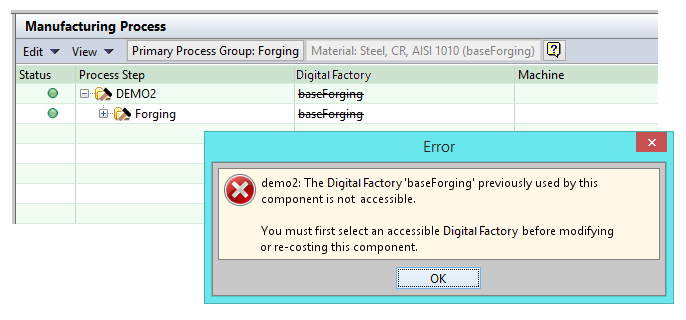
To view an existing, costed component, you do not need Digital Factory access. However, any Digital Factory to which you do not have access that appears in the Manufacturing Process pane is displayed with a "strikethrough" name (similar to a deleted Digital Factory).