You can turn off the display of a heat map menu item using the cslRuleForAction="false" attribute setting. This can be combined with some condition statements to selectively turn off the menu item only under certain circumstances.
-
Open configHeatMap.xml in an editor and scroll down to the line defining the menu item you wish to suppress. For example,
<HeatMapToolSpec name="concentricity">.
-
Insert the cslRuleForAction condition inside the closing angle bracket to suppress the line. For example:
<HeatMapToolSpec name="concentricity" cslRuleForAction="false">Save the file When you finish and restart aPriori. The “Concentricity” menu item is now missing from the list of tolerances.
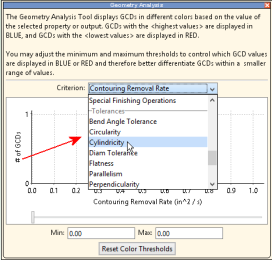

-
To suppress the menu item for only a particular process group, add some conditions to the line. For example, to suppress this menu item except when there is a scenario open in the Sheet Metal process group:
Copy<HeatMapToolSpec name=" concentricity "
cslRuleForAction="{ false if (currentlyOpenScenario == null )
true if ( currentlyOpenScenario.processGroup.name == 'Sheet Metal' ) )
false otherwise }" />