When you use semi-automated costing, your part might be only partially costed. To achieve full costing, follow these steps:
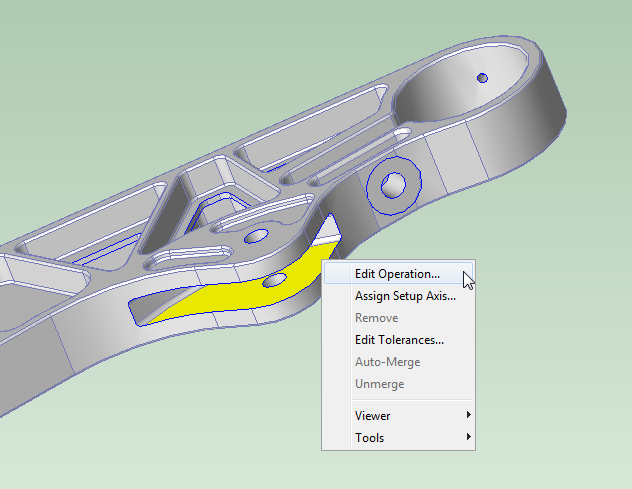
In the Viewer, select the most important (remaining) GCD to review. Click the GCD to select it (the GCD turns yellow when selected).
Right-click the selected GCD, and select Edit Operation….
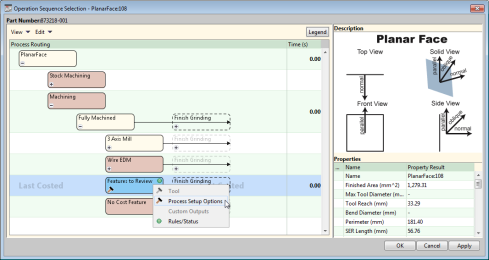
The Operation Sequence Selection dialog appears.
In the Operation Sequence Selection dialog, right-click the Features to Review rectangle, and select Process Setup Options.
Diagnostic information appears, listing the reasons for the infeasibility of candidate operations.
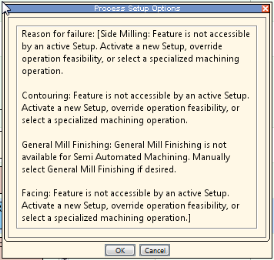
Take action to effect an operation assignment, based on the diagnostic information. Here are some examples of reasons for the infeasibility of candidate operations, together with appropriate responses:
Walls adjacent to the GCD form a sharp corner. Consider whether you should activate a setup axis to allow facing, or (if sharp corners are not the intended geometry) modify the CAD model.
Feature is not accessible from any available setup axis (see Working with Part Setups and SetupAxis GCDs). Consider activating an additional setup axis or overriding the principal setup axes.
Feature has an undercut. Consider manually assigning an appropriate operation (such as Undercut Milling). See Manually Assigned Operations .
Surface too large for contouring. Consider modifying the contouring area ratio threshold. See Contouring Area Ratio Threshold in Machining Node Process Setup Options.
Cost the part again, and check for the desired operation assignment.
If other GCDs are listed as Features to Review, go back to step 1.