Adhesive Bonding Process-level Options
The Adhesive Bonding process provides the following setup options:
Adhesive Type Process
This specifies the type of adhesive to assume for all Adhesive Bonding operations, except any operations that provide an override with the setup option Adhesive Resin Type. This also specifies the type of adhesive to assume if the user has set the setup option Total Area Being Bonded. The default is specified by the Default Tool Material Name field in the Adhesive Bonding tool shop.
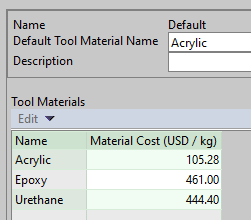
This type is used to determine default adhesive unit cost, which drives Expendable Tooling for Adhesive Bonding. Users can override this unit cost with the setup option Resin Material Price Process.
Resin Material Price Process
This specifies the adhesive unit price for all Adhesive Bonding operations, except any operations that provide an override with the setup option Resin Material Price. It also specifies the adhesive unit price to assume if the user has set the setup option Total Area Being Bonded. By default, this is the unit price for the value of Adhesive Type Process in the Tool Materials table of the Adhesive Bonding tool shop. The value drives Expendable Tooling for Adhesive Bonding.
Total Area Being Bonded