Bevel Cutting Options
By default in starting point Digital Factories, chamfers are assumed to be created by secondary machining, and bevel cutting is disabled for the following Sheet Metal processes:
- Fiber Laser Cut
- Laser Cut
- OxyFuel Cut
- Plasma Cut
- Waterjet Cut
- defaultFiberLaserBevelCuttingStatus
- defaultLaserBevelCuttingStatus
- defaultOxyFuelBevelCuttingStatus
- defaultPlasmaBevelCuttingStatus
- defaultWaterjetBevelCuttingStatus
Users can override the default on a part-by-part basis with one of the following setup options:
- Enable Fiber Laser Bevel Cutting
- Enable Laser Bevel Cutting
- Enable OxyFuel Bevel Cutting
- Enable Plasma Bevel Cutting
- Enable Waterjet Bevel Cutting
Enabling bevel cutting can affect material utilization. For external, chamfered edges, aPriori ensures that there is sufficient distance between parts to allow for kerf clearance. See, for example, the illustration below.
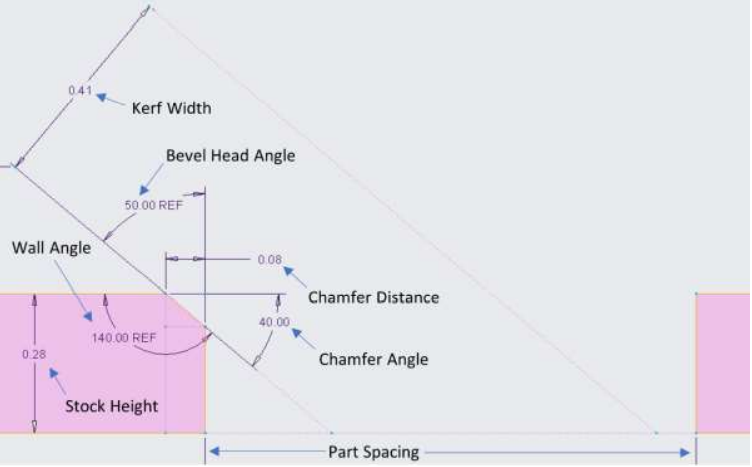
In this illustration, the designated angles correspond to the following geometric properties of the Egde GCD:
- Bevel Head Angle: Angle
- Wall Angle: Min Wall Angle and Max Wall Angle (which are here assumed to be the same)
- Chamfer Angle: 90° – Angle
Sufficient distance for a given edge is calculated as follows:
(Stock Height * tan(Bevel Head Angle)) + (Kerf Width / cos(Bevel Head Angle))