Design Guidance Configuration for Compression Molding
This section covers configuring Design Guidance for the Compression Molding process. You can configure some thresholds that help determine what issues are listed in the Design Guidance tab.
Note that other Plastic Molding Design Guidance issues apply also to Compression Molding – see: Material Issues: Wall Thickness Thresholds, Draft Issues: Draft Angle Thresholds, Radius Issues: Minimum Internal and External Edge Radius, Proximity Issues: Hole Proximity, and Hole Issues: Length-to-Diameter Ratio.
Note: As the materials used in Compression Molding are thermosets and do not require cooling, the Relative Cooling Time (s) metric in the Material section of the Design Guidance panel is set to zero when the Compression Molding routing is used, and a message states “Cooling time is not applicable for Compression Molding”: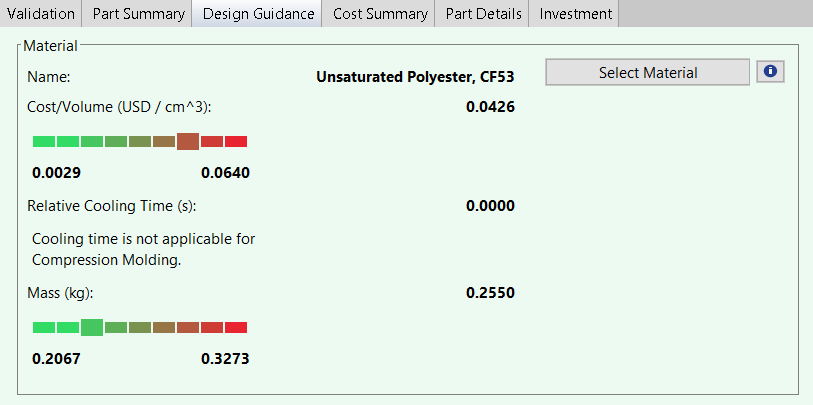
In addition, the Select Material pop-up window shows only Compression Molding materials for comparison, and no % Cooling Time Change figure is shown: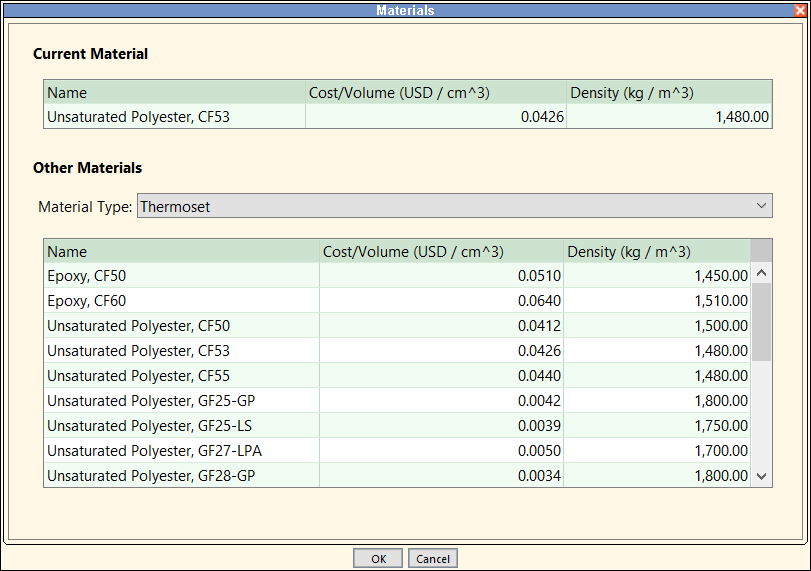
Capped Internal Cutouts
This guidance is driven by the Internal Cutouts Are Capped setup option. The tblDTCLimits lookup table specifies the Cutout Utilization Threshold:

If utilization is below the threshold, aPriori issues advice for the user.
Cure Time
Localized areas of excessive thickness increase the overall part curing time. aPriori checks if the Max Thickness of the part (extracted from geometry) is significantly greater than the Min 80 Thickness. (The Min 80 Thickness property is extracted from geometry and is the smallest value for which at least 80% of the part area has a wall thickness less than or equal to this value.) The ratio of Max Thickness to Min 80 Thickness for the part should not exceed the Limit corresponding to Max Thickness Cure Time in the tblDTCLimits lookup table:

High Required Press Force
The compressionMoldingExcessThicknessThreshold cost model variable specifies the threshold for when a higher press forces is required to drive material into mold crevasses. The default is 25.4 mm in starting point Digital Factories.
If the part Max Thickness is greater than the threshold, aPriori issues advice for the user.