This section covers the following areas of Compression Molding feasibility:
Compression Molding Process Feasibility
The Compression Molding process is feasible only if all the following hold:
-
Compatible material: Compression Molding routing is driven by the material selected in the Material Selection window; the material must have the CAN CM property set to true. All materials are either thermosetting Bulk Molding Compounds (BMCs) or thermosetting Sheet Molding Compounds (SMCs).
-
Minimum thickness: The minimum wall thickness of the part must be greater than or equal to the required Minimum Wall Thickness for the material. This is specified in the tblWallThickness lookup table (1.5 mm in starting point Digital Factories).
-
Maximum thickness: The maximum wall thickness of the part must be less than or equal to the required Maximum Wall Thickness for the material. This is specified in the tblWallThickness lookup table (25 mm in starting point Digital Factories).
Compression Molding Operation Feasibility
The following checks are available for selection:
-
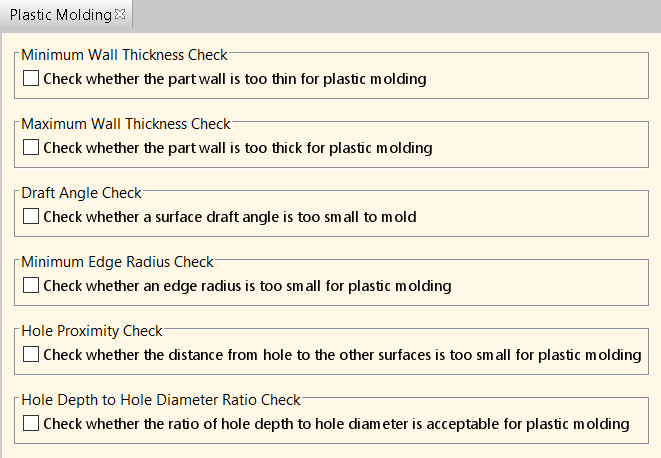
Draft Angle Check: For Curved Wall, Planar Face, and Rib GCDs, the draft angle must be greater than the minimum recommended draft angle for the selected material. The Minimum Draft Angle for thermoset material (required for Compression Molding) is specified in the tblDraftAngle lookup table (1.5 degrees in starting point Digital Factories).
-
Minimum Edge Radius Check: For Sharp Edge GCDs, the external (convex edges only) or internal edge radius must be greater than the minimum limit for the selected material. The Min External Radii and Min Internal Radii for thermoset material (required for Compression Molding) is specified in the tblMinEdgeRadius lookup table (1.5 mm and 2.0 mm respectively, in starting point Digital Factories).
Note that these options are available only if users select the top-level Process Setup Option for Plastic Molding:
Parting Line Flash Trimming Feasibility
Parting line flash trimming is feasible only if all the following hold:
-
A Flash or Semi-Positive mold type is being used (see Mold Closure Type setup option).
-
Internal cutouts that are accessible from the draw direction are capped with material that will require post-molding trimming (see Internal Cutouts Are Capped setup option). Cutouts that are not accessible from the draw direction are detected as voids or simple holes.
Offline part trimming uses a 5-Axis Router (from the Roto and Blow Molding process group) when the part contains internal cutouts and the Include Manual Flash Trimming When No Internal Cutouts Exist setup option is set to false. Alternatively, users can select Waterjet Cut trimming (from the Sheet Metal process group) using the Routing Selection window.
Manual flash trimming is used automatically for parting line trimming when the Include Manual Flash Trimming When No Internal Cutouts Exist setup option is set to true and the part includes no capped internal cutouts.
Void Trimming Feasibility
Typically, voids and undercuts are created in post-press operations. Void trimming is feasible if:
-
The void direction is accessible.
-
The void depth is less than twice the maximum thickness of the part.
-
The Void Shape geometric property is not COMPLEX.
Void ‘No Cost Feature’ Feasibility
The No Cost Feature operation may be assigned to a void using the criteria described below. In this case, the void represents an inward-facing undercut that cannot be created by machining; however, the undercut is shallow enough that it can be produced by the mold. That is, the undercut depth is such that the part can flex sufficiently to allow the part to be removed from the mold.
A void GCD must meet all of the following criteria in order for the No Cost Feature operation to be assigned to it automatically:
-
The void must be accessible, that is, the geometric property Void Direction Accessible must have the value true.
-
The void must be blind, that is, the geometric property Number of Openings must have the value 1.
-
The void must be inward-facing, so it is not accessible for machining.
-
The void must be shallow enough to allow the part to be removed from the mold. If an inward-facing void is not shallow enough, it would cause die lock and so it will fail to cost (see Note below).
-
The void must not be a split void, that is, it must bear the Adjacent relation to no other void. If a void is a split void, it would cause die lock and so it will fail to cost (see Note below).
To determine whether the void is shallow enough to allow the part to be removed from the mold, aPriori compares the depth of the void in the accessible direction (scaled by a void depth-to-height scaling factor) with the projected area equivalent square length in the same direction. The requirement is:
Void Projected Area Equivalent Square Length > Depth Of Void In The Accessible Direction * Void Depth To Height Scaling Factor
-
Void Projected Area Equivalent Square Length: the length of a side of a square that has the same area as the bounding rectangle of the projection, in the accessible direction, of the void.
-
Depth Of Void In The Accessible Direction: extracted from geometry.
-
Void Depth To Height Scaling Factor: specified by the cost model variable cmVoidDepthToHeightScalingFactor (2 in starting point Digital Factories). Increasing this value will result in voids with smaller depth-to-opening ratios being assigned to the No Cost Feature operation.
Note: All adjacent voids (that is, voids with an Adjacent GCD relation) that result from splitting a larger ring-type void will fail feasibility checks for both the No Cost Feature Routing operation and the Void Trimming operation. Such voids will cause a die lock condition which prevents the part from being removed from the tool. The die lock condition will be displayed as a Potential Manufacturing Issue on the Design Guidance tab in aPriori.