Some of the important GCD types are listed in this section. Many of them have associated site variables, described here, that you can use to customize GCD extraction.
Component GCD
The Component GCD represents the whole part. Many of its important properties are listed in the aPriori Professional User Guide; see Component GCD in the Geometric Cost Drivers chapter.
Among the important properties are Length Direction, Width Direction, and Height Direction. Each of these is a unit vector, two of whose components are 0 (the other component is 1 or -1). These vectors can be compared with the Direction vector of another GCD (such as a Perimeter or Setup Axis) in order to determine whether the GCD’s direction is aligned with the part’s length, width, or height.
Hole GCD
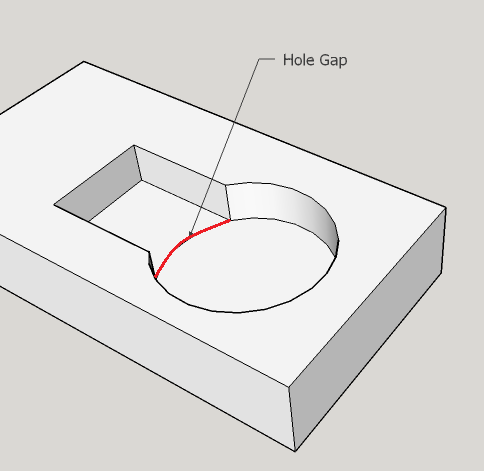
maxHoleGap: specifies the maximum number of degrees of arc that can be missing from an extracted hole’s wall. Holes with missing wall portions can sometimes be created with drilling, and so are sometimes recognized as hole GCDs. But if more than this amount is missing, no hole GCD is recognized, and a curved wall GCD is extracted instead. The default maximum hole gap is 180 degrees. In other words, if no more than half of the wall is missing, a hole GCD is recognized by default.
Parallel Surface Chain GCD
parallelSurfaceChainEnabled: set to false to disable extraction of parallel surface chains; see Parallel Surface Chain. This is set to true in aPriori starting point Digital Factories.
Perimeter GCD
Perimeter extraction is controlled by the site variable perimetersExtractionEnabled: set to false to disable extraction of perimeter GCDs; see Stock Machining Routing and Plate Stock and Perimeter Milling Operation. This is set to true in aPriori starting point Digital Factories.
A perimeter GCD represents the boundary of the part’s projection onto a plane that is orthogonal to the part’s length, width, or depth direction (that is, a projection of a part along a direction parallel to the part’s length, width, or height direction). For example, one perimeter of a part represents the boundary of the shadow cast by a light shining along the length of the part onto a plane orthogonal to the part’s length direction.
Perimeter GCD properties include, among others, the following:
-
Direction: this is a unit vector two of whose components are 0 (and one of whose components is 1 or -1). It can be compared with the Component GCD properties Length Direction, Width Direction, and Height Direction in order to determine a direction that is orthogonal to the plane containing the perimeter. For example, if a Perimeter GCD’s Direction vector matches the Component’s Length Direction vector, the perimeter is contained in a plane orthogonal to the part’s length direction. (Note that two vectors match in this sense if the absolute value of each component of one vector matches the absolute value of the corresponding component of the other vector.)
-
Is Length Direction: true if the perimeter is contained in a plane orthogonal to the part’s length direction; false otherwise.
-
Is Width Direction: true if the perimeter is contained in a plane orthogonal to the part’s width direction; false otherwise.
-
Is Height Direction: true if the perimeter is contained in a plane orthogonal to the part’s length direction; false otherwise.
LIES_NEAR Relation
The LIES_NEAR relation is used to determine feasibility for various operations, for example, for waterjet cutting on perimeter GCDs (waterjet cutting cannot be performed on a perimeter that lies too close to a hole). Feasibility is defined in terms of the ratio of minimum wall thickness to part thickness, and minimum wall thickness is defined by the distance property of the LIES_NEAR relation between the GCD on which the operation is to be performed and the GCD closest to it.
Geometry extracts a LIES_NEAR relation for sufficiently close pairs of GCDs of the following types:
-
Perimeter/perimeter pairs
-
Perimeter/simple hole pairs
-
Perimeter/multistep hole pairs
provided the perimeters have isHeightDirection = true and the holes are not blind and have axes parallel to the height direction.
With the site variables listed below, you can control what counts as sufficiently close:
-
maxRelatedDistanceMm (6.0 in aPriori starting point Digital Factories)
-
maxRelatedThickness (6.0 in aPriori starting point Digital Factories)
-
relatedPerimeterCoeff (0.1 in aPriori starting point Digital Factories)
-
relatedPerimeterIntercept (101.6 in aPriori starting point Digital Factories),
-
relatedPerimeterMaxMm (10.0 in aPriori starting point Digital Factories),
-
relatedPerimeterMaxMmCutoff (12.7 in aPriori starting point Digital Factories)
A perimeter/hole pair is sufficiently close if the distance between them is less than or equal to the following quantity:
GeneralDistance = max (maxRelatedThickness *
Blank Thickness, maxRelatedDistanceMm)
A perimeter/perimeter pair is sufficiently close if the distance between them is less than or equal to the following quantity:
min(relatedPerimeterMaxMmCutoff,
max (GeneralDistance, PerimeterLineFormula))
where
- PerimeterLineFormula = relatedPerimeterMaxMm + relatedPerimeterCoeff * [(min (perimeter1.serLength, perimeter2.serLength)) - relatedPerimeterIntercept]
IS_ABOUT Relation
When a given a rotationally symmetric feature can potentially be machined with a given turning axis (see Turning Axes), geometry extraction creates an IS_ABOUT relation between the feature and the axis. IS_ABOUT relations are sometimes created for partially turnable features, that is, for surfaces whose finished area is greater than the sweep area.
The site variable maxIsAboutForPlaneObstructionPercent (5% in starting point deployment data) specifies the maximum allowable non-turnable percentage of the finished area. If more than this percent of the finished area cannot be turned using a given axis, geometry extraction does not create an IS_ABOUT relation for that surface and axis.
IS_FILLET_OF Relation
A fillet is a candidate for Indirect Filleting only if it bears the IS_FILLET_OF relation to a surface whose finishing might perform the filleting indirectly. See Surface Milling and Turning Operations.
CrossSection GCD
This GCD represents the stock cross-section. Its properties include Area, Height (for rectangular stock), Outside Diameter (for round stock), Inside Diameter (for round tube stock), and Shape.
Note that the value of the Shape property is generally the same as the stock type (for example, SQUARE_BAR or ROUND_TUBE), but for plate stock (which has a rectangular cross-section) the value of the Shape property is RECTANGULAR_BAR.