Geometric User Inputs
The following start part image provides an overview of the relevant, user-supplied, geometric values.
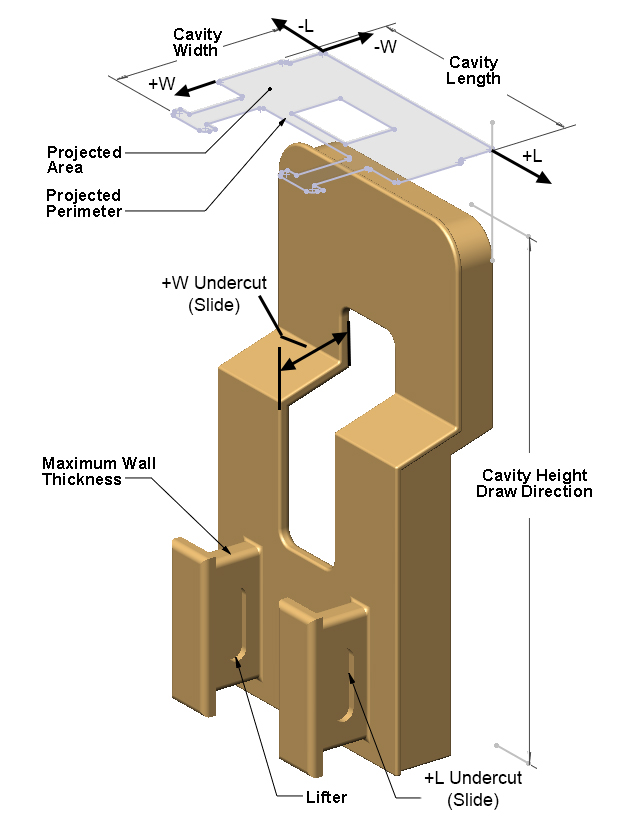
Follow these guidelines to ensure that your part will cost:
-
Create a virtual part and use the settings from an appropriate start part (select or search for the start part scenario from the Recently Used Settings menu of the Cost Guide’s Production Scenario tab; see Using Settings from a Start Part).
-
Open the User Guided node in the Process and Machine Options tab of the Cost Guide. Supply a nonzero value for the required PSO Part Volume.
-
Open the Plastic Molding PG node in the Process and Machine Options tab of the Cost Guide. Supply a nonzero value for all the required PSOs:
-
Cavity Length
-
Cavity Width
-
Cavity Height
-
-
Open the IM Routing node. Supply a value that is greater than or equal to 0 for all the required PSOs:
-
Part Projected Area
-
Part Projected Perimeter
-
Average Part Thickness
-
Max Part Thickness
-
Part Surface Area
-
See Part Surface Area, Projected Area and Perimeter, and Wall Thickness.
In addition, important optional inputs are described in the following sections:
Additional IM PSOs are described in Additional User Inputs.
Part Volume

The required PSO Part Volume is associated with the routing node User Guided Costing. This value contributes to piece part and tooling costs. In particular, part volume is used to determine material utilization (see Material Utilization) and shot size (see Required Shot Size).
This is a required input. Enter a value greater than 0.
Part Length, Width, and Height

The following required PSOs are associated with the routing node Plastic Molding PG:
-
Cavity Height (specifies both cavity height and part height)
-
Cavity Length (specifies both cavity length and part length)
-
Cavity Width (specifies both cavity width and part width)
You must supply values for these inputs, which serve two general purposes:
-
To specify part dimensions, that is, the length, width, and height of the part’s bounding box. Part length and width are used to determine runner volume and runner area. Runner volume and area contribute to piece part cost via material utilization (see Material Utilization), injection time (see Times), and required clamp force (see Required Clamp Force).
-
To specify mold cavity dimensions, that is, the length, width, and height of the cavity’s bounding box. These values help determine mold dimensions (see Mold Dimensions) and tooling costs (see Tooling Cost).
For injection molding cost models, part length and part width are defined so as to have the same values as cavity length and cavity width. So which part dimension is considered the height depends on how the part will be oriented in the mold; see the illustration below. (Note that this is different from process groups that do not involve a parting line; for those process groups, part length >= part width >= part height.)

Part Surface Area, Projected Area and Perimeter, and Wall Thickness

The following required PSOs are associated with the routing node IM Routing:
-
Part Projected Area: area of the projection of the part onto a plane normal to the draw direction. Contributes to required clamp force (see Required Clamp Force) which affects machine selection and piece part cost.
-
Part Projected Perimeter: perimeter of the projection of the part onto a plane normal to the draw direction. Affects tooling costs (see Tooling Cost).
-
Average Part Thickness: average thickness of the walls of the part. Contributes to nominal wall thickness (see Nominal Wall Thickness) which affects cool time, required clamp force, machine selection, and piece part cost.
-
Max Part Thickness: maximum thickness of the walls of the part. Contributes to nominal wall thickness (see Nominal Wall Thickness) which affects cool time, required clamp force, machine selection, and piece part cost.
-
Part Surface Area: affects tooling costs (see Tooling Cost).
Undercut Depths

The user guided IM cost model uses four undercut depth values in order to estimate costs associated with slides. (The GCD-driven injection molding model, in contrast, analyzes the geometry of each undercut and determines how many slides are required and which undercuts each slide handles.)
You must enter this information by using the PSOs described below, which are associated with the routing node Injection Molding.
Each of the four inputs corresponds to one of the four walls of your part’s bounding box. These four walls are the sides of the bounding box that enclose the part about parting line, in other words, the sides on which an undercut might open. Each side has an associated direction, the direction from which an undercut on that side would be accessible, that is, the direction from which a slide for the undercut would approach. The directions are named for a coordinate system whose axes run along the part’s length and width (see Part Length, Width, and Height):
-
+L and –L run lengthwise.
-
+W and –W run widthwise.

There is an undercut depth PSO for each of these directions:
-
Undercut Depth in +L
-
Undercut Depth in –L
-
Undercut Depth in +W
-
Undercut Depth in –W

Undercut depth for a particular side is the distance from the deepest point of the deepest undercut on that side. The depth is measured to the first point that is accessible from the draw direction, in other words, the edge of the shadow that would be cast by a light projected from the draw direction.

Mold size increases as undercut depth increases. Note that the increase in mold size is significantly greater than the undercut depth, since a slide mechanism is considerably larger than the largest undercut it handles; see Mold Dimensions for more information.
Number of Lifters, Inserts and Unscrewing Mechanism
With the PSOs listed below, the user can specify the number of lifters, inserts, and unscrewing mechanisms to be included in the cost estimate. These values contribute to tooling costs. (The GCD-driven injection molding model, in contrast, analyzes part geometry to determine the quantity and size of any required actions.)
These PSOs are associated with the routing node Injection Molding:
-
Number of Lifters
-
Number of Rib Inserts
-
Number of Grill Inserts
-
Number of Unscrewing Mechanisms (to relieve threads)
The cost model estimates the size of each of these types of action based on part dimensions.
Note that slides are handled differently; see Undercut Depths.