Operation Cycle Time and Cut Time Calculations
This section contains the following subsections:
Cycle Time for Machining Operations
The cycle time of individual machining operations is a major contributor to machining process cycle times and costs. For most machining operations, cycle time is the same as cut time:
Cycle Time = Cut Time
See Cut Time for Machining Operations. Exceptions are listed in the following sections:
See also Chemical Milling Formulas.
Cut Time for Machining Operations
Generally, each operation’s cut time is calculated with the following formula:
Cut Time = Engagement Time + Rapid Movement Time
Cut time is the sum of the following:
-
Engagement time: time during which a tool or part is spinning. See the formula below.
-
Rapid movement time: time during which the tool is being positioned while neither tool nor part is spinning. See the formula below.
Engagement Time = Chipmaking Time + Non-chipmaking Time
For most machining operations, engagement time is the sum of the following:
-
Chipmaking time: time during which the tool in contact with the part, and is removing material. See the following sections:
-
Non-chipmaking time: time during which the tool is not in contact with the part or removing material, but during which the tool or part is spinning, such as when the tool over-travels the side of the part (see Non-chipmaking Time, below)
Center Drilling Engagement Time = Machine Spotting Time
For center drilling, engagement time is determined by a property of the current machine, Spotting Time.
Edge Treatment Engagement Time =
(Hole Diameter * Pi) / Tool Linear Speed
For some edge treatment operations, such as edge chamfering and edge rounding, engagement time depends on the following:
-
Hole diameter: obtained from geometry extraction, used to calculate edge length.
-
Tool linear speed: established by tool selection (see Tool Properties) or user specified (see Edge Finishing Option).
Edge Countersinking Engagement Time = Machine Countersinking Time
For edge countersinking, engagement time is determined by a property of the current machine, Countersinking Time.
Rapid Movement Time = (Part Length /
Rapid Traverse Rate) * Rapid Transfer Distance Factor
Rapid movement time depends on the following:
-
Part length: length of the longest side of the part’s smallest enclosing rectangle (specified as a GCD property).
-
Rapid traversal rate: specified as a machine property.
-
Non-chipmaking Time
This is the time spent "cutting air". It is estimated with different heuristics for different operations.
For many operations, it depends on the following:
-
Tool axis speed (see Tool Axis Speed)
-
Machine property Approach/Depart Distance
For rough milling, non-chipmaking time depends on the following:
-
Chipmaking time (see Chipmaking Time for Pocket Rough Milling)
-
Roughing Cut Efficiency: this specifies the fraction of engagement time attributable to chipmaking time. By default, this is generally specified by the cost model variable roughingCutEfficiency (0.67 in starting point Digital Factories). Users can override the default on a per-part basis with the setup option Rough Milling Cut Efficiency (see Machining Node Process Setup Options).
For Pockets and Slots, roughing cut efficiency takes into account the length of the feature openings (floor edges with no wall). The cost model assumes that half the tool diameter runs off the edge each time the tool gets to an opening. A pocket that is completely enclosed by walls has no non-chipmaking time. For pockets, the geometric property Unbounded Perimeter Length specifies the total length of the feature openings. For Slots, aPriori determines the length of the openings from the slot's width and the number of open ends it has (0, 1 or 2).
A milled, large SimpleHole has no non-chipmaking time.
Note: Engagement time is the time during which the tool is engaged (whether or not it is in contact with the part); it is the sum of chipmaking time and non-chipmaking time (see Cut Time for Machining Operations).
For dovetail slot finishing (the Finish Dovetail Milling operation), non-chipmaking time depends on the following:
-
Chipmaking time (see Chipmaking Time for Finish Dovetail Milling)
-
Cost model variable finishDovetailMillingCutEfficiency (0.95 in starting point Digital Factories): this specifies the fraction of engagement time attributable to chipmaking time. Note that egagement time is the time during which the tool is engaged (whether or not it is in contact with the part); it is the sum of chipmaking time and non-chipmaking time (see the formula above).
Note that, unlike chipmaking time, non-chipmaking time does not contribute to expendable tooling costs, another factor in operation costs. Expendable tooling costs depend on tool life and tool cost (see Tool Selection for Machining) as well as cut time. See Expendable Tooling Costs.
Pecking Cycle Time
Pecking Cycle Time = Cut Time + (Number of Pecks * Peck Lift and Lower Time)
Pecking cycle time depends on the following:
-
Cut time: See Cut Time for Machining Operations.
-
Number of pecks: total number of pecks performed for the current operation ; see the formula below.
-
Peck lift and lower time: determined by the value of the cost model variable peckLiftAndLowerTime.
Number of Pecks = Amount of Hole to be Pecked / Pecking Depth
Number of pecks is the quotient of the following:
-
Amount of hole to be pecked: depth achieved by all the pecks to be performed. By default, this is the length of the GCD (or, if the GCD is part of a multistep hole, length of the multistep hole). (Note that, for holes that are part of a multistep hole, Pecking is always preceded by Center Drilling, which requires that that the GCD is the smallest hole of the multistep hole.) Users override the default with the option Amount of Hole to be Pecked; see Hole Making Options.
-
Pecking depth: depth of a single peck. By default, this is the value of the cost model variable lengthOfPeck. Users override the default with the option Peck Depth; see Hole Making Options.
Edge Turning Cycle Time
Edge Turning Cycle Time = Machine Edge Turning Time
For edge turning, cycle time is determined by a property of the current machine, Edge Turning Time.
Keyway Broaching Cycle Time
Keyway Broaching Cycle Time = Handling Time +
(Number of Broaching Passes * Cutting Length / Cutting Speed)
Keyway broaching cycle time is the sum of handling time and cutting time:
-
Handling time. This the product of the number of broaching passes (see below) and repositioning time (specified by the PSO Reposition Time or by the plant variable multipassKeywayBroachingPositioningTime or singlePassKeywayBroachingPositioningTime).
-
Number of broaching passes. By default, this is specified by the formula below. For Multipass Keyway Broaching, if you specify a value for the PSO Number of Shims, number of passes is the number of shims plus 1 (since the first pass doesn’t use a shim). For Single Pass Keyway Broaching, you can override the default calculation and specify the number of passes with the PSO Passes.
-
Cutting length. This is the product of Number of Teeth and Tooth Pitch, both specified by tool properties or PSOs.
-
Cutting speed. This is specified by a tool property or the PSO Cutting Speed. If the tool property exceeds the product of the machine property Max Cutting Speed and the plant variable speedSafetyFactor, it is adjusted downward to the product of Max Cutting Speed and speedSafetyFactor.
Number of Broaching Passes = Keyway Depth / Depth per Pass
Number of broaching passes is the quotient of the following:
-
Keyway depth (specified by geometry extraction)
-
Depth per pass. This is the product of Feed per Tooth and Number of Teeth, both specified by tool properties or PSOs.
Back Counterboring Cycle Time
Back Counterboring Cycle Time = Cut Time +
Tool Change Time + Tool Centering Time
Back counterboring cycle time depends on the following:
-
Cut time: See Cut Time for Machining Operations.
-
Tool change time. This is specified by the cost model variable counterBoringToolChangeTime (1 minute in starting point Digital Factories). It includes time to assemble and disassemble the tool.
-
Tool centering time: This is specified by the cost model variable drillPressToolCenterTime (10 seconds in starting point Digital Factories). It includes time to center the tool after it has been assembled.
Note: Use of a manually-assembled, multi-piece counterboring tool is assumed. See Back Counterboring for more information.
Chipmaking Time for Hole Making and Hole Finishing Operations
Most hole making and hole finishing operations use the following formula:
Chipmaking Time = Tool Path Length / Tool Axis Speed
For most hole making and hole finishing operations, chipmaking time depends roughly on the following:
-
Tool path length: distance the tool travels through the part during the operation:
-
If the hole bottom is modeled as conical or the setup option Hole Bottom Geometry Interpretation is set to Flexible, this is the Length of the hole plus the length of the drill tip.
-
If the hole bottom is modeled as flat and the setup option Hole Bottom Geometry Interpretation is set to Literal,This is the Length of the hole.
-
For a through hole, this is the Length of the hole plus the length of the tool tip plus a small amount of additional clearance to guarantee a clean breakthrough.
(Note that if a hole is modeled with a conical bottom, the geometric property Length specifies the length of the cylindrical portion of the hole, and does not include the conical portion.)
The assumed cone angle for the drill tip is specified by the cost model variable defaultDrillConeAngle (59 degrees in starting point Digital Factories). The cone angle together with the tool diameter determine the tool tip length.
-
-
Tool axis speed: rate at which the tool travels through the part. See Tool Axis Speed.
Note: For center drilling, and edge treatment operations, engagement time is not divided into chipmaking and non-chipmaking time; see Cut Time for Machining Operations.
Note: Chipmaking time for Pecking does not include peck lift and lower time; see Cycle Time for Machining Operations.
Chipmaking Time for Surface Finishing Milling Operations
The formula for milling chip-making time varies from operation to operation. Many surface finishing operations use a formula roughly like this:
Chipmaking Time = Number of Passes * (Surface Area / Area Removal Rate)
For most finishing operations, chip-making time depends roughly on the following:
-
Number of passes: number of times the tool passes over the entire surface. By default, aPriori determines this based on required tolerance and the lookup table tblGtolProcessCapabilities; the default value is typically 1 in aPriori starting point Digital Factories. Users can specify a value with the setup option Number of Finishing Passes; see Surface Finishing Milling Options. If the setup option does not exist for the current operation, this value is typically 1.
-
Surface area: current GCD’s surface area (specified as a GCD property). For the Base Plate Facing operation (used in some Additive Manufacturing routings, and performed on the BuildDirection GCD), this is the area of the base plate, which is the product of the machine bed length and width.
-
Removal rate: rate at which material is removed from the surface, in unit area per unit time. See the formula below.
The formula for facing varies with the assumed tool path. Some cases of facing involve just the GCD perimeter; formulas for these cases use tool path length and tool axis speed rather than area and area-removal rate.
Chipmaking Time = Number of Passes * (Tool Path Length / Tool Axis Speed)
For some facing operations, chipmaking time depends roughly on the following:
-
Number of passes: number of times the tool passes over the entire surface. By default, aPriori calculates this based on required tolerance; the computed value is typically 1 in aPriori starting point Digital Factories. Users can specify a value with the setup option Number of Finishing Passes; see Surface Finishing Milling Options. If the setup option does not exist for the current operation, this value is typically 1.
-
Tool path length: distance the tool travels along the part’s surface during one pass.
-
Tool axis speed: rate at which the tool travels along the surface of the part. See Tool Axis Speed.
Area Removal Rate = Contact Width * Tool Axis Speed
Area removal rate is the product of the following:
-
Contact width: the length (in units of distance), perpendicular to the direction of motion of the tool along the part’s surface, of the contact between the tool and the GCD. This is calculated based on a number of factors, including tool diameter (see Tool Selection for Machining), and in some cases data in the lookup table tblToolReachCompensation. It is often half the tool diameter.
-
Tool axis speed: speed of the tool along the part’s surface. See Tool Axis Speed.
Chipmaking Time for Rough Turning Operations
Rough turning operations use the formulas below.
Chipmaking Time = Volume / Volume Removal Rate
Chipmaking time is the quotient of the following:
-
Volume: GCD volume (for rings) or the product of surface area (obtained by geometry extraction) and roughing depth (as specified by the cost model variable finishAllowance or the option Casting Depth; see Rough Turning Options).
-
Volume removal rate: rate at which material is removed from the part. See the formula below.
Volume Removal Rate = Contact Area * Tool Axis Speed
Volume removal rate is the product of the following:
-
Contact Area: area of the region of contact between the tool’s cutting edge and the workpiece during one rotation of the workpiece. See the formula below.
-
Tool axis speed: speed at which the tool moves along the workpiece in the direction along which the turning axis runs. See Tool Axis Speed.
Contact Area = Cut Depth * Part Diameter * Pi
For rough turning operations, the contact area is estimated as the product of the following:
-
Cut depth: depth of the cut as determined by tool selection (see Tool Properties) or the process setup option Requested Cut Depth (see Rough Turning Options). This value is adjusted based on machine power and limited by material allowance (as specified by the cost model variable finishAllowance or the option Casting Depth; see Rough Turning Options). In some cases it is also adjusted based on static tool deflection.
-
Part diameter * Pi: workpiece circumference at the cut location.
Note that
Volume Removal Rate = (Cut Depth * Part Diameter * Pi) *
Tool Axis Speed = (Cut Depth * Part Diameter * Pi) *
Feed * RPM = (Cut Depth * Part Diameter * Pi) *
Feed * (Speed / (Part Diameter * Pi)) = Cut Depth * Feed * Speed
Chipmaking Time for Finish Turning Operations
Finish turning operations use the formulas below.
Chipmaking Time = Number of Passes * Area / Area Removal Rate
Chipmaking time is the quotient of the following:
-
Number of passes: number of times the tool passes over the surface of the GCD. By default, aPriori calculates this based on required tolerance and the lookup table tblGtolProcessCapabilities; the default value is typically 1 in aPriori starting point Digital Factories. Users can specify a value with the setup option Number of Finishing Passes; see Surface Finishing Milling Options.
-
Area: sweep area of the nearest Is About relation nearest to the GCD, obtained from geometry extraction.
-
Area removal rate: see the formula below.
Area Removal Rate = Contact Width * Tool Axis Speed
Area removal rate is the product of the following:
-
Contact width: width of the line of contact between the tool and the workpiece. This is the workpiece circumference at the cut location, that is, the part diameter times Pi.
-
Tool axis speed: speed at which the tool advances in the direction parallel to the turning axis. See Tool Axis Speed.
Area Removal Rate = (Part Diameter * Pi) *
Tool Axis Speed = (Part Diameter * Pi) * Feed *
RPM = (Part Diameter * Pi) *
Feed * (Speed / (Part Diameter * Pi)) =
Feed * Speed
Note: For Edge Turning, cycle time is determined by a property of the current machine, Edge Turning Time; see Cycle Time for Machining Operations.
Chipmaking Time for Finish Dovetail Milling
Finish Dovetail Milling uses the formula below:
Chipmaking Time = (Slot Length / Tool Axis Speed) *
Number of Radial Passes * Number of Dovetail Sides
For dovetail slot finishing, chipmaking time depends on the following:
-
Slot length: specified by the geometric property Length.
-
Tool axis speed: rate at which the tool travels along the length of the slot. See Tool Axis Speed.
-
Number of radial passes: number of passes required per side, determined using a heuristic derived from a large, representative data sample. The heuristic represents the number of passes as a linear combination of tool neck diameter and slot depth (GCD property Dovetail Depth A). See also Diameter Selection for Dovetail Slot Finishing.
-
Number of dovetail sides: value of the geometric property Number of Undercut Walls.
Note: In some cases, the tool has been chosen on the basis of the assumption that it will cut both sides of the slot at once during the first pass. This allows selection of a larger, higher feed, tool (see Diameter Selection for Dovetail Slot Finishing). In practice, cutting both sides at once in the first pass requires reducing the first-pass feed rate. But this formula assumes the same feed rate for all passes, and accounts for the in-practice feed rate reduction by including an extra pass. Therefore the formula uses the same number of passes regardless of the assumption underlying tool selection.
Chipmaking Time for Slot Milling
Slot Milling uses the formula below:
Chipmaking Time = (Slot Length or Depth / Tool Axis Speed) * Total Number of Passes
For Slot Milling, chipmaking time depends on the following:
-
Slot length or depth: if the tool axis is parallel to the slot floor (see Standard Slot Operations), this is specified by the larger of the geometric properties Depth A and Depth B. Otherwise, this is the sum of the geometric properties End1 Length, Length, and End2 Length.
-
Tool axis speed: rate at which the tool travels along the length or depth of the slot. This is determined as described in Tool Axis Speed.
-
Total number of passes: by default, the number of passes is determined as follows:
-
If the tool axis is parallel to the slot floor (see Standard Slot Operations), the number of passes is the sum of the geometric properties End1 Length, Length, and End2 Length divided by the axial cut depth (see Axial Cut Depth), rounded up to the nearest integer.
-
Otherwise, the number of passes is the larger of the geometric properties Depth A and Depth B divided by the axial cut depth (see Axial Cut Depth), rounded up to the nearest integer. Users can specify the number of passes with the setup option Requested Number of Axial Passes.
-
Chipmaking Time for Groove Milling
Groove Milling uses the formula below:
Chipmaking Time = (Slot Length / Tool Axis Speed) *
Total Number Axial of Passes * Number of Radial Passes
For Groove Milling, chipmaking time depends on the following:
-
Slot length: this is generally the sum of the following geometric properties of the slot:
-
End1 Length
-
Length
-
End2 Length.
-
For fully open slots and loop slots (that is, if End1Type and End2Type are both OPEN or are both LOOP), this is the sum of the slot Length and half the tool diameter.
-
Tool axis speed: rate at which the tool travels along the length of the slot. This is determined as described in Tool Axis Speed.
-
Number of axial passes: by default, the number of axial passes is the slot width (the value of the geometric property Width) divided by the tool width (see Requested Tool Width), rounded up to the nearest integer. Users can override the default with the setup option Requested Number of Axial Passes.
-
Number of radial passes: by default, the number of radial passes is the slot depth (the larger of the geometric properties Depth A and Depth B) divided by the radial cut depth (generally 12.5% of tool diameter--see Radial Cut Depth), rounded up to the nearest integer. Users can specify the number of passes with the setup option Requested Number of Radial Passes.
Chipmaking Time for Slot Rough Milling
The Rough Milling operation for Slot GCDs uses the formulas below:
Chipmaking Time = Volume / Volume Removal Rate
Chipmaking time is the quotient of the following:
-
Volume: slot volume as determined by geometry extraction.
-
Volume removal rate: rate at which material is removed from the workpiece. The default rate is calculated as described in the formula below. Users can specify a volume removal rate with the setup option Material Removal Rate.
Volume Removal Rate = Contact Area * Tool Axis Speed
Volume removal rate is the product of the following:
-
Contact Area: Area of the region of contact between the tool and the workpiece. See the formula below.
-
Tool axis speed: rate at which the tool advances against the workpiece. See Tool Axis Speed.
Contact Area = Engagement Length * Cut Depth
Contact area is the product of the following:
-
Engagement length: width (along the tool diameter) of the region of contact between the tool and the workpiece. By default, this is looked up in tblMilling by tool diameter, material cut code, tool type, tool series, and rough milling aggressiveness. This value is sometimes adjusted based on the roughing tool's length-to-diameter ratio. Users can override the default with the process setup option Radial Cut Depth; see Slot Rough Milling Options.
-
Cut depth: length (along the tool axis) of the area of contact between the part and the tool during chipmaking. See Cut Depth for Roughing Operations. Users can override the default with the process setup option Axial Cut Depth; see Slot Rough Milling Options.
Chipmaking Time for StockTrim Rough Milling
The Rough Milling operation for StockTrim GCDs uses the formulas below:
Chipmaking Time = Volume / Volume Removal Rate
Chipmaking time is the quotient of the following:
-
Volume: StockTrim volume as determined by geometry extraction.
-
Volume removal rate: rate at which material is removed from the workpiece. The default rate is calculated as described in the formula below. Users can specify a volume removal rate with the setup option Material Removal Rate.
Volume Removal Rate = Contact Area * Tool Axis Speed
Volume removal rate is the product of the following:
-
Contact Area: Area of the region of contact between the tool and the workpiece. See the formula below.
-
Tool axis speed: rate at which the tool advances against the workpiece. See Tool Axis Speed.
Contact Area = Engagement Length * Cut Depth
Contact area is the product of the following:
-
Engagement length: width (along the tool diameter) of the region of contact between the tool and the workpiece. By default, this is looked up in tblMilling by tool diameter, material cut code, tool type, tool series, and rough milling aggressiveness. Users can override the default with the process setup option Radial Cut Depth; see StockTrim Roughing Options.
-
Cut depth: length (along the tool axis) of the area of contact between the part and the tool during chipmaking. See Cut Depth for Roughing Operations. Users can override the default with the process setup option Axial Cut Depth; see StockTrim Roughing Options.
Chipmaking Time for Surface Rough Milling
Rough Milling uses the formulas below.
Chipmaking Time = Volume / Volume Removal Rate
Chipmaking time is the quotient of the following:
-
Volume: GCD volume, the product of surface area (obtained by geometry extraction) and roughing depth (as specified by the cost model variable finishAllowance or the option Roughing Depth; see Surface Rough Milling Options).
-
Volume removal rate: rate at which material is removed from the workpiece. The default rate is calculated as described in the formula below. Users can specify a volume removal rate with the setup option Material Removal Rate (see Surface Rough Milling Options).
Volume Removal Rate = Contact Area * Tool Axis Speed
Volume removal rate is the product of the following:
-
Contact Area: Area of the region of contact between the tool and the workpiece. See the formula below.
-
Tool axis speed: rate at which the tool advances against the workpiece. See Tool Axis Speed.
Contact Area = Engagement Width * Cut Depth
Contact area is the product of the following:
-
Engagement width: width of the region of contact between the tool and the workpiece. This is typically half the tool diameter by default, but can be specified with the process setup option Radial Cut Depth; see Surface Rough Milling Options.
-
Cut depth: depth of the cut as determined by tool selection (see Tool Selection for Machining) or the process setup option Axial Cut Depth (see Surface Rough Milling Options). This value is adjusted based on machine power and limited by material allowance (as specified by the option Casting Depth; see Surface Rough Milling Options).
Chipmaking Time for Pocket Rough Milling
Rough Milling uses the formulas below.
Chipmaking Time = Volume / Volume Removal Rate
Chipmaking time is the quotient of the following:
-
Volume: this is the volume removed by the current instance of the Rough Milling operation for the current GCD.
If there is only one such instance, the volume removed is the pocket’s volume as determined by geometry extraction.
If there are two such instances, and the current instance is the first instance (the instance that uses the larger tool diameter), the volume removed by the current instance is interpolated based on the following assumptions:
-
There is a linear relationship between the tool diameter and the volume reomved.
-
The value of the geometric property Inside Dimater Tool Volume specifies the volume that would be removed by a tool whose diameter is equal to the value of the geometric property Inside Diameter.
-
The pocket’s total volume would be removed by a tool whose diameter is equal to the value of the geometric property Corner Diameter.
If there are two instances of the roughing operation for the current pocket, and the current instance is the second instance (the one that uses the smaller tool diameter), the volume removed is the difference between the pocket’s total volume and the volume removed by the operation’s first instance.
For a given instance of the roughing operation, users can override the volume removed with the setup option Requested Percent Milled; see Pocket Rough Milling Options.
-
-
Volume removal rate: rate at which material is removed from the workpiece. The default rate is calculated as described in the formula below. Users can specify a volume removal rate with the setup option Material Removal Rate (see Pocket Rough Milling Options).
Volume Removal Rate = Contact Area * Tool Axis Speed
Volume removal rate is the product of the following:
-
Contact Area: Area of the region of contact between the tool and the workpiece. See the formula below.
-
Tool axis speed: rate at which the tool advances against the workpiece. See Tool Axis Speed.
Contact Area = Engagement Width * Cut Depth
Contact area is the product of the following:
-
Engagement width: width (along the tool diameter) of the region of contact between the tool and the workpiece. By default, this is looked up in tblMilling by tool diameter, material cut code, tool type, tool series, and rough milling aggressiveness. Users can override the default with the process setup option Radial Cut Depth; see Pocket Rough Milling Options.
-
Cut depth: see Cut Depth for Roughing Operations. Users can override the default with the process setup option Axial Cut Depth; see Pocket Rough Milling Options.
Chipmaking Time for Bulk Milling
Bulk Milling uses the formulas below.
Chipmaking Time = Volume / Volume Removal Rate
Chipmaking time is the quotient of the following:
-
Volume: volume to be removed by bulk milling. By default, aPriori calculates this volume based on the geometric characteristics of the part, as well on the number of different tool diameters selected for bulk milling operations. You can use the setup option Requested Percent Milled (see Bulk Milling Options) to specify the percent of part volume to be removed by the designated individual bulk milling operation. If you specify a nonzero value for Dropoff Volume (see Bulk Milling Options), the volume to be removed is less than or equal to the difference between part volume and dropoff volume. Requested Percent Milled specifies the volume to be removed as a percentage of the difference between part volume and dropoff volume.
-
Volume removal rate: rate at which material is removed from the workpiece. The default rate is calculated as described in the formula below. Users can specify a volume removal rate with the setup option Material Removal Rate (see Bulk Milling Options).
Volume Removal Rate = Contact Area * Tool Axis Speed
Volume removal rate is the product of the following:
-
Contact Area: Area of the region of contact between the tool and the workpiece. See the formula below.
-
Tool axis speed: rate at which the tool advances against the workpiece. See Tool Axis Speed.
Contact Area = Engagement Width * Cut Depth
Contact area is the product of the following:
-
Engagement width: width of the region of contact between the tool and the workpiece. The percentage of the tool diameter specified by the setup option Radial Cut Depth (see Bulk Milling Options). If no radial cut depth is specified, the width defaults to 50% of the tool diameter.
-
Cut depth: The percentage of the tool diameter specified by the setup option Axial Cut Depth (see Bulk Milling Options). If no axial cut depth is specified, the width defaults to 50% of the tool diameter. This value is adjusted based on workpiece material and machine power.
Chipmaking Time for Threading Operations
Tapping, Thread Turning, and Thread Milling use the following formula:
Chipmaking Time = Tool Path Length / Tool Axis Speed
For Tapping and Thread Turning, chipmaking time depends roughly on the following:
-
Tool path length: distance the tool travels along the tool’s axis of rotation. For Tapping and Thread Turning, this is twice the length of the threaded portion of the hole, if specified in the model; or twice the length of the hole, if not specified. For Thread Milling, it is the GCD circumference times the number of passes (calculated from threaded length, pitch, and threads per pass).
-
Tool axis speed: rate at which the tool travels through the part. See the formula below.
Tool Axis Speed = Thread Pitch * RPM
Tool axis speed is the product of the following:
-
Thread pitch: distance between threads. This is specified by the operation-level process setup options Thread Pitch and Thread Units. (see Threading Options) If the user specifies threads per inch (instead of millimeters per thread), aPriori converts the value to millimeters per thread. If the user does not specify a thread pitch, the default of 1 millimeter is used. This value is equal to the tool feed, since it is the distance the tool travels through the hole during one rotation of the tool.
-
RPM: number of times the tool rotates per minute. See the formula for RPM in Tool Axis Speed.
Tool Axis Speed
Tool axis speed, the speed at which the tool travels along or through the part, contributes to removal rates and chipmaking time.
Tool Axis Speed = Feed * RPM
Tool axis speed is the product of the following:
-
Feed: distance the tool travels along or through the part per rotation of the tool. An initial value for feed is generally based on one or more of the following:
-
Tool selection’s value for feed or feed per tooth; see Tool Selection for Machining.
-
Tool selection’s value for number of teeth; see Tool Selection for Machining.
-
Various setup options; see Interpolated and User-specified Feed and Speed.
The value is adjusted to compensate for various factors, including tool reach and required tolerance.
The value is also adjusted by multiplying by one of the following cost model variables:
-
boreFeedAdjustment
-
drillFeedAdjustment
-
endmillFeedAdjustment
-
millFeedAdjustment
-
turningFeedAdjustment
-
See Feeds and Speeds in the Machining Cost Model.
-
RPM: number of times the tool rotates per minute. See the formula below.
RPM = Speed / (Pi * Tool Diameter)
RPMs, the number of times the tool rotates per minute, depends on the following:
-
Speed: How fast the tool or workpiece turns in unit distance per unit time; that is, the speed at which a point on the outer edge of the tool moves along the circular path around the center of the tool or (for turning) the speed at which .
Tool selection establishes an initial value; see Tool Selection for Machining. Users can override this value with a setup option; see Interpolated and User-specified Feed and Speed. The value is then adjusted to compensate for various factors, including machine spindle speed limitations and stock hardness.
The value is also adjusted by multiplying by one of the following cost model variables:
-
boreSpeedAdjustment
-
drillSpeedAdjustment
-
endmillSpeedAdjustment
-
millSpeedAdjustment
-
turningSpeedAdjustment
-
See Feeds and Speeds in the Machining Cost Model.
-
Tool diameter: Specified as tool property, established by tool selection. Users can override this value with process setup options. See Tool Selection for Machining.
Speed is calculated (by aPriori ) or specified (by the user) using the units meters per minute. To calculate RPMs, aPriori converts speed to millimeters per minute, since diameter is calculated or specified in millimeters.
Note therefore that, given these units, some formulas use the following:
RPM = 1000 * Speed / (Pi * Diameter)
= (1000 / Pi) * Speed / Diameter
=approx 318 * Speed / Diameter
Setup Operation Times and Costs
aPriori supports several approaches for determining part setup times and the corresponding part setup costs. Which method is used depends on the following:
-
Value of the machine property Offline Load Capable for the current machine
-
Value of the cost model variable partSetupTimeMethod
Following are the different approached to determining part setup times:
-
One approach is for machines with automated part changeover capabilities (specifically for machining centers that support offline loading and incorporate the use of automated pallet change mechanisms). For the 3-, 4-, and 5-axis mill machine types, if the machine property Offline Load Capable is true, the addition to cycle time for the switching of parts between operations is based on the value of the property Base Part Setup Time, which represents the machine-specific pallet change time. The addition to per-part cycle time is this value divided by the number of parts in the pallet. In this case, you may wish to decrease the values of the machine properties Number of Operators and/or Labor Time Standard, to reflect that part loading is occurring in parallel with machining and that the automated changeover systems require reduced operator attention.
-
Another approach is best suited for manufacturing environments in which part setup is performed as quickly as possible and the time allotted simply varies by part weight. By default in starting point Digital Factories, for machines without automated changeover capabilities (that is, if the machine property Offline Load Capable is false), aPriori uses a weight-based approach. In this case, the per-part setup time is a linear function of the product of the following two values:
-
Handling time per operator
-
Number of handling operators (note that this is different from the machine property Number of Operators)
The linear function’s coefficient is partSetupTimeAdjustmentFactor (1 in starting point Digital Factories), and the constant is extraSetupTime (0 in starting point Digital Factories).
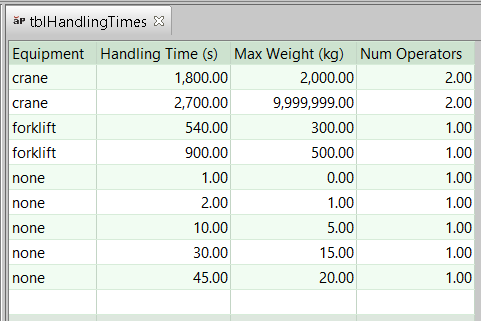
Number of handling operators is looked up by weight in the lookup table tblHandlingTimes. Handling time per operator is interpolated from values looked up by part weight in tblHandlingTimes.
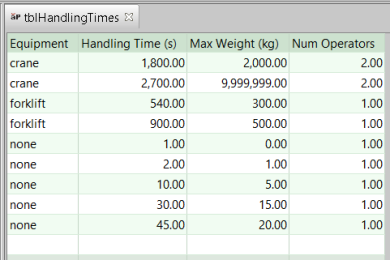
The interpolated value is based on the table rows whose Max Weight values straddle the mass that must be handled. If the mass falls below the minimum mass listed in the table, the handling time is considered negligible, and is set to 0. If the mass exceeds the maximum mass listed in the table, aPriori uses the values in the row with the maximum mass.
-
-
An alternate, machine-based approach is suited for lower-volume precision-machining environments, in which a great deal of time and care is taken with each part setup to minimize errors and scrap. If the machine property Offline Load Capable is false and the cost model variable partSetupTimeMethod is machineBased, aPriori uses the slower, more expensive machine-based approach. In this case, the per-part setup time is a linear function of the value of the machine property Base Part Setup Time. The function’s coefficient is partSetupTimeAdjustmentFactor (1 in starting point Digital Factories), and the constant is extraSetupTime (0 in starting point Digital Factories).
See also Working with Part Setups and SetupAxis GCDs.
For Jig Boring and Jig Grinding, part setup times based on positional tolerance. The time is based on linear interpolation; it falls somewhere between the values of the cost model variables jigBoreMaxPartSetupTime and jigBoreMinPartSetupTime, depending on where part’s tightest required tolerance falls between the cost model variables jigBoreMinPosTol and jigBoreMaxPosTol.
Tool Length and Tool Deflection
aPriori determines tool length based on the length (along the tool axis) of the GCD being machined. For various milling operations, aPriori also takes into account the presence of obstructions near the GCD, and selects a tool length large enough to ensure that such features do not interfere with the tool holder.

This applies to the following operations:
-
Side Milling of PlanarFaces and CurvedWalls
-
Rough Milling of Pockets, Slots, and SimpleHoles (If roughing a volume uses two roughing tools, this applies only to the operation that uses the smaller-diameter tool.)
-
Slot Milling of Slots
-
Perimeter Milling of Perimeters
In addition, for these operations, aPriori adjusts tool feed and/or cut depth based on the rigidity of the tool, in order to ensure that tool deflection is not too great (excessive tool deflection increases the risk of chatter vibration). Tool deflection is determined using a static-force model and is based on tool length, tool diameter, tool material, part material, and cutting parameters. See the following sections for more information:
Determining Tool Length
When aPriori determines tool length for certain milling operations (see Tool Length and Tool Deflection), it first assumes the use of a standard tool holder, and finds the smallest length that provides sufficient tool holder clearance. If that length results in excessive deflection or an infeasible length-to-diameter ratio, aPriori considers the use of a more expensive, slim-profile tool holder, to see if it allows for a significantly smaller tool length.
aPriori follows these steps to determine tool length for an operation on a given GCD:
-
Find the smallest length, Length1, such that both the following hold:
-
Length1 is at least the length of the GCD in the tool axis direction.
-
Length1 is long enough to avoid interference between the tool holder and any feature near the GCD.
For this step, a standard tool holder is assumed. The assumed tool holder diameter is interpolated from values looked up by tool diameter in the lookup table toolHolderSize for Virtual Holder Standard.
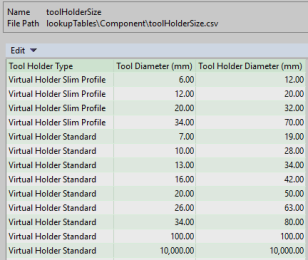
In starting point Digital Factories, a feature interferes with the tool holder if it is within 1mm of it. Administrators can customize this threshold with the cost model variable toolHolderClearance.
If Length1 results in an infeasible length-to-diameter ratio, go to step 3. Otherwise, go to step 2.
-
-
Check whether the tool deflection is small enough, given that the tool's length is Length1.
In starting point Digital Factories,
-
For a roughing operation, tool deflection is small enough if it is no greater than 0.150mm.
-
For a finishing operation, tool deflection is small enough if it is no greater than 0.025mm.
Administrators can customize these thresholds with the cost model variables toolDeflectionLimitRoughing and toolDeflectionLimitFinishing.
If tool deflection is small enough, the tool length is Length1. Otherwise, go to step 3.
-
-
Find the smallest length, Length2, such that both the following hold:
-
Length2 is at least the length of the GCD in the tool axis direction.
-
Length2 is long enough to avoid interference between the tool holder and any feature near the GCD, assuming a slim-profile tool holder.
As in step 1, a feature interferes with the tool holder if its distance from the tool holder is less the value specified by the cost model variable toolHolderClearance (1mm in starting point Digital Factories).
The slim-profile tool holder diameter is interpolated from values looked up by tool diameter in the lookup table toolHolderSize for Virtual Holder Slim Profile.
If the tool diameter is too large for a slim-profile tool holder (greater than 34mm, in starting point Digital Factories), and Length1 results in a feasible length-to-diameter ratio, the tool length is Length1.
If Length2 is significantly smaller than Length1 or Length1 results in an infeasible length-to-diameter ratio, the tool length is Length2.
In starting point Digital Factories, Length2 is considered significantly smaller than Length1 if it is less than 90% of Length1. Administrators can customize this threshold with the cost model variable toolReachReductionCheckThreshold (0.9 in starting point Digital Factories).
If Length1 results in an infeasible length-to-diameter ratio, and the tool diameter is too large for a slim-profile tool holder or Length2 is not significantly smaller than Length1, the operation is considered infeasible.
-

Adjusting Feed and Cut Depth
If tool deflection is too great given the tool's length, the cost model adjusts the cutting parameters to reduce deflection to within allowable limits. In starting point Digital Factories, the allowable limit is 0.150mm for roughing operations and 0.025mm for finishing operations. Administrators can customize these thresholds with the cost model variables toolDeflectionLimitRoughing and toolDeflectionLimitFinishing.
For roughing operations, the cost model reduces the cutting force by adjusting feed downward to bring deflection within range.
For finishing operations, the cost model reduces the cutting force by adjusting both feed and axial engagement to bring deflection within range.
For finishing operations, in starting point Digital Factories,
-
The percentage of the cutting force reduction contributed by the reduction in feed is 70%
-
The percentage of the cutting force reduction contributed by the reduction in axial engagement is 30%.
Administrators can customize these percentages with the following cost model variables:
-
toolDeflectionContributionFinishingFeed (0.7 in starting point Digital Factories)
-
toolDeflectionContributionFinishingAxialEngagement (0.3 in starting point Digital Factories)
Note that the values of toolDeflectionContributionFinishingFeed and toolDeflectionContributionFinishingAxialEngagement must sum to 1.
The factor by which cutting force is reduced is bounded below by the value of the cost model variable toolDeflectionMinCuttingForceCompensation (0.2 in starting point Digital Factories). This means that deflection might not actually be reduced to within range when pre-adjustment tool deflection is very large. Nevertheless, the operation is considered feasible.
Calculating Tool Deflection
Tool deflection in the presence of a static force is calculated with the following formula:
Tool Deflection = (Force * Length3 ) / (3 * Young's Modulus * Second Moment of Area)
Tool deflection depends on the following:
-
Force: tangential force acting on the outer surface of the tool (in the direction normal to a tool radius). See formula, below.
-
Length: length of the tool from the point at which it protrudes from the tool holder to the tool tip.
-
Young's modulus: Young's modulus for the current tool material. Young's moduli for tool materials are listed in the lookup table toolStiffness. Insert-based tools are assumed to be steel.
-
Second moment of area: second moment of area of the tool's cross-section in a plane normal to the tool axis. See formula.
Force = Torque / Tool Radius
The tangential force acting on the outer surface of the tool depends on the following:
-
Torque: see formula
-
Tool radius
Torque = Power / (π x Spindle Speed)
Torque depends on the following:
-
Power: power required to make a milling cut. This is estimated based on part material and cutting parameters.
-
Spindle speed
Second Moment of Area = (π x (0.8 x Tool Diameter)4) / 64
The second moment of area of the tool's cross-section is a function of the tool diameter. The factor 0.8 in the formula above accounts for the reduction in stiffness that is due to the tool's flutes.