User Inputs Affecting Tooling Costs
The following process setup options affect tooling costs (see Tooling Cost). They are listed together with their associated process setup options:
Number of Cavities
-
Default value of 1
-
Cost-efficient
-
Value derived from annual volume for single mold (see Number and Layout of Mold Cavities)
-
User-defined value (1-256)
Tolerances
The 'Unless Otherwise Specified' tolerance for the part.
-
High tolerance: +/- 0.051 mm (+/- 0.002”)
-
Medium tolerance (default): +/- 0.127 mm (+/- 0.005”)
-
Low tolerance: +/- 0.254 mm (+/- 0.010”)
Number of Tools
This specifies the number of mold tools required for the total production volume. By default, aPriori calculates this as the Total Production Volume divided by the product of Tool Life and the number of cavities (if any).
-
Tool Life is the product of: Number of Parts Material Dependent, Tool Steel Life Factor, and Tool Coating Life Factor.
-
Number of Parts Material Dependent: aPriori performs a lookup in the tblToolLife table and selects the Number Shots Per Tool for the Material Type that corresponds to the selected material in the Production Scenario. If the tblToolLife table contains duplicate entries, aPriori uses the number specified by the cost model variable defaultToolLife (defined as the median value of the available data relating to tool life by part material type: 260,000 in starting point Digital Factories).
-
Tool Steel Life Factor: This is a Digital Factory tool shop materials multiplying factor (under Plastic Molding > Processes > [process] > Tool Shops > Tool Life Factor):
-
Tool Coating Life Factor: aPriori performs a lookup in the tblToolCoating table and selects the Tool Life Improvement Factor for the Coating Type that corresponds to the selected Plating of the Mold setup option (see Plating of the Mold below or, for CM, Plating of the Mold). If the tblToolCoating table contains duplicate entries, aPriori sets the coating life factor to 1.
-
-
Total Production Volume is the product of Part Annual Volume and Part Production Life.
With this setup option, users can override the default on a per-part basis.
Cavity Finish
This setup option affects tooling costs.
Specifies the final grinding process used to finish the cavity to Society of the Plastics Industry (SPI) standard grades. SPI finishes are categorized as A (High-Gloss), B (Semi-Gloss), C (Matte), and D (Textured) with each category having three subgrades (1, 2, 3). By default, aPriori uses the following cost model variables for each process; the default in starting point Digital Factories is SPI B3 - Normal Semi-Gloss for all variables:
-
cmCavityFinish: used as the default for Compression Molding.
-
defaultCavityFinishIM: used as the default for Injection Molding.
-
defaultCavityFinishRIM: used as the default for Reaction Injection Molding.
-
defaultCavityFinishSFM: used as the default for Structural Foam Molding.
With this setup option, users can override the default on a per-part basis by selecting an alternative from the Final Cavity Finishing Process drop-down list. The list is populated from the SPIFinishes lookup table. The table also indicates the times required to polish the mold cavity to the required SPI finish (Hours Per Sq Meter); these times are further adjusted by the selected Digital Factory’s machinability index of the tool metal and an 80% learning curve (meaning that every time the work area doubles, the finishing rate will decrease by 20%):
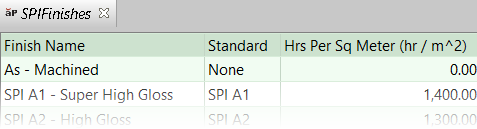
The selected Cavity Finish impacts the Hard Tooling finishing hours and costs (shown on the Investment tab as ‘Finishing, Polishing Cost’ and ‘Finishing, Polishing hours’). For more details, see Labor Cost – Finishing Bench Calculation.
aPriori Design Guidance will alert the user via a Potential Cost Driver if a cheaper finishing option is available.
Finished Area Percentage
This setup option affects tooling costs.
Specifies the percentage of the part’s total surface area that is finished. This value does not include pre-finishing for texturing. The default value is specified by the cost model variable defaultFinishAreaPercentage (50% in starting point Digital Factories). See also Labor Cost – Finishing Bench Calculation.
With this setup option, users can override the default on a per-part basis (0% to 100%).
Number of Plates in Mold
-
2-plate mold
-
3-plate mold
Parting Line Complexity
-
Flat
-
Non-flat
Plating of the Mold
(For Compression Molding, see Plating of the Mold.) Specifies the type of plating used on the mold core and cavity.
-
None
-
Nickel
-
Nitride
-
Chrome
-
Teflon
-
Tribo-Coating
Cavity Texture
This setup option affects tooling costs.
Specifies the type of texture that is added to the mold cavity in order for textured surfaces to appear on final parts that require texture. By default, aPriori uses the following cost model variables for each process; the default in starting point Digital Factories is None for all variables:
-
cmCavityTexture: used as the default for Compression Molding.
-
cavityTexture_IM: used as the default for Injection Molding.
-
cavityTexture_RIM: used as the default for Reaction Injection Molding.
-
cavityTexture_SFM: used as the default for Structural Foam Molding.
With this setup option, users can override the default on a per-part basis by selecting an alternative from the drop-down list. The list is populated from the cavityTextures lookup table; the options include texture patterns of varying depth according to Mold-Tech grading standards (A, B, C, and D). The lookup table also indicates the recommended minimum draft angle thresholds and SPI standard finish required prior to texturing for each texture type:

The selected Cavity Texture impacts the Hard Tooling texturing costs (shown on the Investment tab as ‘Misc. Costs - Texturing’).
The mold texturing cost is based on the time required for individual texturing process steps. The steps are different for the Mold-Tech A standard versus the Mold-Tech B, C, and D standards, as described in the sections that follow.
Mold Tech A Process Steps
The total number of texturing hours required for the Mold Tech A standard is the sum of: Texture SPI Prefinishing Hours, Texture Cleaning Hours, Texture Tool Drying Hours, Texture Masking Hours, Texture Etching Hours, Texture Demasking Hours, Texture Cleaning Hours, Texture Tool Drying Hours, Texture Blasting Hours, and Texture Sealing Hours:
Texture SPI Prefinishing Hours = Texture Prefinishing Rate * (Surface Area Textured * Machinability Index)
-
Texture Prefinishing Rate: calculated as Texture Prefinishing Rate Calculation * (Surface Area Textured / Learning Curve Step):
-
Texture Prefinishing Rate Calculation: aPriori performs a lookup in the SPIFinishes table and returns the Hrs Per Sq Meter corresponding to the selected texture’s SPI Prefinish standard.
-
Surface Area Textured: calculated as (Textured Area Percentage / 100) * Part Surface Area.
-
Learning Curve Step: adjusts the learning curve for the Texture Prefinishing Rate Calculation; measured in square mm, the smaller this value, the less amount of surface area needs to be worked to get faster at finishing. Specified by the cost model variable finishingLCStep (10,000 in starting point Digital Factories).
-
-
Surface Area Textured: as described above.
-
Machinability Index: the Machinability Index factor of the mold material, specified in the Digital Factory tool shop.
Texture Cleaning Hours = Texture Tool Cleaning Rate * Part Surface Area
-
Texture Tool Cleaning Rate: the time in seconds to hand clean 1 square meter of tool. Specified by the cost model variable toolCleaningRate (2150 seconds in starting point Digital Factories).
-
Part Surface Area: the Surface Area of the part, visible in the Geometric Cost Drivers panel.
Texture Tool Drying Hours = Texture Tool Drying Time
-
Texture Tool Drying Time: the time in seconds to dry tool after cleaning. One-size fits all; not area based. Specified by the cost model variable toolDryingTime (1500 seconds in starting point Digital Factories).
Texture Masking Hours = Texture Tool Masking Rate * (Part Surface Area - Surface Area Textured)
-
Texture Tool Masking Rate: the time in seconds to mask 1 square meter of tool. Specified by the cost model variable toolMaskingRate (5285 seconds in starting point Digital Factories).
-
Part Surface Area: as described above.
-
Surface Area Textured: as described above.
Texture Etching Hours = Texture Chemical Etching Rate * Texture Depth
-
Texture Chemical Etching Rate: the time in seconds to etch 1 micrometer of texture depth. Specified by the cost model variable toolChemicalEtchingRate (3 seconds in starting point Digital Factories).
-
Texture Depth: aPriori performs a lookup in the cavityTextures table and returns the Texture Depth corresponding to the selected Cavity Texture setup option.
Texture Demasking Hours = Texture Tool Demasking Rate * (Part Surface Area - Surface Area Textured)
-
Texture Tool Demasking Rate: the time in seconds required to remove the masking. Calculated as toolMaskingRate (described above) * 0.7 (meaning that demasking is expected to be approximately 30% faster than masking).
-
Part Surface Area: as described above.
-
Surface Area Textured: as described above.
Texture Blasting Hours = Texture Tool Blasting Rate * Part Surface Area
-
Texture Tool Blasting Rate: the time in seconds to bead blast 1 square meter of tool. Specified by the cost model variable toolBlastingRate (500 seconds in starting point Digital Factories).
-
Part Surface Area: as described above.
Texture Sealing Hours = Texture Blasting Hours
The time required for sealing is assumed to be the same as for blasting.
Mold Tech B, C, and D Process Steps
The total number of texturing hours required for the Mold Tech B, C, and D standards is the sum of: Texturing Hours Mold Tech A, Texture Photo Masking Hours, Texture Photomask UV Exposure Hours, and Texture Photo Mask Demasking Hours:
-
Texturing Hours Mold Tech A: as described above.
-
Texture Photo Masking Hours: the time in seconds required to apply the photo mask. Calculated as (Texture Tool Masking Rate * Surface Area Textured), as described above.
-
Texture Photomask UV Exposure Hours: the time in seconds to develop the photo mask. One-size fits all; not area based. Specified by the cost model variable toolPhotoMaskUVExposureTime (1200 seconds in starting point Digital Factories).
-
Texture Photo Mask Demasking Hours: the time in seconds required to remove the photo mask. Calculated as (Texture Tool Demasking Rate * (Surface Area Textured), as described above.
Note: aPriori Design Guidance will alert the user via a Potential Cost Driver if a cheaper texturing option (based on the texture depth and SPI pre-finish required) is available within the same Mold-Tech grade (A, B, C, or D).
Textured Area Percentage
This setup option affects tooling costs.
Specifies the percentage of the part’s total surface area that is textured. By default, aPriori uses the cost model variable defaultTextureAreaPercentage (50% in starting point Digital Factories).
With this setup option, users can override the default on a per-part basis (0% to 100%).
Heat Treating of Mold
This specifies whether heat treating should be used on the mold. Typically, this is preferred for large, deep molds and provides better mold life and part quality. The default in starting point Digital Factories is No.
-
Yes
-
No
Stress Relief Mold
Specifies whether stress relief should be used. Typically, this is preferred for large molds with deep cavities. The default in starting point Digital Factories is No.
-
Yes
-
No
Mold Material
(Core and cavity plates; for Compression Molding, see Select Mold Material – Main Plates and Select Mold Material – Clamp Plates.)
-
P20 Tool Steel
-
H13 Tool Steel
-
Stainless Steel
-
Carbon Steel
-
Aluminum
-
Epoxy
Select Material for the Actions
Specifies the material for actions (slides and lifters).
-
P20 Tool Steel
-
H13 Tool Steel
-
Stainless Steel
-
Carbon Steel
-
Aluminum
Select Ejector Box Material
(For Compression Molding, see Select Mold Material – Ejector Box.)
-
P20 Tool Steel
-
H13 Tool Steel
-
Stainless Steel
-
Carbon Steel
-
Aluminum
Select EDM Electrode Material
-
Carbon
-
Copper
Freight Rate
Specifies the freight rate to ship the tool from the tool maker to the molder in terms of cost per mass.
-
Default Digital Factory rate (tool shop variable)
-
User-defined value
Import Duty Rate
Specifies the import duty charge in terms of cost per mass.
-
Default Digital Factory rate (tool shop variable)
-
User-defined value
SG&A Rate
Specifies the percent SG&A (Selling, General & Administrative costs) applied to the tooling cost.
-
Default Digital Factory percent (tool shop variable)
-
User-defined value
Margin Rate (%)
Specifies the percent margin applied to the tooling cost.
-
Default Digital Factory markup/profit percent rate (tool shop variable)
-
User-defined value
Other Inputs Affecting Tooling Design and Cost
The following process setup options affect tooling design and cost and, in some cases, override values derived from geometry extraction:
-
Number of Small/Medium/Large Slides or Side Cores (not applicable to CM).
-
Number of Small/Medium/Large Lifters (not applicable to CM).
-
Number of Unscrewing Mechanisms (to relieve threads; not applicable to CM).
-
Number of Small/Medium/Large Inserts (for CM, see Number of Small Rib Inserts, Number of Medium Rib Inserts, and Number of Large Rib Inserts). See also Plastic Molding Inserts.
-
Number of Small/Medium/Large Speaker Grill Inserts (not applicable to CM). See also Plastic Molding Inserts.
-
Hot Drop Plate Thickness (not applicable to CM).
-
Mold Base Size – Length (for CM, see Mold Base Size – Length).
-
Mold Base Size – Width (for CM, see Mold Base Size – Width).
-
Cavity Plate Height (for CM, see Cavity Plate Height).
-
Core Plate Height (for CM, see Core Plate Height).