Progressive die process setup
This section covers progressive die setup options.
The following options control the addition of extra space (for various purposes) around the part’s flattened pattern, between patterns, and between patterns and the coil edge:
-
Press Carrier Strip Type: controls type and number of carrier strips.
-
Single Edge Carrier Strip Width: adds material for carrier strip.
-
Double Edge Carrier Strip Width: adds material for carrier strips.
-
Press French Stop: adds space for a French stop.
-
Width of Addendum Added to Blank Size [per side]: adds material for holding during stamping (or compensates for underestimation of flattened-part size).
-
Edge Margin Width and Part Spacing Width: add space for cutting a part without damaging adjacent parts.
-
Trim Strip Length for Center Carrier Strip Type: adds space for pilot holes in a center-type carrier strip.
-
Maximum Strip Width: constrains the feasible strip widths.
-
Minimum Strip Width: constrains the feasible strip widths.
The following options control the layout and orientation of blanks:
The following options each control both blank orientation and extra space:
The following options affect the number of die stations:
A number of additional options are also provided; see below.
Number of Parts Stamped Concurrently
Specifies whether two parts can be stamped concurrently, and if so, whether the two are flipped or rotated with respect to one another. Select one of the following options:
-
Evaluate Strip Nesting Layout: 1 Out (default)
-
Evaluate Strip Nesting Layout: 2 Out, Mirrored
-
Evaluate Strip Nesting Layout: 2 Out, Rotated
Blank XY Orientation within Part Strip
In True-Part Nesting mode (see Material Utilization and Part Nesting for Hard Tooled Sheet Metal), specifies how aPriori will determine the blank’s angle within the part strip. The first two options attempt to find the angle that optimizes material utilization; the third option allows the user to specify the angle explicitly. Select one of the following options:
-
-
Determine Angle optimizing utilization, using specified increment: specifies the part rotations aPriori considers in order to optimize nesting. aPriori considers non-negative, whole number multiples of this value that are less than 360 degrees. With a value smaller than the default, costing will be slower, but utilization might increase.
-
Specify Angle [0 = lengthWise, 90 = widthWise]: specifies the part angle within the part strip.
Pierce Before or After Forms
In aPriori starting point Digital Factories, piercing operations precede forming operations, by default. Digital Factory Administrators can customize the default with the cost model variable holesAfterFormsProgDie.You can override the default on a per-part basis with this setup option. Select one of the following:
-
Default
-
User Override: select one of the following:
-
holesBeforeForms
-
holesAfterForms
-
Press Carrier Strip Type
Number and position of the carrier strips that are used to convey the stamped blanks from die station to die station. Select one of the following options:
-
Default: aPriori chooses a default carrier strip type based on the blank’s geometry and orientation on the coil. A single edge strip is used unless both the following hold, in which case a center carrier strip is used:
-
The blank is oriented length-wise or width-wise (the blank’s SER width or length is parallel to the coil’s length—a rotation of 0, 90, 180, or 270 degrees).
-
There is sufficient room on both the leading and trailing sides of the blank (left and right sides of the blank, if the coil flow is left-to-right). The site variable minCarrierStripTabWidth specifies the minimum required amount of room.
-
-
User Override:
-
singleEdge: Only one carrier strip is used, located on one side of the row of blanks. For a 2-out layout, the strip is between the rows.
-
doubleEdge: Two carrier strips are used, one on each side of a row of blanks. For a 2-out layout, a total of three strips are used.
-
center: Only one carrier strip is used, located in the middle of each row of blanks.
-
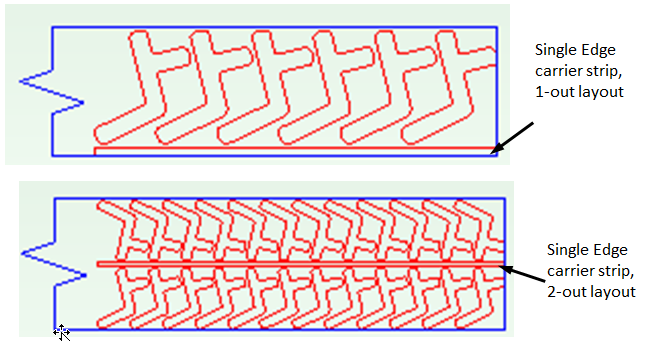


Single Edge Carrier Strip Width
Width to be added to the coil to accommodate a single edge carrier strip.
In starting point Digital Factories, The default carrier strip has enough width to accommodate the pilot hole flanked by margins that are 1.5 times material thickness. Digital Factory Administrators can customize the thickness multiplier with the cost model variable defaultEdgeMarginMultiplier.
Default Carrier Strip Width = 2 *
(defaultEdgeMarginMultiplier *
Material Thickness) + Pilot Hole Diameter
In aPriori starting point Digital Factories, the pilot hole diameter is 6.35mm for material whose thickness is less than 4mm, and 8mm for material whose thickness is greater than or equal to 4mm.
In general, the diameter is looked up in the global lookup table toolingComponentAttributes. The diameter is specified by the table entry pilotPinStandardDiameterSmall for material whose thickness is less than the cost model variable pilotPinSizingThreshold, and it is specified by the table entry pilotPinStandardDiameterLarge for material whose thickness is greater than or equal to pilotPinSizingThreshold.
Select one of the following options:
-
Default: calculated by aPriori (as described above).
-
User Override: enter a value greater than or equal to 0.
(Note that no additional width is required for center-type carrier strips, since they are located in the middle of the row of nested blanks and are assumed never to extend beyond the blank edges.)
Double Edge Carrier Strip Width
Width to be added to the coil to accommodate one edge of a double edge carrier strip.
In starting point Digital Factories, The default carrier strip has enough width to accommodate the pilot hole flanked by margins that are 1.5 times material thickness. Digital Factory Administrators can customize the thickness multiplier with the cost model variable defaultEdgeMarginMultiplier.
Default Carrier Strip Width = 2 * (defaultEdgeMarginMultiplier *
Material Thickness) + Pilot Hole Diameter
In aPriori starting point Digital Factories, the pilot hole diameter is 6.35mm for material whose thickness is less than 4mm, and 8mm for material whose thickness is greater than or equal to 4mm.
In general, the diameter is looked up in the global lookup table toolingComponentAttributes. The diameter is specified by the table entry pilotPinStandardDiameterSmall for material whose thickness is less than the cost model variable pilotPinSizingThreshold, and it is specified by the table entry pilotPinStandardDiameterLarge for material whose thickness is greater than or equal to pilotPinSizingThreshold.
Select one of the following options:
-
Default: calculated by aPriori (as described above).
-
User Override: enter a value greater than or equal to 0.
When you use double-edge type carrier strips with double-row nesting layouts, there are actually 3 strips: one at the top edge of the coil, one at the bottom edge of the coil, and one between the two rows of parts.
See also Coil Width for more information on how strip width contributes to coil width.
(Note that no additional width is required for center-type carrier strips, since they are located in the middle of the row of nested blanks and are assumed never to extend beyond the blank edges.)
Press French Stop
Specifies whether to use a French stop (a notch on the edge of the coil) in order to keep the coil appropriately aligned with the die stations (the notch acts as a positive stop as the coil advances). If used, extra width must be added to the coil width to provide sufficient space for the notch. Select one of the following options:
-
Standard French Stop: add the default extra width for a French stop, the value of the cost model variable defaultFrenchStopSize (3.0 mm in aPriori starting point Digital Factories).
-
No French Stop: no extra width is added. This is the default.
-
User Override: enter a value greater than or equal to 0, the width to be added.
Blank Pitch
Blank pitch is the extent of the flat pattern (with addendum, if any) along the direction of coil flow, supplemented by addendum widths and center trim strip length or part spacing width. By default, this is calculated using aPriori ’s strip nesting algorithm. The default value is the sum of the following:
-
Extent of the flat pattern in the direction of coil flow, when best nested (as determined by the aPriori strip nesting algorithm)
-
Trim Strip Length for Center Carrier Strip, if specified and larger than Part Spacing Width; Part Spacing Width, otherwise
See also the illustrations in Coil Width.
You can override the default with this option, which affects both material utilization and tooling sizes and costs. It is your responsibility to ensure that the overrides have legal results, for example, that the resulting blanks do not overlap.
Select one of the following:
-
Default: calculated by aPriori (as described above)
-
User Override: enter a value in millimeters or inches that is greater than or equal to 1.0 mm.
Coil Width
Coil width is the extent of the flat pattern (with addendum, if any) in the direction perpendicular to the coil flow, supplemented by trim strip and French-stop widths. By default, this is calculated using aPriori ’s strip nesting algorithm.

For a 1-out layout with a single-edge carrier strip, the default value is the sum of the following:
-
Extent of the flat pattern (with addendum, if any) in the direction perpendicular to the coil flow, when best nested (as determined by the aPriori strip nesting algorithm)
-
Edge Margin Width
-
Carrier Strip Width (or Edge Margin Width, whichever is larger)
-
Press French Stop width (if present)

For a 1-out layout with a double-edge carrier strip, the default value is the sum of the following:
-
Extent of the flat pattern (with addendum, if any) in the direction perpendicular to the coil flow, when best nested (as determined by the aPriori strip nesting algorithm)
-
2 * Carrier Strip Width (or 2* Edge Margin Width, whichever is larger)
-
Press French Stop width (if present)

For a 1-out layout with a center carrier strip, the default value is the sum of the following:
-
Extent of the flat pattern (with addendum, if any) in the direction perpendicular to the coil flow, when best nested (as determined by the aPriori strip nesting algorithm)
-
2 * Edge Margin Width
-
Press French Stop width (if present)

For a 2-out layout with a single-edge carrier strip, the default value is the sum of the following:
-
2 * extent of the flat pattern (with addendum, if any) in the direction perpendicular to the coil flow, when best nested (as determined by the aPriori strip nesting algorithm)
-
2 * Edge Margin Width
-
Carrier Strip Width (or Part Spacing Width, whichever is larger)
-
Press French Stop width (if present)

For a 2-out layout with a double-edge carrier strip, the default value is the sum of the following:
-
2 * extent of the flat pattern (with addendum, if any) in the direction perpendicular to the coil flow, when best nested (as determined by the aPriori strip nesting algorithm)
-
2 * Carrier Strip Width (or 2* Edge Margin Width, whichever is larger)
-
Carrier Strip Width (or Part Spacing Width, whichever is larger)
-
Press French Stop width (if present)

For a 2-out layout with a center carrier strip, the default value is the sum of the following:
-
2 * extent of the flat pattern (with addendum, if any) in the direction perpendicular to the coil flow, when best nested (as determined by the aPriori strip nesting algorithm)
-
2 * Edge Margin Width
-
Part Spacing Width
-
Press French Stop width (if present)
Note that center-type carrier strips add to coil pitch, but don’t add to width.
You can override the default with this option, which affects material utilization, as well as tooling sizes and costs. Note that coil width is constrained by the setup option Minimum Strip Width.
Select one of the following:
-
Default: calculated by aPriori (as described above)
-
User Override: enter a value greater than or equal to 0.
Width of Addendum Added to Blank Size [per side]
An offset to be added all around the perimeter of the flattened part. You can enter a non-zero value in order to do one of the following:
-
Add additional material for the purpose of holding the blank during the stamping process, which is subsequently trimmed away.
-
Compensate for cases in which aPriori underestimates flattened blank size, for example, for highly deformed parts.

Select one of the following options:
-
No Addendum: this is the default.
-
Computed Based on Form Depth: derived from the lookup table blankAddendumWidth.
-
User Override: enter a value greater than or equal to 0.
Trim Strip Length for Center Carrier Strip Type
Only used with center-type carrier strips. The carrier strip length for a center carrier strip extends the horizontal spacing between adjacent blanks, in order to provide adequate space for pilot holes located in the carrier strip.
In starting point Digital Factories, The default carrier strip has enough length to accommodate the pilot hole flanked by margins that are 1.5 times material thickness. Digital Factory Administrators can customize the thickness multiplier with the cost model variable defaultEdgeMarginMultiplier.
Default Center Carrier Strip Length =
2 * (defaultEdgeMarginMultiplier *
Material Thickness) + Pilot Hole Diameter
In aPriori starting point Digital Factories, the pilot hole diameter is 6.35mm for material whose thickness is less than 4mm, and 8mm for material whose thickness is greater than or equal to 4mm.
In general, the diameter is looked up in the global lookup table toolingComponentAttributes. The diameter is specified by the table entry pilotPinStandardDiameterSmall for material whose thickness is less than the cost model variable pilotPinSizingThreshold, and it is specified by the table entry pilotPinStandardDiameterLarge for material whose thickness is greater than or equal to pilotPinSizingThreshold.
The carrier strip length affects the pitch computation only when center carrier strips are in use; it is not applied for single-edge or double-edge carrier strips.

Select one of the following options:
-
Default: calculated by aPriori (as described above).
-
User Override: enter a value greater than or equal to 0.
See also Blank Pitch.
Edge Margin Width
For a coil edge with no carrier strip, this option specifies the width of the extra space between the flat pattern and the edge (or French Stop if present). For an edge with a carrier strip, this extra space between is specified by the carrier strip width (see Single Edge Carrier Strip Width and Double Edge Carrier Strip Width) or the Edge Margin Width, whichever is greater. See also Coil Width.
In aPriori starting point Digital Factories, the default value is 1.5 times the material thickness. Digital Factory Administrators can customize the thickness multiplier with the cost model variable defaultEdgeMarginWidthMultiplier.
Select one of the following options:
-
Default: in aPriori starting point Digital Factories, the default value is 1.5 times the material thickness. Digital Factory Administrators can customize the thickness multiplier with the cost model variable defaultEdgeMarginMultiplier.
-
User Override: enter a value greater than or equal to 0.
Part Spacing Width
Width of extra space between adjacent blanks. This value specifies both the distance between blanks in the coil pitch direction (in the absence of a center carrier strip), as well as the distance in the coil width direction between rows of a 2-out layout (if a center carrier strip is used). See also Coil Width and Blank Pitch.
In aPriori starting point Digital Factories, the default value is 1.5 times the material thickness. Digital Factory Administrators can customize the thickness multiplier with the cost model variable defaultPartSpacingMultiplier.
Select one of the following options:
-
Default: in aPriori starting point Digital Factories, the default value is 1.5 times the material thickness. Digital Factory Administrators can customize the thickness multiplier with the cost model variable defaultPartSpacingMultiplier.
-
User Override: enter a value greater than or equal to 0.
Heat Treat of Die Components
Die components are heat treated by default. This option provides a dropdown list with the following items:
To override heat treatment, select No from the dropdown list.
Plating of Die Components
By default, the material used for die plating depends on the base tool material (see Base Tool Material). High-strength materials use the plating specified by the cost model variable highStrengthMatlToolingCoatingType (DuplexVariantic in starting point Digital Factories). Base material S7 uses Nitride plating. Base material D2 uses CVD plating. Any other base material uses the plating specified by the cost model variable defaultToolingCoatingType (Nitride in starting point Digital Factories).
High-strength material is defined as material with a tensile yield strength of 344.74 Mpa in starting point Digital Factories. Digital Factory Administrators can customize this threshold with the cost model variable highStrengthMatlThreshold.
To specify plating material explicitly, select one of the following options:
-
None
-
Nickel
-
Chrome
-
Nitride
-
Teflon
-
Tribo-Coating
-
DuplexVariantic
-
CVD
Base Tool Material
This is used to determine tool plating costs. By default, base tool material is S7. To specify base tool material explicitly, select one of the following options:
-
D2
-
A2
-
S7
Stamp Assembly Qty
Select one of the following options:
-
Default: specified by the cost model variable defaultStampAssemblyQty.
-
User Override: enter a value greater than or equal to 0.
Number of 150, 300, 600, 800, 1000, 1200 Series Cam Units
Select one of the following options:
-
Default
-
User Override: enter a value greater than or equal to 0.
Freight Cost
Freight cost applied to tooling defaults to 0. To explicitly specify a tooling freight charge, enter a value greater than or equal to 0.
Total Carrying Cost
This is the cost for holding the completed tool in inventory prior to shipping. Total carrying cost applied to tooling defaults to 0. To explicitly specify a tooling carrying cost, enter a value greater than or equal to 0.
Total Gage Cost
Total gage cost applied to tooling defaults to 0. To explicitly specify a tooling gage cost, enter a value greater than or equal to 0.
Total Welding Cost
Total welding cost applied to tooling defaults to 0. To explicitly specify a tooling welding cost, enter a vale greater than or equal to 0.
Add IDLE Station Before CUTOFF Station
In starting point Digital Factories, aPriori adds an idle station before the cutoff station, by default. Digital Factory Administrators can customize the default with the cost model variable addIdleBeforeCutoffEnabled. With this PSO, you can override the default on a per part basis. To explicitly specify whether to add an idle station, select one of the following options:
-
Default: value of cost model variable addIdleBeforeCutoffEnabled, which is set to Yes in aPriori starting point Digital Factories.
-
User Override: select Yes or No.
Add IDLE Station Following TRIMMING Station if Blank Pitch is Less Than This
In starting point Digital Factories, aPriori adds an idle station after a trimming station if the blank pitch is less than 80mm, by default. Digital Factory Administrators can customize this threshold with the cost model variable defaultBlankPitchThreshold. With is PSO, you can override the default threshold on per part basis. To explicitly specify a blank pitch threshold, select one of the following options:
-
Default
-
User Override: enter a value greater than or equal to 0.
Maximum Strip Width
If aPriori calculates a required width (see Coil Width) that is greater than this value, the part fails to cost. In aPriori starting point Digital Factories, the maximum allowable strip width is 1828.8mm, by default. Digital Factory Administrators can customize the default with the cost model variable maximumStripWidth. You can override the default for the current part with this setup option. Select one of the following:
-
Default
-
User Override
Minimum Strip Width
This value constrains the choice of material stock. If aPriori calculates a required width (see Coil Width) that is less than this value, this value is used instead of the calculated value in order to determine material and tooling costs.
By default, the minimum allowable strip width is the calculated required strip width. You can override the default for the current part with this setup option. Select one of the following:
-
Default
-
User Override
Enable SCORING Operations for Bends
In aPriori starting point Digital Factories, bends are not scored by default. Digital Factory Administrators can customize the default with the cost model variable scoreBendsProgDie. You can override the default with this PSO. Select one of the following options:
-
Default: specified by the cost model variable scoreBendsProgDie (No in aPriori starting point Digital Factories).
-
User Override: select Yes or No.
Enable COINING Operations for SimpleHoles
In aPriori starting point Digital Factories, flanged, tapped holes are coined, by default. Digital Factory Administrators can customize the default with the cost model variable enableCoiningFlangedHoles. You can override the default with this PSO. Select one of the following options:
-
Default: specified by the cost model variable enableCoiningFlangedHoles (Yes in aPriori starting point Digital Factories).
-
User Override: select Yes or No.
Enable SHAVING Operations for SimpleHoles
In aPriori starting point Digital Factories, flanged, tapped holes are shaved, by default. Digital Factory Administrators can customize the default with the cost model variable enableShavingFlangedHoles. You can override the default with this PSO. Select one of the following options:
-
Default: specified by the cost model variable enableShavingFlangedHoles (Yes in aPriori starting point Digital Factories).
-
User Override: select Yes or No.
Enable Restriking Operation for Straight and Curved Bends
In aPriori starting point Digital Factories, restriking is not performed on bends, by default. Digital Factory Administrators can customize the default with the cost model variable enableRetrikingStraightCurvedBends. You can override the default with this PSO. Select one of the following options:
-
Default: specified by the cost model variable enableRetrikingStraightCurvedBends (No in aPriori starting point Digital Factories).
-
User Override: select Yes or No.
Enable Standalone Piloting Operation
In starting point Digital Factories, piloting is combined with edge trimming on the first die station, by default. Digital Factory Administrators can customize the default with the cost model variable enableStandalonePiloting. You can override the default on a per-part basis with this PSO. Note that this typically increases the total number of die stations. Select one of the following options:
-
Default: specified by the cost model variable enableStandalonePiloting (No in starting point Digital Factories).
-
User Override: select Yes or No.
Set Number of Trimming Operations
By default, aPriori calculates the number of trimming stations. You can override the default with this PSO. Select one of the following options:
-
Default: calculated by aPriori .
-
User Override: enter a value between 0 and the cost model variable maxTrimStagesProgDie (4 in aPriori starting point Digital Factories).
Enable In Die TAPPING operations
In aPriori starting point Digital Factories, in-die tapping is disabled by default. Digital Factory Administrators can customize the default with the cost model variables defaultEnableInDieTapping. You can override the default with this PSO. Select one of the following options:
-
Default: specified by the cost model variables defaultEnableInDieTapping (No in aPriori starting point Digital Factories).
-
User Override: select either Yes or No.
Add Idle Station Before After Tapping
In aPriori starting point Digital Factories, an Idle station is added before and after a Trimming station, by default. Digital Factory Administrators can customize the default with the cost model variable addIdleBeforeAfterTappingEnabled. You can override the default with this PSO. Select one of the following options:
-
Default: specified by the cost model variable addIdleBeforeAfterTappingEnabled (Before and After in aPriori starting point Digital Factories).
-
User Override: select one of the following:
-
Before
-
After
-
Before and After
-
None
-
Add Idle Station After Trimming
In aPriori starting point Digital Factories, an Idle station is added after a Trimming station, by default. Digital Factory Administrators can customize the default with the cost model variable addIdleAfterTrimming. You can override the default with this PSO. Select one of the following options:
-
Default: specified by the cost model variable addIdleAfterTrimming (Yes in aPriori starting point Digital Factories).
-
User Override: select Yes or No.
Add Idle Station After Cam Forming
In aPriori starting point Digital Factories, an Idle station is added after a Cam Forming station, by default. Digital Factory Administrators can customize the default with the cost model variable addIdleAfterCamForming. You can override the default with this PSO. Select one of the following options:
-
Default: specified by the cost model variable addIdleAfterCamForming (Yes in aPriori starting point Digital Factories).
-
User Override: select Yes or No.
Add Idle Station After Cam Trimming
In aPriori starting point Digital Factories, an Idle station is added after a Cam Trimming station, by default. Digital Factory Administrators can customize the default with the cost model variable addIdleAfterCamTrimming. You can override the default with this PSO. Select one of the following options:
-
Default: specified by the cost model variable addIdleAfterCamTrimming (Yes in aPriori starting point Digital Factories).
-
User Override: select Yes or No.
Add Idle Station After Cam Bending
In aPriori starting point Digital Factories, an Idle station is added after a Cam Bending station, by default. Digital Factory Administrators can customize the default with the cost model variable addIdleAfterCamBending. You can override the default with this PSO. Select one of the following options:
-
Default: specified by the cost model variable addIdleAfterCamBending (Yes in aPriori starting point Digital Factories).
-
User Override: select Yes or No.
Add Idle Station After Cam Piercing
In aPriori starting point Digital Factories, an Idle station is added after a Cam Piercing station, by default. Digital Factory Administrators can customize the default with the cost model variable addIdleAfterCamPiercing. You can override the default with this PSO. Select one of the following options:
-
Default: specified by the cost model variable addIdleAfterCamPiercing (Yes in aPriori starting point Digital Factories).
-
User Override: select Yes or No.
Number of Shear Planes
By default in starting point Digital Factories, shear force is calculated on the assumption that cluster punching is not used (that is, on the assumption of a single shear plane, with all GCDs pressed at the same time). Digital Factory Administrators can customize the default number of shear planes with the cost model variable numShearPlanes. In addition, users can override the default on a per-part basis with this setup option.
Multiple shear planes indicate the use of cluster punching, with different groups of GCDs pressed in a staggered fashion, rather than simultaneously. Required press force decreases as the number of shear planes increases. A decrease in required press force can sometimes lower costs due to selection of a lower-overhead machine.