Sheet Metal Process Routings
By default, aPriori auto-selects the lowest cost routing at the selected facility. You can override the default and select an alternate routing. If the alternate routing is not feasible based on routing rules, aPriori warns you and reverts to auto-selection. If you want to use the alternate available routing and ignore the routing rules, you can select this option using the Process Routing window. In this case, aPriori attempts to cost the component with the selected routing regardless of feasibility constraints. Note that costing might still fail for other reasons, which would be reported as an error to you, but would not cause aPriori to revert to a different routing.
If the Machining process group has been licensed, Sheet Metal routings can include 3-Axis Milling, Cylindrical Grinding, Gun Drill and 2-axis Wire EDM operations. For complete details about machining, see Stock Machining and Machining.
The routing also includes subsequent optional surface treatment and packaging processes, if your company has licensed these modules.
Stage Tooling and Progressive Die process routings that evaluate the type and number of die stages/stations required for a particular component. Operations are determined using die selection algorithms according to individual rules defined for stage tooling dies and progressive die stations respectively. Once die stages and stations have been determined, tooling costs are then computed and displayed.
The default behavior is to let aPriori determine the number of stages. You can also manually edit the number of stages by editing the number of occurrences of the Generic Press (for stage tooling) process or the Die Station component-level operation (for progressive die). A number of setup options also allow you to influence the number of stations for progressive die; see Progressive die process setup.
Partial Progressive Die routings also are supported but not generated automatically by aPriori . Users can construct them from (full) Progressive Die routings by assigning GCDs from Progressive Die to Stage Tooling (generic press), using the GCD Editor.
The hard-tooled stamping processes (Stage Tooling, Tandem Press, Progressive Die, and Standard Press) all are available via a separately licensed module.
Operation-level Feasibility and Routing for Progressive Die
Below are the hard-tooled sheet metal operations, grouped by GCD type.
Blank
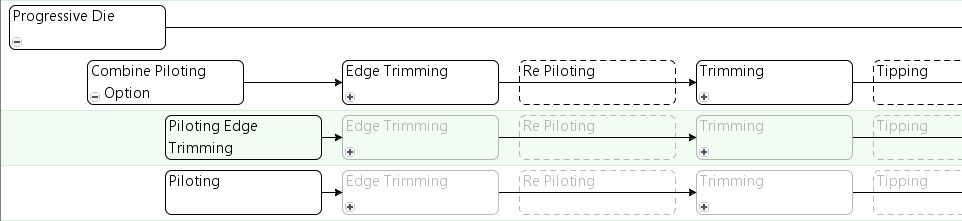
Initial operations to create the blank consist of piloting or piloting combined with edge trimming, followed by edge trimming, optional repiloting, and additional trimming if necessary.
-
Piloting Edge Trimming is used by default in starting point Digital Factories. It is used if the setup option Enable Standalone Piloting Operation is No. This allows piloting and edge trimming to be performed on the same die station.
-
Piloting is used only if the setup option Enable Standalone Piloting Operation is Yes. In this case, piloting is performed on a separate die station, prior to edge trimming.
-
Edge Trimming is used if at least one of the following hold:
-
Cost model variable multipleTrimsProgDie is true. (The variable is set to true in aPriori starting point Digital Factories.)
-
Flattened part has at least one long, thin “peninsula” (see Peninsular Ratio Property for Hard Tooled Sheet Metal).
-
By default, the routing includes one instance of the operation for each edge to be trimmed, except the edge trimmed by the operation Trimming Piloting. So the number of instances of this operation is either the value of the cost model variable numEdgeTrimsPerPart (if the PSO Enable Standalone Piloting Operation is Yes) or one less than the value of the cost model variable numEdgeTrimsPerPart (if the PSO Enable Standalone Piloting Operation is No). In starting point Digital Factories, the cost model variable numEdgeTrimsPerPart is 1.
-
Re Piloting must be manually included in a routing, and is always considered feasible.
-
Trimming is included in the operation sequence only if at least one of the following hold:
-
Cost model variable multipleTrimsProgDie is true. (The variable is set to true in aPriori starting point Digital Factories.)
-
Flattened part has at least one long, thin “peninsula” (see Peninsular Ratio Property for Hard Tooled Sheet Metal).
-
By default, the routing includes one instance of the Trimming operation for each trim still to be performed. aPriori calculates the number of trims based on the blank perimeter and numEdgeTrimsPerPart (1 in starting point Digital Factories). This value is limited by the cost model variable maxTrimStagesProgDie (4 in starting point Digital Factories); in other words, the number of Trimming instances never exceeds maxTrimStagesProgDie minus numEdgeTrimsPerPart. You can override the calculated value with the PSO Direct Trim Angle Threshold.
Later operations on the blank consist of optional operations tipping, tipping back, and coining, followed by cutoff.

-
Tipping must be manually included in a routing, and is always considered feasible.
-
TippingBack must be manually included in a routing, and is always considered feasible.
-
Coining is included in the operation sequence only if the blank is chamfered (see the Blank property Is Chamfered in the Geometric Cost Drivers pane).
-
Cutoff is always included.
StraightBend
StarightBends are created with the Bending operation and several optional operations. In the following example sequence, aPriori decided to include Scoring:

-
Scoring is performed if both the following hold:
-
Process setup option Enable SCORING Operations for Bends is Yes. (The PSO default is No is starting point Digital Factories.)
-
Bend is a long hem or bend is close to a large hole.
Long hem recognition compares the bend arc angle with the plant variables maxHemRecognitionAngle and minHemRecognitionAngle, and compares the bend length with the plant variable hemLengthThreshold.
Close means a distance less than the product of blank thickness and the plant variable formBasedScoringMultiplierThreshold.
Large hole recognition compares diameter with minSimpleHoleDiameterThreshold (for simple holes) and perimeter with minComplexHolePerimeterThreshold (for complex holes).
-
-
Bending is feasible only if both the following hold:
-
Bend arc angle is greater than or equal to the cost model variable flapBasedRecognitionAngle.
-
Bend flap size greater than or equal to the cost model variable bendFlapSizeThreshold.
-
-
Cam Action Bending is performed if both the following hold:
-
Bend arc angle is greater than or equal to the cost model variable camBendingRecognitionAngle..
-
Bend is not a standard hem. Standard hem recognition compares the bend arc angle with the plant variables maxHemRecognitionAngle and minHemRecognitionAngle, and requires that the hem is not between the main surface and any other bend or form.
-
-
Restriking is performed if both the following hold:
-
Setup option Enable Restriking Operation for Straight and Curved Bends is set to Yes (the default in starting point Digital Factories).
-
Bend flap size greater than or equal to the cost model variable bendFlapSizeRestrikeThreshold.
-
-
-
DownOverBending is performed if the following condition holds:
-
Bend is a standard hem. Standard hem recognition requires that the bend arc angle is between the plant variables maxHemRecognitionAngle and minHemRecognitionAngle, and requires that the hem is not between the main surface and any other bend or form.
-
-
Setting is performed if the following condition holds:
-
Bend is a standard hem. Standard hem recognition requires that the bend arc angle is between the plant variables maxHemRecognitionAngle and minHemRecognitionAngle, and requires that the hem is not between the main surface and any other bend or form.
-
Form
Forming operations are divided into two categories:
-
Standard forming
-
Drawing

Standard forming operations are used only if both the following hold:
-
At least one of the following holds:
-
Deep draw ratio is less than the cost model variable deepDrawRatioThreshold. The deep draw ratio is the ratio of the form’s depth to Width (depth is either Depth Up or Depth Down, whichever is greater):
max(Depth Up, Depth Down) / SER Width < deepDrawRatioThreshold
-
Form’s enclosing-rectangle area (product of SER Length and SER Width) is more than half of the part’s area (product of component Length and Width):
(form SER Length * form SER Width) / (component Length * component Width) > 0.5
-
Form Sub Type is CurvedBend
-
Form Sub Type is Stamp
-
-
At least one of the following holds:
-
Form is not too deep; that is, the sum of the form’s Depth Up and Depth Down is less than the cost model variable drawDepthThreshold:
Depth Up + Depth Down< drawDepthThreshold
-
Draw ratio is less than the cost model variable drawRatioThreshold. The draw ratio is the GCD Area divided by the part’s area (product of component Length and Width):
Form Area / (Component Length * Component Width) < drawRatioThreshold
-
Form’s enclosing-rectangle area (product of SER Length and SER Width) is more than half of the part’s area (product of component Length and Width).
(form SER Length * form SER Width) / (component Length * component Width) > 0.5
-
Form Sub Type is CurvedBend
-
Form Sub Type is Stamp
-
Standard forming operations are all optional. In the following example sequence, aPriori decided to include Embossing:

-
Scoring is performed only if both the following hold:
-
Cost model variable scoreBendsProgDie is true.
-
Bend is a long hem or bend is close to a large hole.
Long hem recognition compares the bend arc angle with the plant variables maxHemRecognitionAngle and minHemRecognitionAngle, and compares the bend length with the plant variable hemLengthThreshold.
Close means a distance less than the product of blank thickness and the plant variable formBasedScoringMultiplierThreshold.
Large hole recognition compares diameter with minSimpleHoleDiameterThreshold (for simple holes) and perimeter with minComplexHolePerimeterThreshold (for complex holes).
-
-
Bending is performed only if the form Sub Type is CurvedBend.
-
Cam Action Bending is performed only if all the following hold:
-
Form Sub Type is CurvedBend.
-
Bend arc angle is greater than or equal to the cost model variable camBendingRecognitionAngle..
-
Bend is not a standard hem. Standard hem recognition compares the bend arc angle with the plant variables maxHemRecognitionAngle and minHemRecognitionAngle, and requires that the hem is not between the main surface and any other bend or form.
-
-
Stamping is performed only if the form Sub Type is Stamp
-
Forming is performed only if one of the following holds:
-
Form Sub Type is Tab.
-
Form Sub Type is Bridge
-
Form Sub Type is Emboss and form is a dimple. Dimple recognition compares form perimeter with the cost model variable maxDimplePerimeter, and compares each of depth up and depth down with the cost model variable maxDimpleDepth.
-
-
.Embossing is included in the operation sequence only if all of the following hold:
-
Form Sub Type is Emboss.
-
Form is a not a dimple. Dimple recognition compares form perimeter with the cost model variable maxDimplePerimeter, and compares each of depth up and depth down with the cost model variable maxDimpleDepth.
-
Form either is orthogonal to the main surface or is both relatively large and not on the edge of either the part or a complex hole.
A form is orthogonal to the main surface if it is accessible from a direction that forms an angle with the main surface of about 90 degrees. The angle must be within sideActionAxisTolerance of 90 degrees to be considered orthogonal.
A form is considered relatively large if the cost model variable formAreaAreaThreshold is less than the percentage of half the component Surface Area occupied by the form Area, that is, if formAreaThreshold < (form Area / (component Surface Area / 2) * 100.
-
-
Side Action Forming is included in the operation sequence only if all of the following hold:
-
Form Sub Type is Emboss.
-
Form is not orthogonal to the main surface. A form is orthogonal to the main surface if it is accessible from a direction that forms an angle with the main surface of about 90 degrees. The angle must be within sideActionAxisTolerance of 90 degrees to be considered orthogonal.
-
Form is highly deformed. A form is considered highly deformed if the cost model variable deformationThreshold is less than the percentage of half the component Surface Area occupied by the forms child GCDs:
deformationThreshold < (sum of Areas of form’s children / (component Surface Area / 2) * 100.
-
Form is either on the edge of the part or on the edge of a complex hole.
-
Form is relatively small. A form is considered relatively small if the cost model variable formAreaThreshold is greater than the percentage of half the component Surface Area occupied by the form Area:
formAreaThreshold > (form Area / (component Surface Area / 2) * 100.
-
-
Restriking is included in the operation sequence only if the setup option Enable Restriking Operation for Straight and Curved Bends is set to Yes (the default in starting point Digital Factories) and at least one of the of the following holds:
-
Form is orthogonal to the main surface. A form is orthogonal to the main surface if it is accessible from a direction that forms an angle with main surface of about 90 degrees. The angle must be within sideActionAxisTolerance of 90 degrees to be considered orthogonal.
-
Form is not on the edge of either the part or a complex hole.
-
Form is relatively large. A form is considered relatively large if the cost model variable formAreaAreaThreshold is less than the percentage of half the component Surface Area occupied by the form Area.
formAreaThreshold < (form Area / (component Surface Area / 2) * 100.
-
Form Sub Type is not Emboss.
In addition, if the form’s Sub Type is Curved Bend, the following must hold for this operation to be included in the sequence:
-
Form’s Depth up or Depth Down (whichever is larger) is less than or equal to the cost model variable bendFlapSizeRestrikeThreshold.
In addition, if the form’s Sub Type is not Curved Bend, one of the following must hold
-
Form Sub Type is Emboss and form is sufficiently big. A form is considered sufficiently big if the sum of its Depth Up and Depth Down is greater than 10mm and the form is not a deep dimple. Deep dimple recognition compares form perimeter with the cost model variable maxDimplePerimeter, and compares each of depth up and depth down with the cost model variable maxDeepDimpleDepth.
-
Form Sub Type is Bridge and form is sufficiently deep. A form is considered sufficiently deep if the form’s Depth Up or Depth Down (whichever is greater) is greater than the product of the blank Thickness and the cost model variable bridgeRestrikingMultiplier.
-
Drawing operations are divided into two categories:
-
Deep drawing
-
Standard drawing

-
Deep Drawing is feasible only if both the following hold:
-
Form’s deep draw ratio is greater than or equal to the cost model variable deepDrawRatioThreshold. The deep draw ratio is the ratio of the form’s depth to width, that is, the form’s Depth Up or Depth Down (whichever is larger) divided by the form’s SER Width.
-
Form’s enclosing-rectangle area (product of SER Length and SER Width) is less than or equal to half the part’s area (product of component Length and Width).
(form SER Length * form SER Width) / (component Length * component Width) <= 0.5
This operation is performed only if the form’s Sub Type is not Stamp.
The operation, if performed, is performed between 2 and maxNumberDeepDraws (cost model variable) times. The number of times is the form’s deep draw ratio divided by the cost model variable deepDrawRatioThreshold, if within range:
# of times = rounddown(((max(Depth Up, Depth Down) / SER Width) / deepDrawRatioThreshold)
If this value is less than 2, the operation is performed twice. If this value is greater than maxNumberDeepDraws, the operation is performed maxNumberDeepDraws times.
-
-
Standard Drawing is performed only if the form’s Sub Type is not Stamp.
The operation, if performed, is performed between 2 and maxNumberDraws (cost model variable) times. The number of times is the form’s draw ratio divided by the cost model variable drawRatioThreshold, if within range:
# of times = rounddown(((Depth Up + Depth Down) / SER Width) / drawRatioThreshold)
If this value is less than 2, the operation is performed twice. If this value is greater than maxNumberDraws, the operation is performed maxNumberDraws times.
SimpleHole
Simple hole operations are all optional. In the following example sequence, aPriori decided to include Piercing and CounterSinking:

-
Piercing is feasible only if both the following hold:
-
Hole is not blind.
-
Operation is capable of achieving the required tolerance (to view the achievable tolerance range, see the Piercing process setup option Best/Worst Achievable Tolerance).
Piercing is included in the operation sequence only if at least one of the following holds:
-
Hole is approximately orthogonal to the main surface.
-
Setup option Pierce Before or After Forms is set to holesBeforeForms.
-
Hole is flanged.
-
Hole is countersunk.
-
Hole is threaded.
-
Hole is not accessible from any candidate setup axis.
-
-
Cam Action Piercing is feasible only if all the following hold:
-
Hole is not approximately orthogonal to the main surface.
-
Hole is not flanged.
-
Hole is not countersunk.
-
Hole is not threaded.
-
Hole is accessible from a candidate setup axis.
-
Setup option Pierce Before or After Forms is set to holesAfterForms.
-
-
Extruding is included in the operation sequence only if the following holds:
-
Hole is flanged.
-
-
Coining is included in the operation sequence only if all the following hold:
-
PSO Enable COINING Operations for SimpleHoles is set to Yes.
-
Hole is flanged.
-
Hole is threaded.
-
-
Shaving is included in the operation sequence only if all the following hold:
-
PSO Enable SHAVING Operations for SimpleHoles is set to Yes.
-
Hole is flanged.
-
Hole is threaded.
-
-
Countersinking is included in the operation sequence only if the following holds:
-
Hole is countersunk.
-
-
Tapping is included in the operation sequence only if all the following hold:
-
In-die tapping is enabled; that is the PSO Enable In Die TAPPING operations is Yes (the default in starting point Digital Factories).
-
Hole is threaded; that is, the isThreaded property of the GCD is true.
-
Hole diameter is within range; that is, the diameter is between sizes M2 and M12 (1.78mm and 11.51 mm in starting point Digital Factories; specified in the lookup table toolingComponentAttributes, in the entries for holeDiameterM2 and holeDiameterM12).
-
ComplexHole
Complex hole operations are required and feasible under the circumstances described below.
-
Cam Piercing is required only if all the following hold:
-
Hole is not approximately orthogonal to the main surface.
-
Hole is not flanged.
-
Hole is not coined.
-
Hole is accessible from a candidate setup axis.
-
Setup option Pierce Before or After Forms is set to holesAfterForms.
It is feasible only if the operation is capable of achieving the required tolerance.
-
-
Coining is required if the hole is chamfered. It is feasible only if the operation is capable of achieving the required tolerance.
-
Extruding is required if the hole is flanged. It is feasible only if the operation is capable of achieving the required tolerance.
-
Piercing is required only if at least one of the following holds:
-
Hole is not approximately orthogonal to the main surface.
-
Setup option Pierce Before or After Forms is set to holesBeforeForms.
-
Hole is flanged.
-
Hole is chamfered.
-
Hole is not accessible from any candidate setup axis.
-
It is feasible only if the operation is capable of achieving the required tolerance.
-
Trimming is required only if both the following hold:
-
Hole is sufficiently large, that is, the hole’s Perimeter is greater than or equal to the cost model variable bigEnoughArtifactPerimeter: Perimeter > = bigEnoughArtifactPerimeter
-
Hole intersects, but is not coplanar with, a sufficiently large multibend or form of Sub Type Emboss that has no bends between it and the main surface. A form is sufficiently large if it is not a dimple and the sum of Depth Up and Depth Down is greater than 25 mm. Dimple recognition compares form perimeter with the cost model variable maxDimplePerimeter, and compares each of depth up and depth down with the cost model variable maxDimpleDepth.
-
It is feasible only if the operation is capable of achieving the required tolerance.
How aPriori Groups Operations onto Die Stations
The Progressive Die operation routings for a part determine the order of operations on a given GCD. All together, they provide a partial ordering of all the operations on all the part’s GCDs—only operations on the same GCD are ordered with respect to one another. aPriori further orders the operations on all GCDs by assigning operations to die stations, and ordering the die stations. (Operations assigned to the same die station are not ordered with respect to one another; they are performed at the same time on different GCDs.)
Three kinds of rules guide aPriori’s assignment of operations and ordering of die stations:
Compatibility Rules
Any two operations that are assigned to the same die station must be compatible with one another. Two operations are compatible if and only if they not incompatible, as defined below:
-
Any Trimming operation is incompatible with any Edge Trimming operation.
-
Two Trimming operations are incompatible if they are not both performed on complex holes.
-
Any two Edge Trimming operations are incompatible.
-
Any two Post Form Trimming operations are incompatible.
-
Any two Cam Action Trimming operations are incompatible.
-
A Cam Action Bending operation is incompatible with any operation.
-
A Tipping operation is incompatible with any operation that is not another Tipping operation.
-
A Tipping Back operation is incompatible with any operation that is not another Tipping Back operation.
-
A Cam Piercing operation is incompatible with any other Cam Piercing operation that is performed by a different Cam unit.
-
Any Cam Piercing operation is incompatible with any Restriking operation.
-
Any two operations which work primarily in opposite directions are incompatible, where the direction in which an operation works is defined (in terms of properties of the GCD on which the operation is performed) as follows:
-
Coining: Chamfer Direction
-
Countersinking, countersink direction
-
Extruding, flange direction
-
Cam over bending, bend direction
-
Down over bending, bend direction
-
Cam Action Bending on a Straight bend, bend direction
-
Embossing, direction of greater depth (for example, up, if Depth UP is greater than Depth Down)
-
Shear Embossing, direction of greater depth
-
A Bending operation on a Form GCD, direction of greater depth
-
Any operation on a MultiBend GCD, bend direction
-
A Bending operation on a Straight Bend GCD, bend direction
-
Gussett Bending, bend direction
-
-
Any Piercing operation is incompatible with any operation of one of the following kinds:
-
Restriking
-
Forming
-
Deep Drawing
-
Drawing
-
Embossing
-
Coining
-
Bending
-
Down Over Bending
-
Side Action Forming
-
Scoring
-
-
Two Piercing operations are incompatible if the GCDs on which they are performed are too close to each other, that is, if the distance between them (according to the LIES_NEAR relation) is less than or equal to the product of the blank’s Thickness and the cost model variable minHoleSpacingMultiplier.
-
Two bending operations are incompatible if one bend lies between the other bend and the part’s main surface.
-
A Bending operation on a GCD is incompatible with a Restriking operation on another GCD, if one GCD lies between the other GCD and the main surface.
-
A Bending operation on a GCD is incompatible with a Cam Piercing operation on another GCD, if one GCD lies between the other GCD and the main surface.
-
Any Tapping operation is incompatible with any non-Tapping operation.
-
Two Tapping operations are incompatible if the GCDs on which they are performed are too close to each other, that is, if the distance between them (according to the LIES_NEAR relation) is less than the cost model variable minimumTapSpacingDistance.
-
Any two Side Action Forming operations are incompatible.
If two operations are not incompatible as defined above, they are compatible.
Precedence Rules
The precedence rules specify, for any pair of operations, whether one must be performed before the other and, if so, which must be first.
If one operation must precede another, according to these rules, the first operation must be assigned to a die station that is earlier than the die station to which the second operation is assigned.
Following are the precedence rules:
-
An Extrusion, Coining, Countersinking, Piercing, or Tapping operation must precede a bending operation of any of the following types, if the bend is between the extrusion or hole and the part’s main surface, and the extrusion or hole is not orthogonal to the main surface (that is, it is not accessible from a direction that is within 15 degrees of forming a 90 degree angle with the main surface):
-
Any operation on a MultiBend GCD.
-
Bending
-
Restriking
-
Setting
-
Scoring
-
Down Over Bending
-
Cam Action Bending
-
-
An Embossing operation must precede a bending operation of any of the following types, if the bend is between the form and the main surface:
-
Any operation on a MultiBend GCD.
-
Bending
-
Gussett Bending
-
Cam Over Bending
-
-
Down Over Bending
-
Cam Action Bending
-
Setting
-
Scoring
-
-
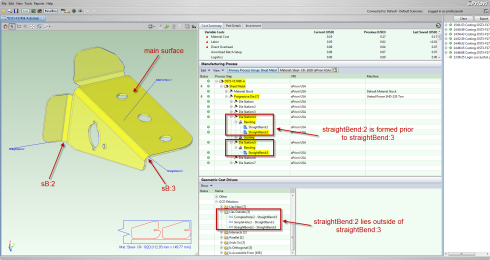
A Bending operation on a GCD, bend1, must precede a Bending operation on a GCD, bend2, if bend2 is between bend1 and the main surface.

-
A Bending operation must precede a Cam Piercing operation, if the bend is between the pierce and the main surface.
-
A Cam Action Bending operation on a GCD, bend1, must precede a Bending operation on a GCD, bend2, if bend2 is between bend1 and the main surface.
-
A Cam Action Bending operation on a GCD, feature1, must precede a Restriking operation on a GCD, feature2, if feature2 is between feature1 and the main surface.
-
The Cutoff operation must be preceded by every other operation.
-
The Piloting operation must precede every other operation.
-
The Piloting Edge Trimming operation must precede any other operation except an edge trimming operation.
-
Any operation of one of the following types must precede any Repiloting operation:
-
Embossing
-
Restriking
-
Drawing
-
Deep Drawing
-
-
Any Embossing operation must precede any Restriking operation.
-
Any Edge Trimming operation must precede any operation of one of the following types:
-
Cam Piercing
-
Embossing
-
Bending
-
Drawing
-
Deep Drawing
-
-
Any Full Blanking operation must precede any operation of one of the following types:
-
Embossing
-
Bending
-
Drawing
-
Deep Drawing
-
Cam Piercing
-
Shear Embossing
-
Operation on a MultiBend GCD
-
Gusset Bending
-
Cam Over Bending
-
Down Over Bending
-
Setting
-
Scoring
-
Cam Action Bending
-
Stamping
-
Forming
-
Shear Forming
-
Shear Stamping
-
Restriking
-
Extruding
-
Coining
-
Countersinking
-
Side Action Forming
-
-
Any Trimming operation must precede any operation of one of the following types:
-
Bending
-
Cam Piercing
-
Embossing
-
Shear Embossing
-
Operation on a MultiBend GCD
-
Gusset Bending
-
Cam Over Bending
-
Down Over Bending
-
Setting
-
Scoring
-
Cam Action Bending
-
Stamping
-
Forming
-
Shear Forming
-
Shear Stamping
-
Restriking
-
Extruding
-
Coining
-
Countersinking
-
Side Action Forming
-
Drawing
-
Deep Drawing
-
-
Any operation of one of the following types must precede any Cam Action Piercing operation:
-
Side Action Forming
-
Cam Action Bending
-
Down Over Bending
-
Countersinking
-
Restriking
-
-
Any Bending operation must precede any Restriking operation.
-
Any operation of one of the following types on a GCD, feature1, must precede any Cam Action Bending operation on a given bend, if feature1 does not lie between the bend and the main surface:
-
Operation on a MultiBend GCD
-
Setting
-
Scoring
-
Stamping
-
Forming
-
Drawing
-
Deep Drawing
-
Embossing
-
Restriking
-
Coining
-
Bending
-
ShearEmbossing
-
ShearForming
-
ShearStamping
-
-
Any operation of one of the following types must precede any Cam Action Piercing operation:
-
Operation on a MultiBend GCD
-
Setting
-
Scoring
-
Stamping
-
Forming
-
Drawing
-
Deep Drawing
-
Embossing
-
Restriking
-
Coining
-
Bending
-
ShearEmbossing
-
ShearForming
-
ShearStamping
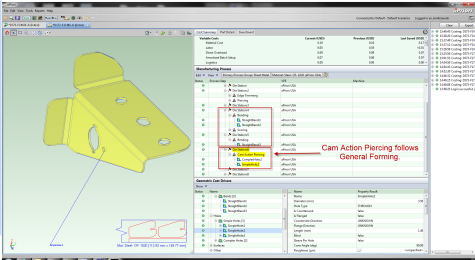
The screen capture below shows Bending operations preceding a Cam Action Piercing operation.
-

-
Any operation of one of the following types must precede any Cam Trimming operation:
-
Operation on a MultiBend GCD
-
Setting
-
Scoring
-
Stamping
-
Forming
-
Drawing
-
Deep Drawing
-
Embossing
-
Restriking
-
Coining
-
Bending
-
ShearEmbossing
-
ShearForming
-
ShearStamping
-
-
A Piercing operation on a hole must precede a Bending operation, if the hole is not accessible from any candidate setup axis.
-
A Cam Action Piercing operation on must precede a Piercing operation on a given hole if the setup option Pierce Before or After Forms is set to holesAfterForms and the hole is accessible from a direction that is within 15 degrees of the perpendicular to the main surface.
-
Any operation of one of the following types must precede a Piercing operation on a given hole if the setup option Pierce Before or After Forms is set to holesAfterForms and the hole is accessible from a direction that is within 15 degrees of the perpendicular to the main surface:
-
Forming
-
Deep Drawing
-
Drawing
-
Embossing
-
Restriking
-
Coining
-
Setting
-
Stamping
-
Side Action Forming
-
Cam Action Bending
-
DownOverBending
-
Bending
-
-
An orthogonal hole-making operation (Piercing, Extruding, Coining, Shaving, CounterSinking, or Tapping) must precede an operation of one of the following types on a given hole if the setup option Pierce Before or After Forms is set to holesBeforeForms:
-
Forming
-
Deep Drawing
-
Drawing
-
Embossing
-
Restriking
-
Coining
-
Setting
-
Stamping
-
Side Action Forming
-
Cam Action Bending
-
DownOverBending
-
Bending
-
-
Any Post Form Trimming operation must precede any Piercing operation.
-
Any Post Form Trimming operation must precede any Cam Action Piercing operation.
-
Any Cam Action Trimming operation must precede any Piercing operation.
-
Any Cam Action Trimming operation must precede any Cam Action Piercing operation.
-
Any operation of one of the following types must preceded any Cam Action Trimming operation:
-
Forming
-
Deep Drawing
-
Drawing
-
Embossing
-
Coining
-
Bending
DownOverBending -
Side Action Forming
-
Scoring
-
Bending
-
Cam Action Bending
-
-
Any Embossing operation must precede any Tapping operation.
-
Any Cam Piercing operation must precede any Tapping operation on a hole that is orthogonal to the main surface if the setup option Pierce Before or After Forms is set to holesAfterForms.
-
Any operation of one of the following types must precede and Post Form Trimming operation:
-
Embossing
-
Restriking
-
Drawing
-
DeepDrawing
-
Bending
-
CamActionBending
-
Idle Station Rules
aPriori sometimes adds idle stations before or after a given station, based on the following rules:
-
Tapping: an idle station must precede a station that includes a Tapping operation, by default in aPriori starting point Digital Factories.
Digital Factory Administrators can customize the default with the cost model variable addIdleBeforeAfterTappingEnabled (which is set to Before and After in aPriori starting point Digital Factories).
You can override the default on a per-part basis with the PSO Add Idle Station Before After Tapping.
-
Cutoff: an idle station must precede a station that includes a Cutoff operation, by default in aPriori starting point Digital Factories.
Digital Factory Administrators can customize the default with the cost model variable addIdleBeforeCutoffEnabled (which is set to Yes in aPriori starting point Digital Factories).
You can override the default on a per-part basis with the PSO Add IDLE Station Before CUTOFF Station.
-
Tapping: an idle station must follow a station that includes a Tapping operation, by default in aPriori starting point Digital Factories.
Digital Factory Administrators can customize the default with the cost model variable addIdleBeforeAfterTappingEnabled (which is set to Before and After in aPriori starting point Digital Factories).
You can override the default on a per-part basis with the PSO Add Idle Station Before After Tapping.
-
Trimming: an idle station must follow a station that includes a Trimming operation, by default in starting point Digital Factories, if the blank pitch (see Blank Pitch) is less than 80mm.
Digital Factory Administrators can use the cost model variable defaultBlakPitchThreshold to customize the blank pitch that, by default, requires an idle station. Digital Factory Administrators can use the cost model variable addIdleAfterTrimmingEnabled to specify that, by default, trimming requires no idle station, regardless of blank pitch.
You can override the defaults on a per-part basis with the PSOs Add Idle Station After Trimming and Add IDLE Station Following TRIMMING Station if Blank Pitch is Less Than This.
-
Cam Action Piercing: an idle station must follow a station that includes a Cam Action Piercing operation, by default in aPriori starting point Digital Factories, if the cam approach is within 45o of being parallel to the part strip flow.
Digital Factory Administrators can use the cost model variable camApproachAngleThreshold to customize the default allowable deviation from parallel for cam unit approach. Digital Factory Administrators can use the cost model variable addIdleAfterCamPierceEnabled to specify that, by default, cam piercing requires no idle station, regardless of the cam’s angle of approach.
You can override the default on a per-part basis with the PSO Add Idle Station After Cam Piercing.
-
Cam Action Bending: an idle station must follow a station that includes a Cam Action Bending operation, by default in aPriori starting point Digital Factories, if the cam approach is within 45o of being parallel to the part strip flow.
Digital Factory Administrators can use the cost model variable camApproachAngleThreshold to customize the default allowable deviation from parallel for cam unit approach. Digital Factory Administrators can use the cost model variable addIdleAfterCamBendEnabled to specify that, by default, cam bending requires no idle station, regardless of the cam’s angle of approach.
You can override the default on a per-part basis with the PSO Add Idle Station After Cam Bending.
-
Cam Action Trimming: an idle station must follow a station that includes a Cam Action Trimming operation, by default in aPriori starting point Digital Factories, if the cam approach is within 45o of being parallel to the part strip flow.
Digital Factory Administrators can use the cost model variable camApproachAngleThreshold to customize the default allowable deviation from parallel for cam unit approach. Digital Factory Administrators can use the cost model variable addIdleAfterCamTrimEnabled to specify that, by default, cam piercing requires no idle station, regardless of the cam’s angle of approach.
You can override the default on a per-part basis with the PSO Add Idle Station After Cam Trimming.
-
Cam Action Forming: an idle station must follow a station that includes a Cam Action Forming operation, by default in aPriori starting point Digital Factories, if the cam approach is within 45o of being parallel to the part strip flow.
Digital Factory Administrators can use the cost model variable camApproachAngleThreshold to customize the default allowable deviation from parallel for cam unit approach. Digital Factory Administrators can use the cost model variable addIdleAfterCamFormEnabled to specify that, by default, cam piercing requires no idle station, regardless of the cam’s angle of approach.
You can override the default on a per-part basis with the PSO Add Idle Station After Cam Forming.