Cycle Time for Sheet Plastic
Cycle Time and Process Time vary according to the selected routing. Process Time comprises a set of Cycle Time drivers corresponding to the different stages of the thermoforming process: loading, heating, forming, cooling, and unloading. aPriori sums the time required for each of these stages to calculate a Total Stage Time. Cycle Time is given by the following formula:
Cycle Time = Cycle Time Adjustment Factor * Process Time
Cycle Time depends on the following:
Cycle Time Adjustment Factor
Cycle Time Adjustment Factor is a multiplier applied to Process Time, specified by the cost model variable cycleTimeAdjustmentFactor (1 in starting point Digital Factories).
Process Time
Process Time is the time required for one complete process of the machine to make a single part. aPriori calculates this as the total time that the formed sheet spends on the thermoforming machine (Total Stage Time) divided by the number of parts nested onto the stock sheet (specified by the setup option Number of Parts per Sheet). Total Stage Time varies for each thermoforming routing:
-
Single Station Thermoforming: Total Stage Time is the sum of the following Cycle Time driver values: Loading Stage Time, Heating Stage Time, Forming Stage Time, Cooling Stage Time, and Unloading Stage Time.
-
Shuttle Station Thermoforming: Total Stage Time is whichever is the greatest of the following Cycle Time driver values: Heating Stage Time or (Loading Stage Time + Forming Stage Time + Cooling Stage Time + Unloading Stage Time).
-
3 Station Rotary Thermoforming: Total Stage Time is whichever is the greatest of the following Cycle Time driver values: Heating Stage Time, (Loading Stage Time + Unloading Stage Time), or (Forming Stage Time + Cooling Stage Time).
-
4 Station Rotary Thermoforming: Total Stage Time is whichever is the greatest of the following Cycle Time driver values: Loading Stage Time, Heating Stage Time, (Forming Stage Time + Cooling Stage Time), or Unloading Stage Time.
The Cycle Time drivers are described in the following sections.
Heating Stage Time
Heating Stage Time is the total time spent at the station used to heat the sheet. aPriori calculates this as the sum of Station Index Time (the time to move the sheet between stations on the machine) and Heat Sheet Time (the time spent heating the sheet to the forming temperature).
-
Station Index Time is specified by the machine property Station Index Time.
-
Heat Sheet Time is the product of the thickness of the stock sheet and the material property Heat Time Per Unit Thickness.
Loading Stage Time
Loading Stage Time is the total time spent at the station used to load the sheet onto the machine. aPriori calculates this as the sum of Load Sheet Time and Clamping Time (the time required to clamp the sheet with the thermoforming machine’s clamp frame).
-
Load Sheet Time is specified by the Load Time value in the lookup table componentLoadTime corresponding to the mass and the maximum dimension (length, width, or thickness) of the unformed stock sheet.
-
Clamping Time is specified by the cost model variable clampingTime (2 seconds in starting point Digital Factories).
Unloading Stage Time
Unloading Stage Time is the total time spent at the station used to unload the sheet from the machine. aPriori calculates this as the sum of Unclamping Time (the time to unclamp the sheet from the machine’s clamp frame), Unload Formed Sheet Time, and Station Index Time (the time to move the sheet between stations on the machine).
-
Unclamping Time is specified by the cost model variable unClampingTime (2 seconds in starting point Digital Factories).
-
Unload Formed Sheet Time is specified by the Unload Time value in the lookup table componentLoadTime corresponding to the mass and the maximum dimension (length, width, or thickness) of the formed sheet.
-
Station Index Time is specified by the machine property Station Index Time.
Forming Stage Time
Forming Stage Time is the total time spent at the station used to form the sheet. aPriori calculates this using the following formula:
Forming Stage Time = Station Index Time + Max(Apply Pressure Time, Extend Tool Time) + Extend Plug Time + Extend Core Pulls Time + Apply Vacuum Time
aPriori sums Station Index Time, Extend Plug Time, Extend Core Pulls Time, Apply Vacuum Time, and either Apply Pressure Time or Extend Tool Time (whichever is greater):
-
Station Index Time: the time to move the sheet between stations on the machine, specified by the machine property Station Index Time.
-
Apply Pressure Time: the time to apply pressure if pressure forming is required (as determined by the value of the setup option Pressure Forming Required). If required, this is specified by the cost model variable applyPressureTime (3 seconds in starting point Digital Factories).
-
Extend Tool Time: the time to move the tool towards the sheet prior to forming it. aPriori calculates this as: Tool Movement Distance (the part Height) divided by Tool Movement Rate (specified by the cost model variable toolMovementRate (100 mm / second in starting point Digital Factories).
-
Extend Plug Time: the time to extend plug assist tooling into the mold, if required (as determined by the value of the setup option Plug Assist Tooling Required). If required, aPriori calculates this as: Plug Movement Distance (the part Height) divided by Plug Movement Rate (specified by the cost model variable plugMovementRate; 100 mm / second in starting point Digital Factories).
-
Extend Core Pulls Time: the time to extend all side actions. aPriori calculates this as: Max Core Pull Distance (the maximum depth of all core pull operations) divided by Core Pull Movement Rate (specified by the cost model variable corePullMovementRate (100 mm / second in starting point Digital Factories).
-
Apply Vacuum Time: the time to apply the vacuum to form the part. aPriori performs a lookup in the thermoformingVacuumProperties table, finds the entry with the lowest Draw Depth that is greater than or equal to the part Height, and returns the corresponding Vacuum Time value.
Cooling Stage Time
Cooling Stage Time: the total time spent at the station used to cool the formed sheet. aPriori calculates this as the sum of Sheet Cool Time (the time to cool the sheet before removing it from the tool) and Retract Core Pulls Time (the time to retract all side actions).
-
Sheet Cool Time: aPriori calculates this as: Heat Energy Transferred To Cool Sheet (the total heat energy transferred to the tool and surrounding environment while cooling the sheet) divided by Total Heat Transfer Rate To Cool Sheet (the total heat transfer rate while the formed sheet cools).
-
Heat Energy Transferred To Cool Sheet is a function of Sheet Mass (the product of material density and stock Volume) and the material properties Specific Heat, Normal Forming Temperature, and Set Temp.
-
Total Heat Transfer Rate To Cool Sheet is the product of the total surface area of the top half of the formed sheet and the total heat flux (due to conduction, convection, and radiation) while the formed sheet cools.
-
-
Retract Core Pulls Time: the time to retract side actions. aPriori uses the same calculation that it uses for Extend Core Pulls Time, as described above.
You can override the individual Cycle Time drivers in the Formula Dependencies window. Note however that you cannot override the Total Stage Time or the top-level Cycle Time or Process Time values, because the Labor Time calculation uses only the individual Cycle Time drivers and not their aggregated values. For details, see Labor Time for Sheet Plastic.
The Cycle Time driver times are also displayed as Custom Outputs in the Part Details tab:
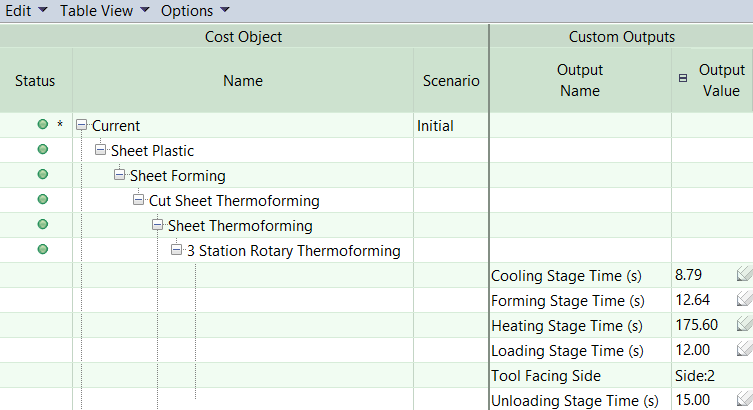
As shown in the screen capture above, aPriori also displays the Tool Facing Side as a Custom Output. This indicates which side of the part is in contact with the mold. For details, see Sheet Plastic Undercuts and Core Bundles and Mold Type.