Tooling Costs Overview
This section covers the following topics:
Investment Tab
The Investment tab shows the Sheet Plastic hard tooling costs, with the high-level costs displayed at the top:
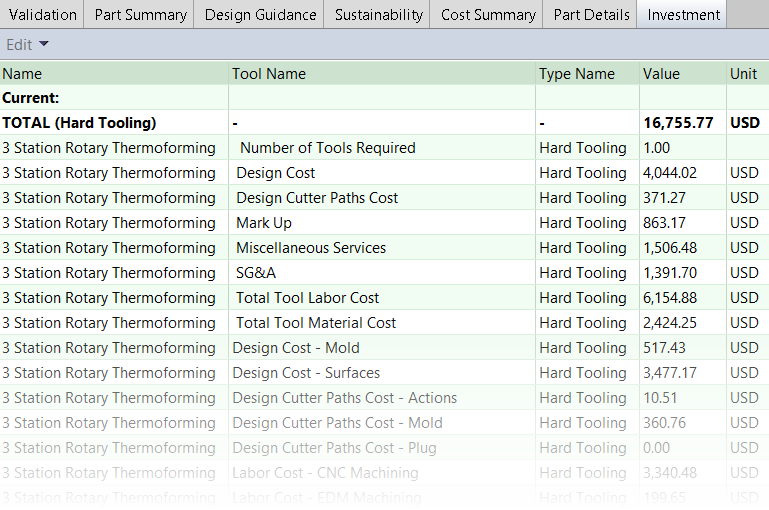
Hard Tooling Formula Dependencies
The total cost of Hard Tooling is shown in the Hard Tooling column of the Capital Costs section in the Part details tab in the aPriori UI. To view the formulas for the tooling calculations, right click the figure in the Hard Tooling column and click Select Formula Dependencies:

Click any node to expand the tree. Any calculations that are not required in the current routing will not be visible in Formula Dependencies. For example, if no pressure forming or plugs are required, or if there are no Core Pulls involved, the calculations for these will not be shown.
Scroll to the right of the window to view the formulas in aPriori Cost Scripting Language (CSL). If you want to view the cost model files in which the formulas appear, click the formula to open the Cost Model Workbench (CMWB). If you want more information about using CMWB, see the Cost Model Workbench User Guide.
Thermoforming Tool Overview
aPriori selects either a positive (convex, or 'male') or negative (concave, or 'female') tool based on the geometry of the part. By default, aPriori selects a positive tool (specified by the cost model variable moldType and overridable using the setup option Mold Type).
Optional tools include a plug tool for a negative mold (specified by the setup option Plug Assist Tooling Required) and a pressure box for pressure forming (specified by the setup option Pressure Forming Required).
The simplified image below illustrates the typical high-level components of a negative thermoforming tool.
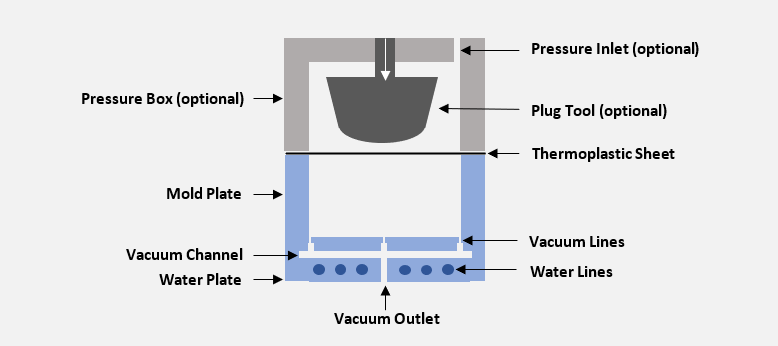
The image illustrates the following elements:
-
The mold plate is the cavity in which the heated thermoplastic stock sheet is formed. In a positive tool, the mold plate would be a convex shape over which the plastic sheet is draped.
-
The water plate forms the base of the tool. The mold plate and the water plate are fastened tightly together with cap head screws. There are material costs associated with the screws.
-
There are machined vacuum channels in the water plate for the vacuum lines built into the mold plate. The Sheet Plastic cost model attributes costs to the number of vacuum lines required, based on default spacing (specified by the cost model variable vacuumHoleSpacing, 38.1mm in starting point Digital Factories) and the length of the parting line perimeter. There are also material costs associated with vacuum line hoses and fittings.
-
To reduce costs, the top part of the vacuum lines are drilled with as small a diameter as possible and with a high tolerance (this also helps to prevent dimples appearing on the formed sheet). The lower part of the water line can be drilled with a lower tolerance and at a higher drilling rate. The ratio of high tolerance to low tolerance for each vacuum hole is specified by the cost model variable vacuumHoleHighTolFactor (0.2 in starting point Digital Factories).
-
The mold is water cooled and therefore the water plate contains water lines. There are material costs associated with water manifolds, hoses, and baffles, and labor costs associated with water line drilling.