This section provides an example of adding new plant variables (also known as cost model variables) to a process group. The example uses the sample custom process AbrasiveJet Cut, which is copied from Laser Cut, and will mimic Waterjet Cut (see Adding a New Process to a Process Group). An additional example is also included, to support a further customization related to cycle time padding.
This section includes the following subsections:
For more information on plant variables, see Working with Plant Variables in Working with Cost Model Data and Metadata.
Adding Plant Variables for a New Process
Follow these steps to add the AbrasiveJet plant variables:
-
In the navigation pane, expand Global Cost Model Information, and double click Cost Model Variables.
-
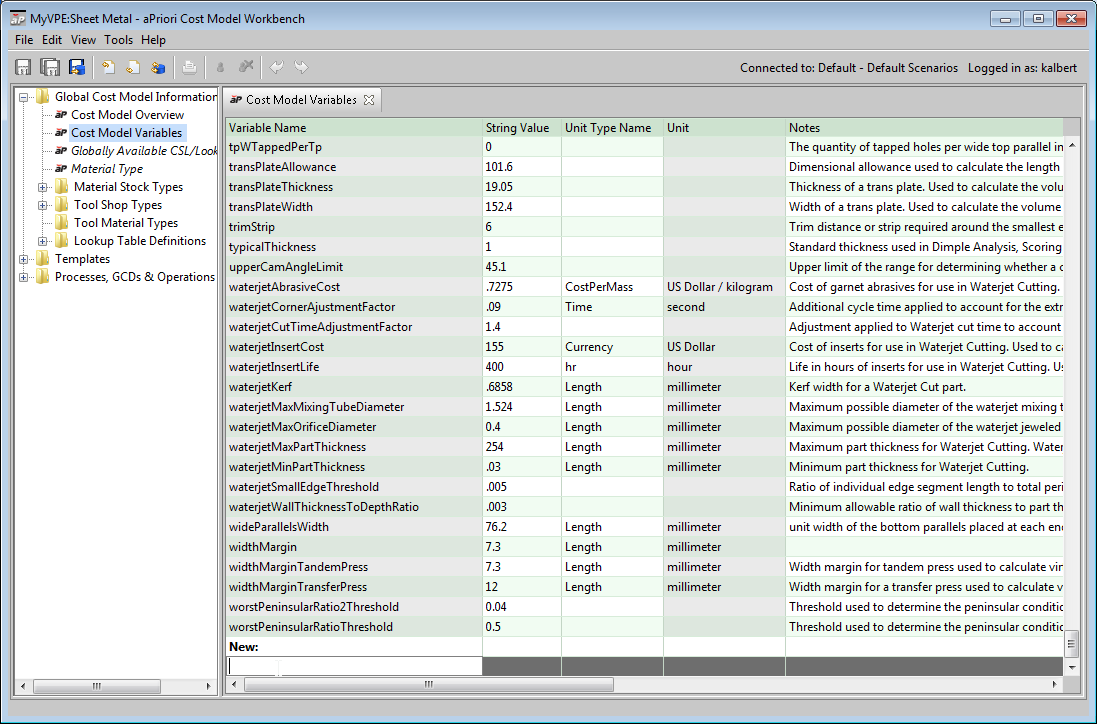
In the editing pane, scroll to the bottom, and double click the cell underneath New:
-
Enter the information in the table below. Double-click a cell to enter a value. In the Unit Type Name field, when you select an item from the dropdown list, a value for the Unit field appears automatically.
|
Varaible Name |
String Value |
Unit Type Name |
Unit |
Notes |
|---|---|---|---|---|
|
abrasiveJetAbrasiveCost |
.7275 |
CostPerMass |
US Dollar / kilogram |
Cost of garnet abrasives for use in AbrasiveJet Cutting. Used to calculate expendable tooling cost. |
|
abrasiveJetCornerAjustmentFactor |
.09 |
Time |
second |
Additional cycle time applied to account for the extra time required to stop the feed rate at each corner during AbrasiveJet Cutting. |
|
abrasiveJetCutTimeAdjustmentFactor |
1.4 |
|
|
Adjustment applied to AbrasiveJet cut time to account for the extra time required for acceleration or deceleration to the required feed rate. |
|
abrasiveJetInsertCost |
155 |
Currency |
US Dollar |
Cost of inserts for use in AbrasiveJet Cutting. Used to calculate expendable tooling cost. |
|
abrasiveJetInsertLife |
400 |
hr |
hour |
Life in hours of inserts for use in AbrasiveJet Cutting. Used to calculate expendable tooling cost. |
|
abrasiveJetKerf |
.6858 |
Length |
millimeter |
Kerf width for an AbrasiveJet Cut part. |
|
abrasiveJetMaxMixingTubeDiameter |
1.524 |
Length |
millimeter |
Maximum possible diameter of the abrasiveJet mixing tube. |
|
abrasiveJetMaxOrificeDiameter |
0.4 |
Length |
millimeter |
Maximum possible diameter of the abrasiveJet jeweled orifice. |
|
abrasiveJetMaxPartThickness |
254 |
Length |
millimeter |
Maximum part thickness for AbrasiveJet Cutting. AbrasiveJets can actually cut thicker parts but the cutting model breaks down above this threshold. |
|
abrasiveJetMinPartThickness |
.03 |
Length |
millimeter |
Minimum part thickness for AbrasiveJet Cutting. |
|
abrasiveJetSmallEdgeThreshold |
.005 |
|
|
Ratio of individual edge segment length to total perimeter length below which an edge is considered small and must be cut using a slower feed rate. |
|
abrasiveJetWallThicknessToDepthRatio |
.003 |
|
|
Minimum allowable ratio of wall thickness to part thickness for an AbrasiveJet Cut part. |
Adding Plant Variables: Padding Cycle Time
This section adds a plant variable to support cycle time padding. This variable can be used directly in a taxonomy module (see Padding Cycle Time by Adding a Constant), or to supply a default value for a process setup option (see Adding a Setup Option: Padding Cycle Time). See also Modifying a Machine Type: Padding Cycle Time.
Follow these steps to define the variable:
-
In the navigation pane, expand Global Cost Model Information, and double click Cost Model Variables.
-
In the editing pane, scroll to the bottom, and double click the cell underneath New:.
-
Enter a new line in the table, specifying the following information:
-
Field Name:
AbrasiveJetCycleTimeAdditiveAdjustment -
String Value:
0 -
Unit Type Name:
Time
-