To calculate cut times and pierce times for each GCD of the current part, Laser Cut uses operations on the blank, simples hole, and complex hole GCDs. As with Laser Cut, AbrasiveJet Cut uses an operation on the simple hole GCD to calculate pierce times and cut times for each simple hole. But unlike Laser Cut, AbrasiveJet Cut uses blank and complex hole operations to calculate pierce times only; AbrasiveJet Cut uses an operation on the edge GCD to calculate cut times for each edge of the blank and each edge of each complex hole. So we must add two new operations to AbrasiveJet Cut.
The following tables show which times are calculated by each processes and operation:
|
Laser Cut |
Process |
SimpleHole Operation |
Blank Operation |
ComplexHole Operation |
|---|---|---|---|---|
|
Traverse Time |
X |
|
|
|
|
Pierce Time |
|
X |
X |
X |
|
Cut Time |
|
X |
X |
X |
|
AbrasiveJet Cut |
Process |
SimpleHole Operation |
Blank Operation |
Blank Edge Operation |
ComplexHole Operation |
ComplexHole Edge Operation |
|---|---|---|---|---|---|---|
|
Traverse Time |
X |
|
|
|
|
|
|
Pierce Time |
|
X |
X |
|
X |
|
|
Cut Time |
|
X |
|
X |
|
X |
AbrasiveJet Cutting operation
For the AbrasiveJet Cutting operation under Blank, as well as for the AbrasiveJet Cutting operation under ComplexHole, do the following:
-
Right-click on the operation, and select New > Operation....
-
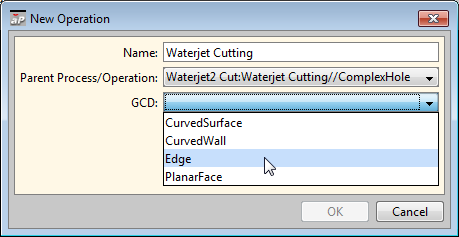
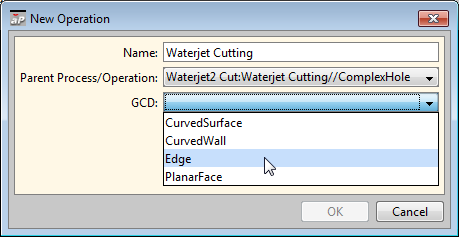
Resize the dialog box, if necessary, in order to make the operation pathnames entirely visible in the Parent Process/Operation filed. Ensure that this field is set to the operation you right-clicked on.
-
In the New Operation dialog, click the GCD field and select Edge.
-
Click OK.
-
To incorporate your changes into the cost model, select Publish Cost Model and Digital Factory from the File menu, or click
 in the toolbar.
