Design Guidance Enhancements
aPriori 2025 R1 provides several design guidance enhancements across multiple process groups. These enhancements collectively improve the quality of guidance provided to design engineers, ensuring they receive impactful feedback that enhances the quality of part designs.
- Enhanced Sheet Metal Unique Hole Size Design Guidance
- Enhanced Sheet Metal Unique Bend Radii Design Guidance
- Improved Draft Angle Design Guidance
- Improved Milling L/D Ratio Design Guidance
- Updates to Plastic Molding Cavity Finish Design Guidance
- Updates to Plastic Molding Cavity Texture Design Guidance
Enhanced Sheet Metal Unique Hole Size Design Guidance
aPriori 2025 R1 enhances the unique hole size design guidance, enabling design engineers to focus on significant cost drivers.
Previously, for both hard-tooled and soft-tooled Sheet Metal processes, aPriori generated design guidance concerning the number of unique hole diameters within a part. aPriori provided design guidance when the total number of unique hole diameters was greater than a specified number, set to one by default (controlled by the uniqueHoleSizesMax row of the lookup table tblDTCHoleGuidance).
This guidance is relevant for hard-tooled processes, as each distinct hole size requires additional tools and therefore additional tooling cost. However, for most soft-tooled processes, the additional cost driven by unique hole sizes is typically negligible. Therefore, aPriori no longer generates this guidance for most soft-tooled processes.
In this release, only the following Sheet Metal processes continue to provide design guidance when there are multiple distinct hole diameters:
-
Generic Press
-
Laser Punch (Perforating and Punching operations)
-
Plasma Punch (Perforating and Punching operations)
-
Progressive Die
-
Std Press
-
Tandem Press
-
Turret Press
Enhanced Sheet Metal Unique Bend Radii Design Guidance
aPriori 2025 R1 enhances the unique bend radii design guidance, enabling design engineers to focus on significant cost drivers.
Previously, aPriori generated design guidance concerning the number of distinct bend radii within a part, regardless of the manufacturing process. aPriori provided design guidance when the total number of unique bend radii was greater than a specified number, set to one by default (controlled by the uniqueBendRadiiMax row of the lookup table tblDTCBendGuidance).
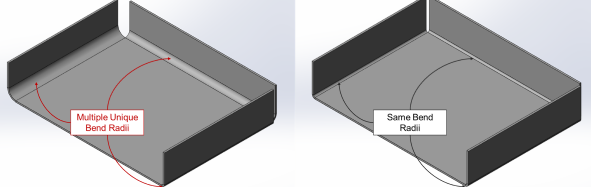
However, this guidance is relevant only for specific processes (such as Bend Brake and Roll Bending) for which unique bend radii each require additional tools and therefore additional tooling cost. For other processes (such as Stage Tooling), the additional cost driven by unique bend radii is typically negligible. Therefore, aPriori now generates this guidance only for the following processes:
-
Bend Brake
-
2 Roll Bending
-
3 Roll Bending
-
4 Roll Bending
Improved Draft Angle Design Guidance
aPriori 2025 R1 improves draft angle manufacturability guidance in Casting process groups, allowing design engineers to identify features requiring draft angles more accurately.
Draft angle feedback refers to the requirement to taper off features parallel to the draw direction to ensure successful ejection from the mold. If the draft angle of any feature is less than the required minimum, a corresponding draft issue is listed as a Potential Manufacturing Issue.
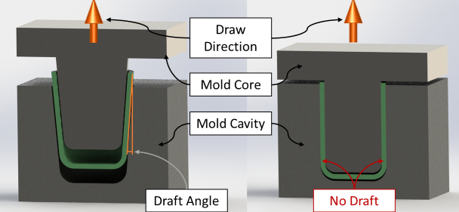
Previously, aPriori flagged any feature with less than the required minimum draft angle, even if the feature required rough machining. This could result in false positives, such as a hole that is fully machined after ejection from the mold.
It should be noted that features that are partially manufactured by the casting process and extracted parallel to the draw direction will require draft. If the feature is completed by rough machining, it is likely the draft will be removed. As the CAD model represents the finished state of the part, the draft applied will not be visible on the CAD.
aPriori 2025 R1 enhances the guidance to exclude features that require rough machining, if they are fully or partially machined. This exclusion does not apply to features requiring only finish machining, as finishing processes are unlikely to remove significant material. This enhancement applies to the Casting – Die, Casting – Sand and Casting – Investment process groups, ensuring draft angle design guidance is only provided for relevant features present in the CAD model.
Note: Draft angle thresholds are controlled by the lookup table tblDraftAngle in Casting-Die and Casting-Sand Process Groups and by two cost model variables (minWaxPatternDraftAngle and minCeramicCoreDraftAngle) in Casting-Investment.
Improved Milling L/D Ratio Design Guidance
aPriori 2025 R1 improves the clarity of milling L/D design guidance, helping to direct design engineers to consider redesigning the part to reduce machining time and cost.
Using a milling tool with a high length-to-diameter ratio can result in poor cut quality and accelerated tool wear. While reducing the material removal rate can mitigate excessive tool vibration with longer tools, exceeding a critical length-to-diameter threshold leads to unacceptable deflection, making use of the tool infeasible.
aPriori provides design guidance when a feature requires a tool with a reach outside a recommend range or with an unacceptably high length-to-diameter ratio. Previously, this feedback was provided by several distinct messages, at times flagging the same geometric features multiple times.
In aPriori 2025 R1, the design guidance was streamlined to improve clarity. The following changes have been made:
-
High Milling L/D Ratio: This type of guidance has been deprecated due to redundancy. The information provided by this type of guidance is largely duplicated by Long Tool Reach guidance, which warns of any milled GCD that requires the material removal rate to be reduced due to a long tool reach, resulting in an increased machining cycle time.
-
Side Milling L/D: This type of guidance is now titled Side Milling L/D Ratio Exceeded to improve clarity. The guidance informs a user that a geometric feature cannot be manufactured using side milling due to an excessive tool length-to-diameter ratio.
Updates to Plastic Molding Cavity Finish Design Guidance
aPriori 2025 R1 improves cavity finish design guidance within Plastic Molding, enabling design engineers to focus on significant cost drivers.
aPriori provides design guidance on the specified cavity finish as a potential cost driving issue when cheaper finish options are available. Cavity finish relates to the final grinding process used to finish the cavity. aPriori utilizes the Society of the Plastics Industry (SPI) standard grades. The default in starting point Digital Factories assumes a cavity finish of SPI B3 - Normal Semi-Gloss for all processes. For more information see the section User Inputs Affecting Tooling Costs in the Plastic Molding chapter of the Cost Model Guide.
Previously, aPriori provided cavity finish guidance whenever a less expensive option was available. This included instances when the Digital Factory default was selected but a cheaper option was available. aPriori 2025 R1 improves the quality of this guidance by flagging an issue only when a less expensive cavity finish is available that can achieve a finish quality that meets or exceeds the default finish standard . This ensures the design guidance is relevant to specific design standards and avoids excessive flagging.
Updates to Plastic Molding Cavity Texture Design Guidance
aPriori 2025 R1 improves cavity texture design guidance enabling design engineers to focus on significant cost drivers.
aPriori provides design guidance on the specified mold cavity texture, for parts designed with textured surfaces. (By default, the cavity is not textured—for more information see the section User Inputs Affecting Tooling Costs in the Plastic Molding chapter of the Cost Model Guide.)
Previously, aPriori provided design guidance on cavity texture whenever a less expensive option was available. Cavity textures are stored in the lookup table cavityTextures. aPriori 2025 R1 improves the quality of this guidance by providing a user with a list of cheaper cavity texture options within the same texture standard. For example, if a more expensive texture within Mold-Tech A is selected, the user sees a list of less expensive Mold-Tech A textures.
The guidance is also now sensitive to the default cavity texture specified in the Digital Factory and will not flag an issue if the default cavity texture is specified. These enhancements ensure cavity texture feedback is provided only when relevant options are available, and they inform users of reasonable alternatives.