Digital Factory Administration Enhancements
aP Pro 2025 R1 provides new capabilities for managing site variables with the Process Group Site Variables tool in the Digital Factory Toolset. These enhancements:
-
Streamline the process of upgrading to a new release of aPriori.
-
Enable the use of new aPriori baseline Digital Factories alongside older configured customer digital factories.
-
Make it easy to identify when site variables have been edited, to facilitate troubleshooting issues involving GCD extraction.
For helpful background information about site variables, see Site Variable Overview in the Digital Factory Administration Guide.
For more information see:
-
Site Variable Values Can Now Vary Across Manufacturing Process Model Version (CMV)
-
New Site Variables Automatically Set Appropriately During Upgrade to New Releases of aPriori
-
Reports and Indicators Provided when Key Site Variables are Set Incorrectly, after Upgrade to 25.1
Site Variable Values Can Now Vary Across Manufacturing Process Model Version (CMV)
Site variables now can be set independently for each manufacturing process model version (CMV), enabling simultaneous use of Digital Factories that require different geometry extraction. Previously, there was a single global value for each site variable, which meant that geometry extraction behavior could not vary based on the versions and capabilities of the manufacturing models present in the deployment. In some cases, this effectively prevented the use of recent aPriori baseline Digital Factories alongside older, configured customer Digital Factories.
Note: It is important to understand that the manufacturing process model version (historically called “cost model version” and abbreviated "CMV") for a given process group is distinct from the aPriori release version for a given deployment. It is possible, and indeed common, for a deployment to upgrade to a new release of aPriori (such as aPriori 2025 R1), while continuing to use older, configured versions of the manufacturing process models for various process groups.
Beginning in aP Pro 2025 R1, site variables can be set independently for different versions of a manufacturing model, to enable the appropriate and desired geometry extraction behavior for each version. This enables a customer to easily use and evaluate the latest out-of-the box baseline manufacturing models and compare them to older models that include customer-specific configurations. Due to enhancements in the new baseline models, it may be possible to adopt the new models and eliminate some or all of the configurations.
If you first analyze a part in one Digital Factory, then select a different Digital Factory, aPriori determines whether any relevant site variables are set differently between the two Digital Factories. If so, aPriori re-extracts the geometry before analyzing the part with the second Digital Factory, to ensure that the geometry extraction corresponds to the values specified for that Digital Factory. If no relevant site variables are set differently, aPriori simply analyzes (re-costs) the scenario without re-extracting GCDs.
New Site Variables Automatically Set Appropriately During Upgrade to New Releases of aPriori
Previously, when customers upgraded to a new release of aPriori, they were required to confirm that the values of any newly introduced site variables were set appropriately for the versions (CMVs) of the manufacturing process models in their deployment and adjust the values if necessary.
Prior to aPriori 2025 R1, the value of any new site variable was set to the “latest and greatest” value when the customer was upgraded to a new release. That is, the new site variable was set to a value appropriate for the most-recently released baseline manufacturing process model. Customers were notified (via Release Notes, the Upgrade Impact Guide, and their aPriori account team) of any new site variables that must be set differently than this default, depending on the version (CMV) of their manufacturing process model. If users did not change the site variable value to one compatible with their manufacturing process model version, aPriori could underestimate manufacturing times, costs, and carbon emissions, and produce inaccurate design guidance.
Now site variables can be set to different values, depending on the manufacturing process model version. When you upgrade to a new release, the upgrade process automatically sets these values correctly for each manufacturing process model version present in the customer deployment. This removes the need for customer administrators or aPriori staff to manually set the values, streamlining and error-proofing this portion of the upgrade process.
See the next section for details on how to set site variables to different values for different manufacturing process model versions, and how to review the values specified for each version.
Improved User Interface for Site Variables
The aPriori Process Group Site Variables tool was enhanced to enable setting site variables to different values for different manufacturing process model versions (CMVs). The tool also now allows users to visually identify values that are set differently from the default values, and to enter comments when changing a value.
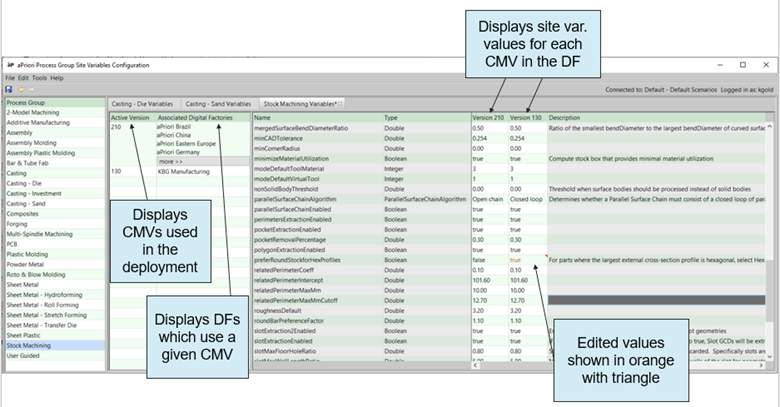
To edit site variable values, open the Digital Factory Toolset and select Process Group Site Variables. The aPriori Process Group Site Variables Configuration tool appears. When you click a process group in the left pane, a tab appears containing the site variables table for the process group. You will notice several changes in aPriori 2025 R1 compared to previous releases:
-
There is now a column, Active Version, which indicates the version(s) of the manufacturing process models in your deployment, and a column, Associated Digital Factories, which lists the digital factories that use that version.
-
In this example, the customer’s deployment contains two different versions of the Stock Machining process model: CMV 210 and CMV 130.
-
The Digital Factory KBG Manufacturing uses CMV 130, while the newer aPriori baseline Digital Factories use the most recent version, CMV 210.
-
-
To the right of the Name and Type columns, there now are columns that specify the values of the site variables for each manufacturing process model version.
-
In this case, there are two columns for values: Version 210 and Version 130.
-
-
If you edit the value of a site variable, the value now is displayed in orange and there is an orange, triangular icon in the upper right corner of its cell. This enables you to easily see if values were changed from the out-of-the-box defaults.
-
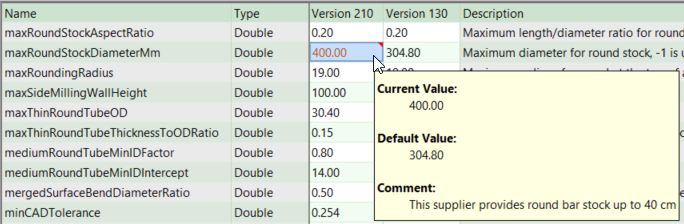
If you hover over the orange triangular icon, a tooltip shows the current value and default value for user awareness.
-
When you edit a value, you now may enter a comment (optional), for example to note the name of the user who made the change and the rationale for the change.
-
-
When a value was changed in a previous release, the upgrade to aP Pro 2025 R1 adds the comment Migrated from un-versioned value. This is to provide some visibility for those historical changes that were made before users could add comments for traceability.
-
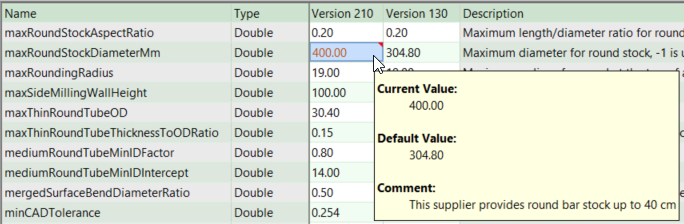
You can right-click a value to either edit or remove the comment, or to undo the override and restore the out-of-the-box default value for that version (CMV).
Note: The list of site variables for the secondary Machining process group, available in previous releases, has been removed in aP Pro 2025 R1. All site variables from this list now are included in the site variable tables for relevant primary process groups.
Note: If you had previously edited the value of a site variable from the Machining process group in an earlier release of aPriori, upon upgrade to aP Pro 2025 R1 this edited value will be copied into all primary process groups that include that site variable, and it will be displayed as edited (in orange text and with a tooltip indicator).
Reports and Indicators Provided when Key Site Variables are Set Incorrectly, after Upgrade to 25.1
When a customer upgrades to aPriori 2025 R1 (or a subsequent release) from an earlier release, aPriori produces a log of any key site variables that are set incorrectly, so these can be reviewed and corrected. In addition, a comment indicating that the value is set incorrectly is added and made visible via the Process Group Site Variables Configuration screen. aPriori does not change these values automatically, as they will likely change aPriori results. So customers should decide when to make the changes.
A small subset of site variables comprises the key compatibility site variables, which must be set to specific values for specific versions of the manufacturing process models. For more information, refer to Site Variable Value Compatibility in the Digital Factory Guide.
For on-premise installations of aP Pro, after the Baseline Update file is loaded, a message is displayed, as shown below:
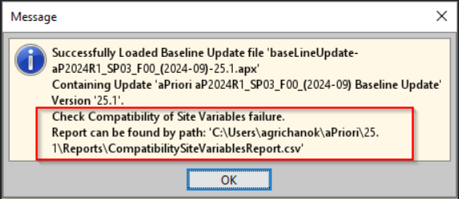
If any incorrectly-set compatibility site variables are detected, the message includes instructions to Check Compatibility of Site Variables Failure and the location of a report that lists the incorrectly-set variables.
The report, CompatibilitySiteVariablesReport.csv, will be located in the directory C:\Users\<username>\aPriori\25.1\Reports\,where <username> is the Windows username of the administrator who performed the upgrade/Baseline Update.
This report is generated only if at least one incompatible site variable value is detected; if all site variable values are compatible with the manufacturing process model versions (CMVs) in the deployment, no report is generated.
For customers using aPriori’s cloud solutions, aPriori staff will review the logs and notify customers who have incorrectly set site variables so a remediation plan can be agreed on.
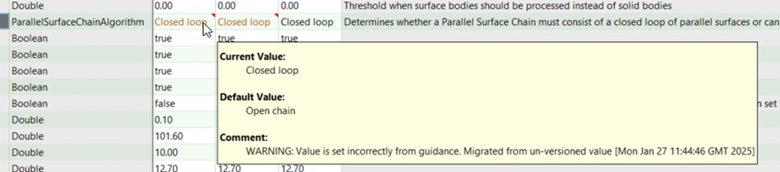
Also note that an incompatible site variable value will be noted in the Comment section of the tooltip that is displayed for edited values, as shown below: