Purchase volume affects material cost, which is based on the following values:
-
Base cost per unit (assuming average buying power and typical material purchase volumes)
-
Company-specific buying power
-
Purchase volume
For more information on how purchase volume affects material cost, see Working with Material Factors in the Digital Factory Administrator Guide.
-
You cannot set material purchase volume for a part until you have the initial costing.
-
The initial costing assumes the default purchase volume for the current material and process group.
-
The default purchase volume is determined by the settings in the Material Factors table, which is administered by your Digital Factory administrator.
In the Material Selection dialog, the Material Unit Cost panel contains a Purchase Volume dropdown list. The list is populated with all the purchase volumes (in metric or imperial tons) that apply to the current material and process group.
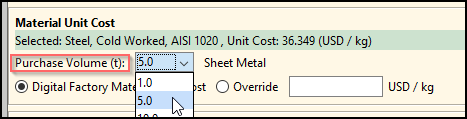
As with the default purchase volume, the available purchase volumes are determined by the settings in the Material Factors table, which is administered by your Digital Factory administrator.
Note: Specifying or changing material, stock form, or stock can change the default purchase volume as well as the available purchase volumes.
Changing material purchase volume
-
In the Production Scenario tab of the Cost Guide, click
 next to the Material field to open the Material Selection dialog.

-
In the Material Unit Cost panel, select a value from the Purchase Volume dropdown list.