Usability Enhancements
aPriori 2026 R1 SP1 provides the following usability enhancements:
-
Bulk Costing & Analysis: Improved Reliability of Multi-Threaded Assembly Costing
-
Material Specified in Bulk Costing & Analysis Dialog Now Applied During GCD Extraction
-
Improved Cursor Rendering in the 3D Viewer for aP Pro in the Cloud
Recently Used Settings: Multiple Issues Resolved
aPriori 2026 R1 SP1 resolves several issues related to the Recently Used Settings functionality, which allows you to copy inputs from a recently used scenario to your current scenario.
The following issues were introduced in the 2025 R1 release stream and are now addressed:
-
Inputs could not be copied from a virtual part created in selected older versions of aPriori to a new virtual part.
-
For virtual parts, process setup option overrides were not always copied from the referenced scenario to the new scenario.
-
Explicit stock form selections (for parts analyzed in the Stock Machining and Bar & Tube Fabrication process groups) were not copied from the referenced scenario to the new scenario.
Bulk Costing & Analysis: Improved Reliability of Multi-Threaded Assembly Costing
aPriori 2026 R1 SP1 improves the reliability of costing assemblies with the Bulk Costing & Analysis module when it is configured to use multiple threads.
Previously, the Bulk Costing process sometimes failed to cost assemblies and instead produced the error Bulk loader timed out and terminated child process for <assembly file name>.
This issue primarily affected customers using aP Pro in the cloud, where the number of parallel threads defaults to three. For on-premise deployments the default is one thread, and customers were affected only if they had manually configured multiple threads (see Improving performance).
Alongside these processing improvements, the log entries in relation to bulk costing have been updated. This allows easier debugging when issues do arise. Now when a bulk cost group is processed, aPriori:
-
Records the thread number being used on each scenario.
-
Provides information on job completeness.
Log example:
BulkLoad completed. Total Components: 200. Processed: 150. (Costed: 100. Skipped: 30. Failed: 20.) Total Time: 123.45 seconds (2.0575 minutes)
Material Specified in Bulk Costing & Analysis Dialog Now Applied During GCD Extraction
aPriori 2026 R1 SP1 resolves an issue where the material specified in the Bulk Costing & Analysis dialog was not correctly applied during GCD extraction, causing material-dependent GCDs to be computed incorrectly. Bulk Costing via spreadsheet input was not affected by this issue.
The main process groups and GCDs affected by this issue were:
-
Casting (manufacturability assessment of holes)
Spreadsheet Reports Can Be Renamed
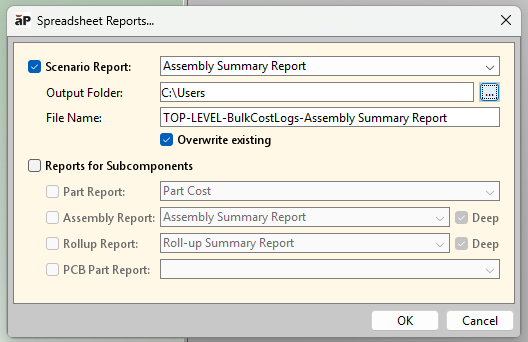
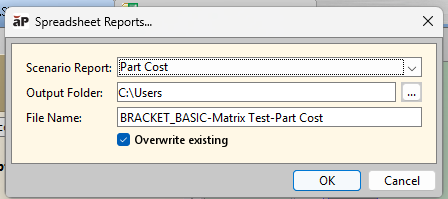
aPriori 2026 R1 resolves an issue that prevented users from being able to override default spreadsheet names within the application. This issue was introduced in aP Pro 2025 R1 SP2, when aPriori provided an enhancement to generate spreadsheet reports for all components within an assembly or rollup. Users who wished to use custom report names to organize and distinguish their outputs were unable to update these names as expected in the report creation UI. This issue is now resolved, and spreadsheet reports can be renamed successfully.
When you select Reports > Spreadsheet Reports, aPriori now displays an updated dialog that includes a new File Name field, as shown below. This field is populated with a default file name but can be edited if desired.
New Assembly/Rollup dialog:
New Part-level dialog:
Improved Cursor Rendering in the 3D Viewer for aP Pro in the Cloud
Previously, with aP Pro in the cloud, the cursor could appear blurred during normal part navigation, impacting usability across workflows in the CAD viewer. This has been resolved, and the cursor now displays consistently and clearly throughout the viewer.
New Keyboard Shortcut for Scenario Export
A keyboard shortcut, Ctrl+E, has been added for the Export Current Scenario & Children action (File > Export > Current Scenario & Children).