Edit Roll-up Properties
You can edit properties for both static and dynamic roll-ups, including cost and Digital Factory information:
-
Double-click a roll-up in the navigation pane.
-
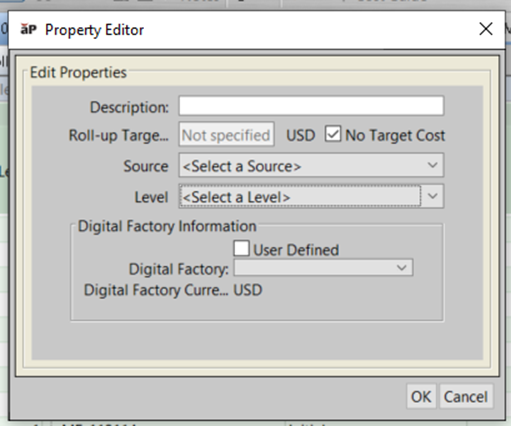
Select Edit > Properties to show the Property Editor:
-
You can edit the following properties:
-
Description: the roll-up description.
-
Roll-up Target Cost: the target cost for the roll-up. To edit this value, deselect the No Cost Target checkbox, then enter the target cost for the roll-up in the Roll-up Target Cost field.
- Source: the department that produced the roll-up.
-
Level : the category of cost estimate.
-
-
You can edit the following Digital Factory information, adding either a pre-defined or user-defined Digital Factory:
- To select a user-defined Digital Factory
- Check the User-Defined checkbox
- Enter the Digital Factory name in the Digital Factory field
- Select Digital Factory Type and Digital Factory Currency.
- To use a pre-defined Digital Factory
- Clear the User Defined checkbox
- Select a Digital Factory from the Digital Factory drop-down list. Digital Factory Type and Digital Factory Currency are filled in automatically.
- To select a user-defined Digital Factory
-
Click OK.
-
Click the Save icon on the toolbar to save your changes.