Top-level Setup Options
The following options are provided by the routing node Assembly Plastic Molding:
Minimum Wall Thickness Check
Maximum wall thickness checking is disabled by default. If this setup option is enabled, aPriori checks the Min Thickness of each Stage GCD to ensure that it is no less than the relevant minimum. The relevant minimum thickness is looked up by the Stage’s material in the lookup table tblWallThickness.
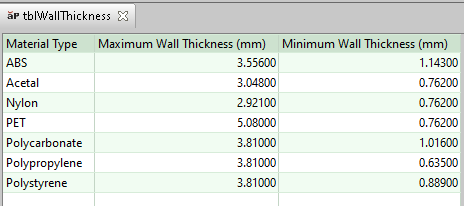
If the Stage’s Min Thickness is less than the threshold, the Multi-Shot operation is considered infeasible for that GCD, and costing fails. See Operation Assignment for the Multi-Shot Operation. See also Maximum Wall Thickness Check.
Maximum Wall Thickness Check
Maximum wall thickness checking is disabled by default. If this setup option is enabled, aPriori checks the Max Thickness of each Stage GCD to ensure that it is no greater than the relevant maximum. The relevant maximum thickness is looked up by the Stage’s material in the lookup table tblWallThickness.
If the Stage’s Max Thickness exceeds the threshold, the Multi-Shot operation is considered infeasible for that GCD, and costing fails. See Operation Assignment for the Multi-Shot Operation. See also Minimum Wall Thickness Check.
Draft Angle Check
Draft angle checking is disabled by default. If this setup option is enabled, operation assignment fails for GCDs with insufficient draft. The recommended minimum draft angle is looked up by material in the lookup table tblDraftAngle.
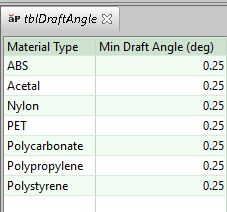
If draft angle checking is enabled, aPriori checks the draft angle for each Void that is handled by a slide or lifter, as well as for each PlanarFace and CurvedWall that is not part of a void handled by a slide or lifter. (A PlanarFace or CurvedWall is part of a void if it bears the Lies On relation to a Void. A Void is handled by a bundle if it is a child of a SlideBundle or LifterBundle GCD.)
To perform the check for a given GCD, aPriori compares the recommended minimum draft angle to one of the following properties:
• Void (that is handled by a slide or lifter): Draft Angle of the Is Accessible From relation between the following two GCDs:
o Bundle GCD of which the Void is a child
o SetupAxis GCD (which serves as the access direction for the Bundle)
Minimum Edge Radius Check
Edge radius checking is disabled by default. If this setup option is enabled, operation assignment fails for SharpEdge GCDs whose edge radius is too small. The recommended minimum edge radius is looked up by material in the lookup table tblMinEdgeRadius.
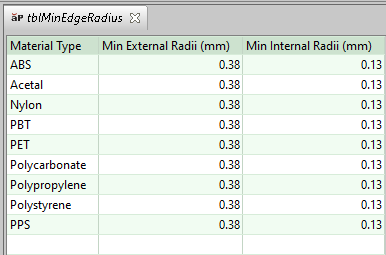
In this table:
• Min External Radii specifies the thresholds for convex edges (geometric property Convex is true)
• Max Internal Radii specifies the thresholds for concave edges (geometric property Convex is false).
If edge radius checking is enabled, aPriori checks the radius for each SharpEdge GCD that does not lie on either a simple hole or the parting line (that is, does not bear the Lies On relation to a SimpleHole GCD or to the PartingLine GCD).
To perform the check for a given GCD, aPriori compares the recommended minimum edge radius to the geometric property Round Radius.