Polygon GCD
Polygon GCDs represent internal and external polygonal features (such as hex shapes and square shapes, among others). These include rotationally symmetric features whose cross-sections (in a plane normal to the axis of rotation) are regular polygons.
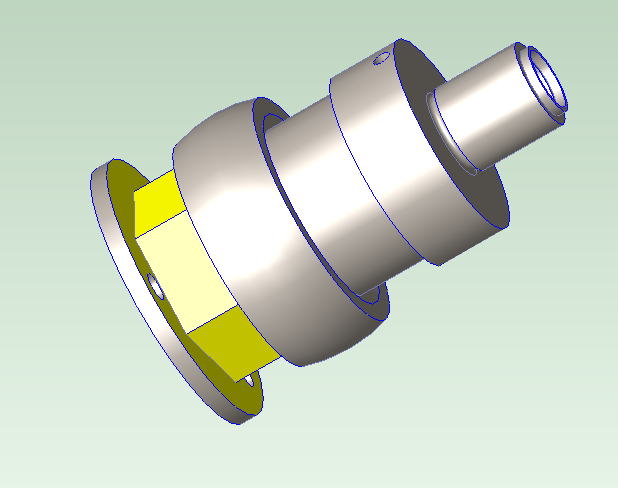
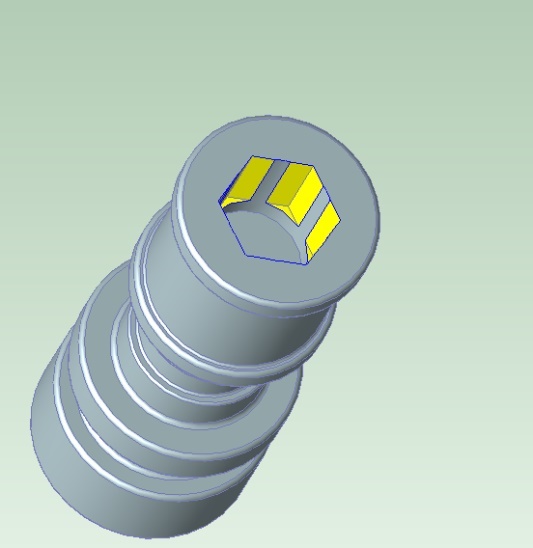
aPriori also extracts a Polygon GCD for a rotationally symmetric external feature with just two faces, where the faces are parallel to one another.
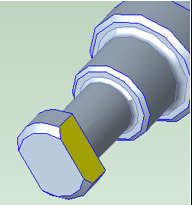
The following sections provide more information about Polygons:
Polygons and Volumetric Material Removal
Each Polygon GCD captures geometric information about the material removed from the workpiece in order to create a particular polygonal feature. A surface bears the Lies On relation to the Polygon if it (or part of it) forms part of the boundary of the removed volume. A hole bears the Lies On relation to an internal Polygon if its axis coincides with polygon’s axis of rotation. aPriori assumes that the removal is performed by a polygon-specific operation (Polygon Turning or Rotary Broaching) if feasible.
Polygon Facets
Each polygonal feature has an associated set of rotationally symmetric planar facets about a setup axis or hole axis. The facets (if there are more than two) form the walls of a regular prism. If there are two facets, they are parallel. Facets may be interrupted by non-polygonal part geometry, such as corner rounding (for external polygonal features) or a hole (for internal polygonal features). See Polygons with Interrupted Facets.
The uninterrupted portions of the facets are represented by PlanarFaces that bear the Lies On relation to the Polygon that represents the polygonal feature.
Polygons in the Geometric Cost Drivers Pane and Viewer
In the Geometric Cost Drivers pane, Polygons appear under the Volume node. When you select a Polygon in the Geometric Cost Drivers pane, the Viewer highlights the surfaces that Lie On the Polygon, including the surfaces that represent the Polygon Facets. See also Polygons and Volumetric Material Removal.
Polygon Recognition
An external polygonal feature (whose surfaces are accessible from outside of the workpiece) is recognized as a Polygon only when all the following hold:
• Feature is rotationally symmetric about an active turning axis.
• Feature has two or more facets.
An internal polygonal feature (whose surfaces are accessible from the inside of the workpiece) is recognized as a Polygon only when all the following hold:
• Feature is rotationally symmetric about either an active turning axis or the axis of symmetry of a SimpleHole GCD that the feature encloses.
• Feature has three or more facets.
• Width of the feature (specified by the geometric property Max Enclosed Circle Diameter) is no greater than the value of the site variable idPolygonMaxEnclosedCircleDiameter (15mm by default). The feature is recognized as a Pocket instead of a Polygon if the width is greater than the value of the site variable. See also Polygon Geometric Properties and Polygon Site Variables.
Polygons with Interrupted Facets
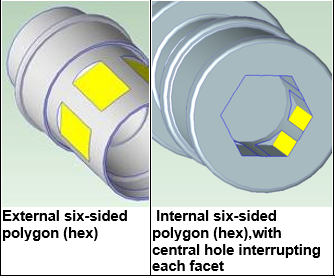
Polygon GCDs are extracted even when the facets of the polygonal feature are interrupted by other part geometry. For example, a symmetric pattern of flats on a cylindrical shank is extracted as a Polygon--see the illustration External six-sided polygon (hex).
Internal Polygon GCDs are recognized even when the facets of the polygonal feature are interrupted by the walls of a hole with the same axis of symmetry--see the illustration Internal six-sided polygon (hex), with central hole interrupting each facet. in this case aPriori recognizes both a Hole GCD and a Polygon GCD, since typically these internal polygonal features are made by feeding a rotary broach into and enlarging a pre-existing round hole.
Polygon Geometric Properties
Polygon GCDs have the following geometric properties:
• Approach From Name: indicates whether the GCD represents an internal (ID) or external (OD) polygonal feature. The property has two possible values:
o ID: the surfaces that Lie On the Polygon are accessible from the inside of the workpiece.
o OD: the surfaces that Lie On the Polygon are accessible from outside of the workpiece.
• Length: length of the GCD along its axis of symmetry.
• Volume: volume of the material assumed to be removed by Polygon Turning (for OD polygons) or by Rotary Broaching (for ID polygons). See also Polygons and Volumetric Material Removal.
• Max Enclosed Circle Diameter: diameter of the largest circle enclosed by a cross-section (in a plane normal to the GCD’s axis of rotation) of the Polygon facets.
• Min Enclosing Circle Diameter: diameter of the smallest circle that encloses a cross-section (in a plane normal to the GCD’s axis of rotation) of the Polygon facets.
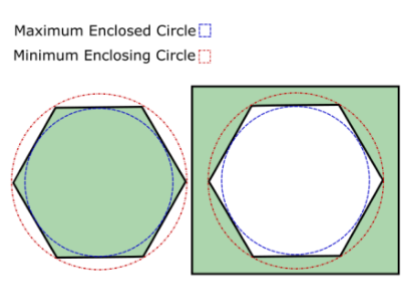
• Number of Facets: the number of Polygon Facets associated with the polygonal feature represented by the Polygon.
Polygon Site Variables
The following site variables affect polygon extraction:
• idPolygonMaxEnclosedCircleDiameter: an internal polygonal feature is extracted as a polygon only if the width of the feature (specified by the geometric property Max Enclosed Circle Diameter) is no greater than the value of this site variable (15mm by default). The feature is recognized as a Pocket instead of a Polygon if the width is greater than the value of the site variable. See also Polygon Geometric Properties and Polygon Recognition.
• polygonExtractionEnabled: this is true by default. Set to false to disable polygon extraction.