Machining Cost Model Enhancements
aPriori 2021 R1 provides these enhancements to the Machining cost model:
New Polygonal Feature Recognition, Polygon Turning and Rotary Broaching
aPriori now recognizes polygonal feature geometry and provides two new machining operations Polygon Turning and Rotary Broaching for machining these polygonal features.
In the Stock Machining and Multi-Spindle Machining process groups, polygonal feature geometry such as a hex, square, or other symmetric shapes now will be extracted as a Polygon GCD. Such features are common on some part types, for example to enable assembling and tightening parts with allen wrenches or open-end wrenches. aPriori now also provides two new machining operations Polygon Turning and Rotary Broaching which are commonly used for creating these polygonal features. There are several aspects to this enhancement:
• aPriori now will extract a Polygon GCD to represent both external and internal polygonal features that are machined into round bar stock. Internal Polygon GCDs also will be extracted on other stock types. To be recognized as a polygon, internal features must have 3 or more symmetric planar faces, or “facets” centered on the part’s turning axis or another hole. Internal features also must be smaller than a specified threshold or will be extracted as a Pocket GCD rather than a Polygon GCD. (This threshold is set to 15 mm in the baseline cost model and is controlled with the site variable idPolygonMaxEnclodedCircleDiameter). External features with 2 or more symmetric facets centered on the part’s turning axis may be recognized as a polygon. Some examples of geometry now recognized as polygons are shown in these figures.
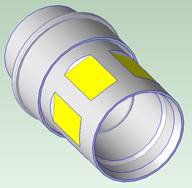 | 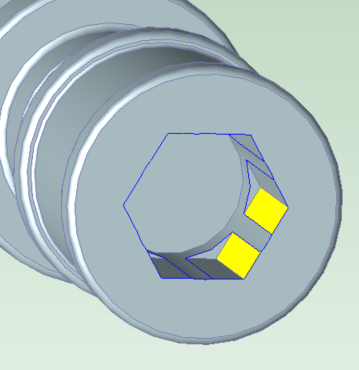 | 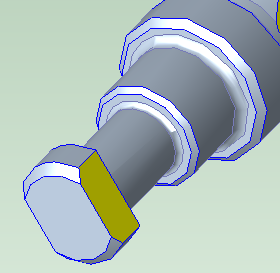 |
External 6-sided polygon (Hex) | Internal 6-sided polygon (Hex), with central hole interrupting each facet | External 2-sided polygon (also known as “Flats”) |
Polygon GCDs are extracted even when the facets of the polygon are interrupted by other part geometry. For example, a symmetric pattern of flats on a cylindrical shank will be extracted as a Polygon (as shown in picture above left). Internal polygons will be recognized even when the facets of the polygon are interrupted by the walls of a hole also centered on the part’s turning axis; in this case aPriori will recognize both the Hole GCD and a Polygon GCD, since typically these internal polygons are made by feeding a rotary broach into and enlarging a pre-existing round hole. The Polygon GCD properties include whether it is an internal or external feature, the Number of Facets, the axial Length of the polygon, and the Volume machined from the in-process part to make the polygonal feature.
• A new Rotary Broaching operation is available for machining internal polygons. This operation also referred to as “Wobble Broaching”. In this operation, a shaped cutting tool is fed into a hole and shears the workpiece material to create the desired polygonal shape. Rotary Broaching may be used to create both “blind” and “through” geometries. This operation is available for both Turning and Milling processes. Note that in this release, the baseline cost model assigns Rotary Broaching only to internal polygons with 4 or 6 facets, as standard rotary broach tools are available for these shapes, and they are by far the most common type of internal polygon geometry observed in industry and our customers parts. In practice, custom rotary broach tools can be used to rotary broach internal polygons with a different number of sides; if needed the cost model can be configured to allow this.
• A new Polygon Turning operation is available for machining external polygons on the 3 Axis Lathe, 3 Axis Bar Feed Lathe, and Mill Turn processes. In this operation, the planar facets of the polygon are machined via synchronized rotation of the workpiece and a specialized live tooling cutter with multiple cutting inserts. Polygon turning typically has a significantly faster cycle time than would Milling of the same geometry but is less capable of achieving tight tolerances. Note that tolerances must be specified on the PlanarFace GCDs which comprise the facets of the Polygon; tolerance fields are not available on the Polygon GCD itself.
• Rough Milling operations will be assigned to external Polygon GCDs if Polygon Turning is found to be infeasible. Rough Milling also can be manually assigned if desired. In the baseline cost model, Rough Milling is not available for internal Polygon GCDs since typically internal polygons are of small size and have sharp-corner geometry that would necessitate other machining approaches.
NOTE: Customers who have configured Machining cost models and are upgrading to aPriori 2021 R1 but are NOT upgrading their cost model to the latest version should disable extraction of Polygon GCDs. To do this, set the site variable polygonExtractionEnabled to false. Otherwise, polygonal features will be extracted as Polygon GCDs but will not have roughing operations assigned to them, and the part cost estimate will neglect the cost of rough machining required to make those features.
Support for One-sided Dovetail Slots and Modified-Dovetail Slots
aPriori now recognizes CAD geometry representing half-dovetail slots and “modified dovetail” slots as Slot GCDs and assigns slot-making machining operations to estimate the time and cost of these features.
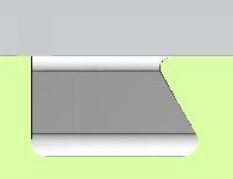
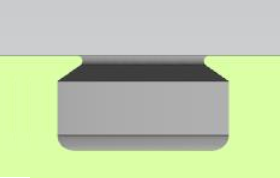
Previously, aPriori extracted Slot GCDs only for traditional dovetail slot features and slots with parallel walls. Now aPriori also extracts Slot GCDs for half-dovetail slots (also known as “one-sided” dovetail slots) and the “modified dovetail” geometry shown on the right in the figure (in which there is a straight-walled section below the undercut portion of the slot). Previously these geometries typically were not recognized as individual GCDs but instead were included in the BulkRemoval GCD; occasionally they were recognized as Pocket GCDs if they had a short, straight trajectory.
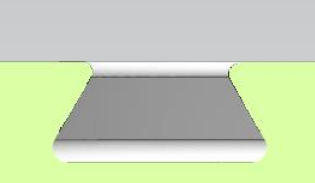 |  |  |
Traditional Dovetail (Supported previously) | Half-Dovetail (New in aPriori 2021 R1) | Modified Dovetail (New in aPriori 2021 R1) |
Like traditional dovetail slots, half-dovetail slots are assigned (rough) slot milling and finish dovetail milling machining operations but require fewer total finish passes because only a single side requires machining. A new Slot GCD property Number of Undercut Sides enables the cost model logic to distinguish traditional dovetail slots from one-sided slots. Modified dovetail slots are assumed to be machined with a specialized shaped tool (specifically, a DSP Cutter for cable grooves) and assigned (rough) slot milling and finish dovetail milling operations.
Due to this enhancement, cost estimates for parts containing these new slot types will change compared to the previous release of aPriori. Generally, the cycle time and cost attributed to the slot geometry will increase, as previously the volume of these slot features were included in the BulkRemoval GCD, and their cost was estimated using an assumed average volumetric material removal rate that typically is higher than what is achieved with a slot-milling operation.
Upgrade Notes:
• Recognition of these new slot types can be disabled using the new geometry site variable slotExtraction2Enabled
• Small updates to the Finish Dovetail Milling cost model operation are required to accurately estimate cycle time and cost for the new slot types. If you do not upgrade your machining cost model to the latest version, the cycle-time estimate for one-sided dovetail slots will be overestimated and modified dovetail slots will fail to cost. aPriori recommends disabling recognition of these new slot types if you do not update your cost model logic.
Updated Cost Accounting for 2-Model Machining
By default, discrete cost categories from the “source” scenario now are rolled up into the respective categories in the 2-Model Machining scenario, as generally customers prefer this cost accounting approach.
In aPriori 2021 R1, by default, cost accounting for parts cost in the 2-Model Machining process group is updated to allocate costs into more discrete categories than in previous aPriori versions. Previously either the entire fully burdened cost or the entire piece part cost of the source scenario (typically a raw casting or forging) was rolled into the Material Cost of the 2-Model Machining scenario (controlled by the cost model variable useSourceModelFBCAsMaterialCost). Arguably, this approach over-estimated the Material Cost and therefore the Material Overhead Cost (MOH) of the finished part, while under-estimating other cost categories such as Labor Cost. Now a new cost model variable rollupSourceCostsInCategories is provided; it governs whether the discrete cost categories from the source scenario are rolled up into the respective cost categories of the 2-Model Machining scenario or if the legacy behavior should persist. By default, this variable is set to true, and the Material Cost of the 2-Model Machining scenario is simply the Material Cost of the source scenario. Customers wishing to retain legacy behavior should set the value to false.
Note that due to this change in cost accounting approach, the value of Fully Burdened Cost (FBC) of the 2-Model Machining scenario computed in aPriori 2021 R1 may differ slightly from values reported in previous releases., depending on how the relevant cost model variables are set. This is because the values of the various individual cost categories now are computed (aggregated) differently, and some then used to compute other cost values. Using default settings, the Fully Burdened Cost estimate will decrease compared to the previous value. The behavior corresponding to different settings of the relevant cost model variables is described below.
useSourceModelFBCAsMaterialCost | rollupSourceCostsInCategories | 2MM FBC Difference (aPriori 2021 R1 vs. Previous) |
|---|---|---|
TRUE (Default) | TRUE (Default) | FBC Difference = - MOH (From source scenario) |
TRUE (Default) | FALSE | No Difference, as 21.1 settings match 20.1 default settings |
FALSE | TRUE (Default) | FBC Difference = - MOH (From source scenario) |
FALSE | FALSE | FBC Difference = MOH (in aP 2021 R1) - MOH (previous version) - Total Amortized Investment (From source scenario) |
Table 1 Difference in Fully Burdened Cost (FBC) estimates in aPriori 2021 R1 vs. Previous release, where MOH = Material Overhead Cost.
As shown in the first and third rows of this table, when rollupSourceCostsInCategories is set to true, the value of useSourceModelFBCAsMaterialCost is ignored, and the difference in FBC is equal to the material overhead cost of the 2-Model Machining scenario. Because the legacy behavior used the source scenario’s fully burdened cost as the material cost of the 2-Model Machining scenario, the legacy accounting computed the material overhead cost based on the source model’s fully burdened cost. In aPriori 2021 R1, when rollupSourceCostsInCategories is true, the 2-Model Machining scenario uses only the source model’s material cost to calculate material overhead. In this case, fully burdened cost will decrease compared to the previous release.
The fourth row describes what happens if in aPriori 2021 R1, the customer wishes to shift to using the Piece Part Cost of the Source Model as the Material Cost of the 2-Model Machining Scenario and not rollup source costs into categories. In this scenario, the fully burdened cost of 2-Model Machining scenario now will be equal to the difference in material overhead cost between 2021 R1 (which is based on the Piece Part Cost of the source scenario) and the previous version (which was based on the FBC of the source scenario) minus the total amortized investment of the source model. In this scenario fully burdened cost also will decrease in aPriori 2021 R1 compared to the previous version.
Improved Recognition of Lettering Features Prevents Unnecessary DTC “Sharp Corner” Warning
aPriori has improved recognition of lettering features on CAD models and now assigns them to a “no-cost” operation rather than generating a large number of unnecessary Design to Cost issues associated with the lettering.
Typically, CAD lettering features contain many interior sharp corners (especially if CAD lettering approximates curved letters using a series of straight-line segments). In fully machined parts cost in the Stock Machining process groups, aPriori previously flagged these sharp corners as not machinable using standard milling operations, and the large number of DTC issues generated due to the presence of lettering tended to overwhelm more salient issues with the part. Additionally, lettering typically is created by various part-marking processes not by machining, so these warnings were irrelevant. Now in most cases, aPriori will recognize the lettering and no longer will generate Design to Cost messages for lettering geometry.