User Inputs Affecting Mold Design
The following process setup options affect mold design and are used by the IM, RIM, and SFM processes. They affect tooling costs, material cost and utilization, and machine selection.
Lower recommended shot size percentage limit
This places a lower limit on the fraction of barrel capacity used for a shot.
-
-
Override: enter a value between 0 and 1.
Upper recommended shot size percentage limit
This places an upper limit on the fraction of barrel capacity used for a shot.
-
Default: specified by the cost model variable recommendedShotSizeLimitUpper (0.75 in starting point Digital Factories).
-
Override: enter a value between 0 and 1.
Edge Gate Location
This specifies the side of the cavity to which the runner is attached (long side or short side). Changing the runner attachment side can increase or decrease the runner length.
-
Default: specified by the cost model variable defaultRunnerAttachmentSide (long in starting point Digital Factories.).
-
Override: select Long or Short.
Cavity Orientation
This specifies how the cavity is oriented with respect to the mold base. Changing the cavity orientation can affect machine, selection, material utilization, and tooling cost, because it can affect mold base and runner size. See Cavity Orientation for more information.
-
Default: lengthwise, that is, the length of the cavity is aligned with the length of the mold base.
-
Override: select lengthwise to align the cavity length with the mold base length or widthwise to align the cavity width with the mold base length.
Cavity Machined from Insert
This specifies whether the cavity and water line channels are drilled directly into the solid mold base, or into smaller inserts which then are placed into the solid mold base. Spacing allowances are affected by this choice. By default, whether inserts are assumed is governed by one of the following:
-
Cost model variable defaultEnablePlasticFormingRegionInserts (if the cost model variable defaultInsertMethod is SPECIFY)
-
Lookup by number of mold cycles (annual production volume divided by number of cavities) in the lookup table tblSpiType (otherwise).
Users can override the default with this setup option. Select true or false.
Gating Type for Cold Runner System
Changing between edge and center gating can decrease or increase the runner length.
-
Default, specified by the cost model variable defaultGatingType (Edge in starting point Digital Factories).
-
Override: select Edge or Center.
Gating Runner System
Specifies the type of runner system used to feed the cavity gates. By default, aPriori uses the cost model variable defaultRunnerSystem (defaults to ‘Cold Runner’ in starting point Digital Factories).
With this setup option, users can override the default on a per-part basis by selecting an alternative from the drop-down list. The available options are ‘Cold Runner’ or ‘Hot Runner.’
Maximum Material Injection Pressure
Specifies the maximum material injection pressure at the nozzle of the barrel. aPriori uses this to determine cavity pressure and required press force with consideration of runner system type, flow ratio, number of cavities, and wall thickness (see Required Clamp Force). The options are as follows:
-
Material Recommended Max:
-
If the material property Injection Pressure Max is less than Material Injection Pressure Min, aPriori uses the Material Injection Pressure Min value.
-
Material Injection Pressure Min: specified by the material property Injection Pressure Min (unless there is a null value for the material property, or if the material property is less than the cost model variable minInjectionPressure, in which case aPriori uses the value of the cost model variable (27.57903 newton/mm2 in starting point Digital Factories).
-
-
If the material property Injection Pressure Max is less than the cost model variable minInjectionPressure, aPriori uses the value of the cost model variable (as described above).
-
Otherwise, this is specified by the material property Injection Pressure Max (unless there is a null value for the material property, in which case the value is specified by the cost model variable defaultInjectionPressure (130 newton/mm2 in starting point Digital Factories).
-
-
Material Recommended Average: (default value) calculated as (Material Recommended Min + Material Recommended Max) / 2. See above for calculations.
-
Material Recommended Min: as per Material Injection Pressure Min, described above.
-
User Override: users can enter their own value. The minimum value allowed is specified by the cost model variable minInjectionPressure, as described above.
Minimum Number of Gates Per Cavity
This is for information only and specifies the minimum number of gating locations per cavity:

By default, the Minimum Number of Gates Per Cavity is specified by the calculated Flow Appraisal GCD property Number of Sites. You can override the calculated value on the selected Flow Appraisal GCD in the Geometric Cost Drivers panel (see Flow Appraisal GCD):
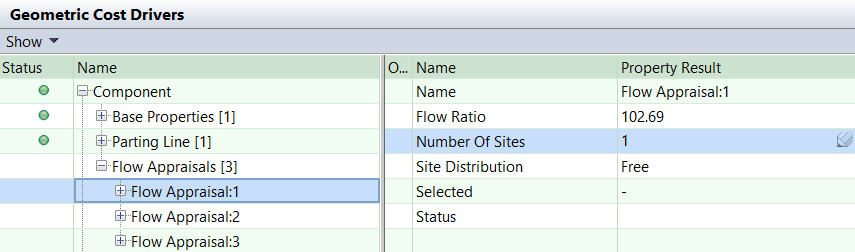
If the Flow Appraisal feature is switched off via the site variable isFlowAppraisalEnabled, the Minimum Number of Gates Per Cavity is specified by the cost model variable defaultNumberOfGatesPerCavity (defaults to 1 in starting point Digital Factories).
Selected Flow Appraisal
This is for information only. By default, this specifies which of the three possible Flow Appraisal GCD values aPriori has selected, based on feasibility rules (see Tooling Feasibility):

If the Flow Appraisal feature is enabled but no Flow Appraisal GCD is available, aPriori displays the message: Flow appraisal GCD not available. Try re-extracting GCDs and recosting.

If the Flow Appraisal feature is switched off via the site variable isFlowAppraisalEnabled, aPriori displays the message: Flow appraisal GCD disabled via site variable.

Note: This information is also shown for the Custom Output field Selected Flow Appraisal GCD. For more details, see Flow Appraisal Custom Outputs.
Hot Drop Layout
Specifies the layout of hot drops evenly distributed across the cavity surface area accessible from the draw direction. Note that this setup option has no effect if the Flow Appraisal properties are extracted from the part. By default, aPriori uses the cost model variable defaultHotDropLayout (defaults to ‘Linear’ in starting point Digital Factories).
With this setup option, users can override the default on a per-part basis by selecting an alternative from the drop-down list. The available options are ‘Linear’ or ‘Square.’
Hot Drop Type
This setup option affects tooling costs.
Specifies the default hot drop type. By default, aPriori uses the cost model variable defaultHotDropType (defaults to ‘Standard’ in starting point Digital Factories).
With this setup option, users can override the default on a per-part basis by selecting an alternative from the drop-down list. The available options are ‘Standard’ or ‘SVG.’
Water Line Diameter
This specifies the diameter of the water line used for temperature control.
-
Default: specified by the cost model variable defaultWaterLineDiameter (8mm in starting point Digital Factories).
-
Override: Select a value from the dropdown list (6, 8, 10, or 12 millimeters).
Use Overhanging Clamping Plates
This specifies whether the mold base uses clamping plates that hang over the mold’s other plates (cavity and core plates). By default, in starting point Digital Factories, the clamping plates are flush with the mold’s other plates. Digital Factory Administrators can customize the default with the cost model variable defaultEnableOverhangingClampingPlates (false in starting point Digital Factories). Users can override the default on a per-part basis with this setup option.
Use of overhanging clamping plates increases tooling cost and may result in selection of a larger machine than would be selected with flush clamping plates in use.