Flow Appraisal
aPriori’s Flow Appraisal feature simulates melt flow around the mold tool. It considers part geometry and the selected material’s flow properties to automatically determine the minimum number of gates required to fill the mold cavity and the resulting maximal flow length.
Note: Flow Appraisal applies only to Injection Molding and Structural Foam Molding. The site variable isFlowAppraisalEnabled determines if Flow Appraisal GCDs are extracted for a part. The default value is true in starting point Digital Factories. If you don’t want to use the Flow Appraisal feature, you can set this to false. In this case, aPriori will use the previous cost model logic using Flow Ratio 2D Analysis, ignoring any inputs from the Flow Appraisal GCDs. (Note that aPriori also falls back to the previous Flow Ratio 2D Analysis if no Flow Appraisal GCD is found, for example if geometry has not been re-extracted for a scenario after enabling Flow Appraisal.)
Flow Length Ratio property
The Flow Appraisal feature utilizes the material property Flow Length Ratio. This represents the maximum flow path distance that the material will travel before freezing, assuming a uniform cavity wall thickness of 1mm. aPriori uses Flow Length Ratio to calculate Required Clamp Force and to identify potential Short Shot Conditions. Note that you should provide Flow Length Ratio values for any new or custom material that you add, using the following guidelines:
-
If the new material’s Material Type already exists in the material table, use the Flow Length Ratio values provided for the relevant material.
-
If the new material’s Material Type does not already exist in the material table, use the Flow Length Ratio values of a closely related Material Type family.
-
If there is no closely related Material Type family available, we recommend using 150 as a reasonable starting point value.
The site variable flowLengthRatioDefault specifies the value assumed by the Flow Appraisal analysis if the selected material’s Flow Length Ratio property is not populated. The default value is 150 in starting point Digital Factories.
Flow Appraisal GCD
aPriori automatically performs the Flow Appraisal analysis whenever you cost a part using the Injection Molding or Structural Foam Molding process. The Flow Appraisal GCD stores the results of the analysis:
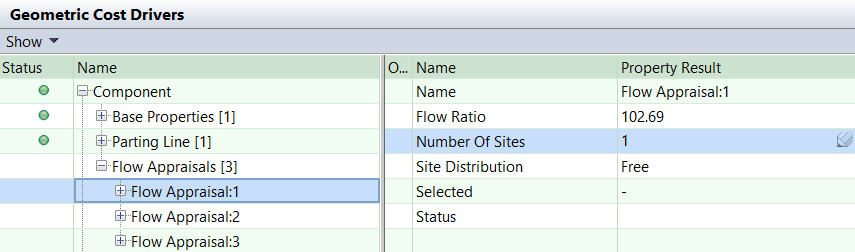
The analysis includes the following properties:
-
Flow Ratio: the maximal flow ratio for a part. The value corresponds to an ‘optimal’ placement of Number Of Sites (see below).
-
Number Of Sites: the minimal number of sites (gates) needed for a Flow Ratio less than the maximum allowed for the selected material (specified by the material Flow Length Ratio property). Note that you can override the default number of sites value and re-run the geometry analysis to re-calculate the Flow Ratio.
Note: If you override the Number of Sites, aPriori will update the Required Clamp Force calculation (which affects machine selection and overhead cost). Note that Short Shot Conditions are likely to occur if you enter a value that is lower than aPriori’s calculated value, in which case costing will fail. However, you can choose to switch off aPriori’s Flow Ratio feasibility rules, as described in Short Shot Conditions.
-
Site Distribution: determines where sites can be placed. This can be one of the following values:
-
Free: sites can be located anywhere within the cavity.
-
Long Side: sites can be located on the long side of the cavity. More precisely, sites can be located on the boundary of the model along the long side of the boundary box of the parting line.
-
Short Side: sites can be located on the short side of the cavity. More precisely, sites can be located on the boundary of the model along the short side of the boundary box of the parting line.
-
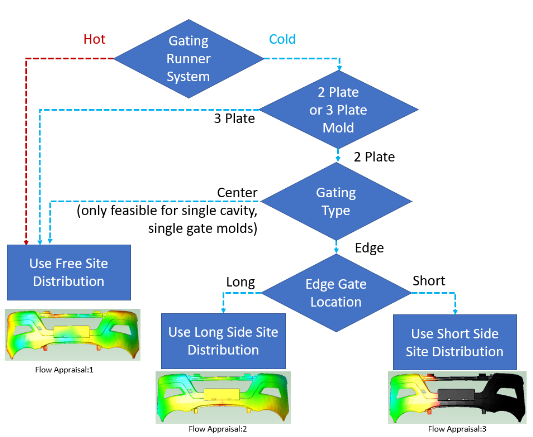
aPriori extracts three Flow Appraisal GCDs (one for each of the Site Distribution properties: Free, Long Side, and Short Side) and selects the appropriate one based on the value of the following setup options:
-
If Gating Runner System is set to ‘Hot Runner,’ aPriori selects the ‘Free’ Site Distribution.
-
If Gating Runner System is set to ‘Cold Runner’:
-
aPriori selects the ‘Free’ Site Distribution if Gating Type for Cold Runner System is set to ‘Center.’
-
aPriori selects the ‘Long Side’ Site Distribution if Gating Type for Cold Runner System is set to ‘Edge’ and Edge Gate Location is set to ‘Long’.
-
aPriori selects the ‘Short Side’ Site Distribution if Gating Type for Cold Runner System is set to ‘Edge’ and Edge Gate Location is set to ‘Short’.
-
The following flow chart illustrates how aPriori selects a specific Flow Appraisal GCD:
Note: The value of the setup option Minimum Number of Gates Per Cavity is calculated by the selected Flow Appraisal GCD’s Number of Sites property.
Note: The setup option Selected Flow Appraisal specifies which of the three possible Flow Appraisal GCDs aPriori has selected, based on feasibility rules.
Flow Appraisal Custom Outputs
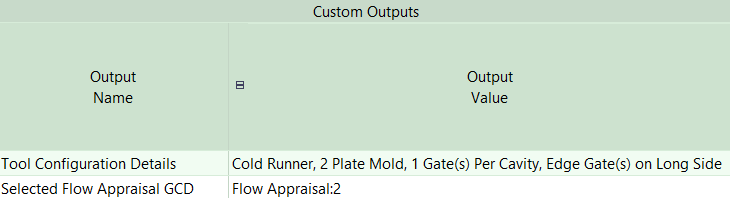
In addition to the setup option Selected Flow Appraisal, aPriori also provides the following custom outputs for the Flow Appraisal feature:
-
Tool Configuration Details: displays details about the tool and runner system used for calculating which Flow Appraisal GCD aPriori has selected. This is based on the setup options Gating Runner System, Gating Type for Cold Runner System, Minimum Number of Gates Per Cavity, and Number of Plates in Mold.
-
Selected Flow Appraisal GCD: displays the Flow Appraisal GCD which aPriori has selected. This information is also displayed in the information-only setup option Selected Flow Appraisal.
Flow Appraisal Visualization
When you select one of the Flow Appraisal GCDs (1, 2, or 3) in the aPriori UI, you can visualize the melt flow analysis on a color-coded image of the part in the Component Viewer:
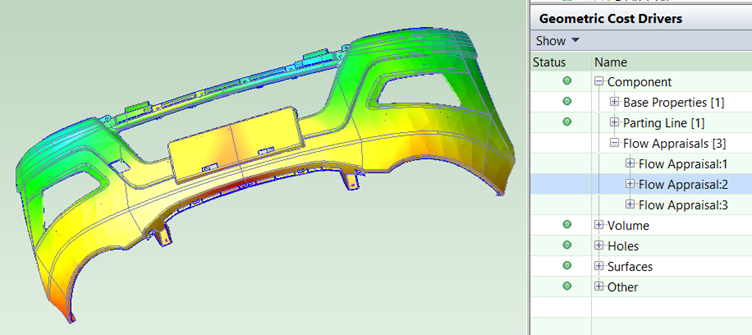
Blue, green, and yellow shading indicate areas that are comfortably filled by the melt material. Red shading indicates areas of the part that are at the limits of the material’s Flow Length Ratio value. Black shading indicates an infeasible configuration or Short Shot Conditions.
Note: The site variable isFlowAppraisalHighlightingEnabled determines whether selection of a Flow Appraisal GCD in the GCD tree visualizes the flow analysis in the aPriori Component Viewer. The default value is true in starting point Digital Factories.
Tooling Feasibility
Most combinations of the gating and cavity configuration setup options are feasible for the utilization of Flow Appraisal GCD properties. For gating, the only infeasible combinations are as follows:
-
Gating Runner System is set to ‘Cold Runner,’ and
-
Gating Type for Cold Runner System is set to ‘Center,’ and
-
Number of Sites (for the selected Flow Appraisal GCD) is set to a value greater than 1, and
-
Number of Plates in Mold is set to 2 (note that a value of 3 is feasible).
If feasibility fails, you should consider changing the Number of Sites for the selected Flow Appraisal GCD to ‘1’ (see Note below) or changing the values of the setup options Gating Runner System, Gating Type for Cold Runner System, or Number of Plates in Mold.
For cavities, the only infeasible combinations are as follows:
-
Number of Cavities is set to a value greater than 1, and
-
Gating Runner System is set to ‘Cold Runner,’ and
-
Gating Type for Cold Runner System is set to ‘Center,’ and
-
Number of Plates in Mold is set to 2 (note that a value of 3 is feasible).
If feasibility fails, you should consider changing Number of Cavities to ‘1’ or changing the values of the setup options Gating Runner System, Gating Type for Cold Runner System, or Number of Plates in Mold.
Note: Both the information-only setup option Selected Flow Appraisal and the custom output Selected Flow Appraisal GCD (see Flow Appraisal Custom Outputs) display the Flow Appraisal GCD which aPriori has selected. In addition, the information-only setup option Minimum Number of Gates Per Cavity indicates how many gating locations per cavity are configured (you can override this using the Flow Appraisal GCD property Number of Sites, as described above).
Short Shot Conditions
Feasibility, and therefore costing, will fail if you select an infeasible combination of material, runner system, and gating options. aPriori will display a warning message if the calculated Flow Ratio exceeds the maximum Flow Length Ratio of the selected material, thus causing a short shot condition. This means that the melt will be unable to reach the extremities of the cavity. When the flow resistance is too high, the melt front will freeze before the cavity can be completely filled.
In addition, aPriori Design Guidance will alert the user via a Potential Manufacturing Issue when a short shot condition occurs. aPriori Design Guidance will suggest several ways to optimize the configuration so as to fill the cavity.
Note: You can disable the feasibility checks using the cost model variable checkFlowRatioFeasibility. This is set to true in starting point Digital Factories. If set to false, the cost model will ignore the Flow Ratio feasibility checks.