Plastic Molding Enhancements
aPriori 2025 R1 provides several updates to the Plastic Molding tooling models:
See also Updates to Plastic Molding Cavity Finish Design Guidance and Updates to Plastic Molding Cavity Texture Design Guidance.
Adjustable Material Selection for Cavity and Core Inserts
aPriori 2025 R1 provides the ability to independently select a material for cavity and core inserts, decoupling selection from the main plate material.
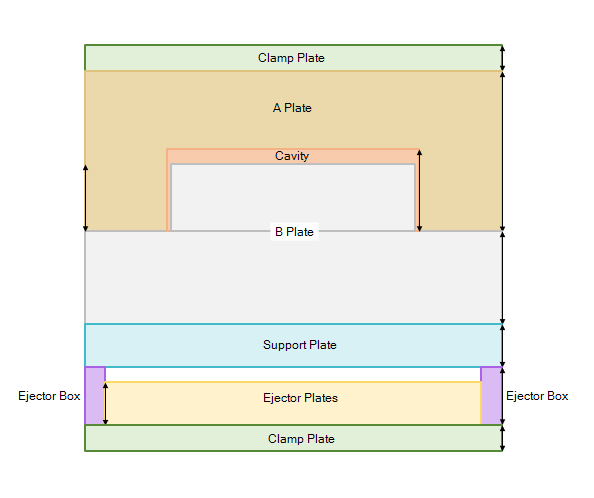
Previously, users had the ability to specify tool materials for several different sections of the mold base using process setup options, including:
-
Select Mold Material – Main Plates - A-Plate, B-Plate, Third Plate and Support Plate
-
Select Material for the Actions - Slides and Lifters
-
Select Ejector Box Material - Spacer block, ejector plate, ejector retainer plate, top clamp plate, bottom clamp plate.
-
Select EDM Electro Material - EDM electrodes
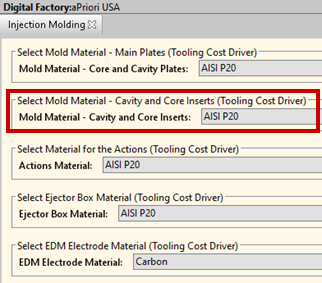
aPriori 2025 R1 introduces a new process setup option, Select Mold Material – Cavity Core Inserts (Tooling Cost Driver), which provides users with the ability to specify the material for the cavity and core plastic forming region inserts independently from the material used for the main plates. The new process setup option is available for the Injection Molding, Structural Foam Molding and Reaction Injection Molding processes.
When the process setup option Cavity Machined from Insert is set to true (the default in starting point Digital Factories), the cavity inserts have a distinct material cost, tool weight, tool life and CNC machining time, independent of the main plates. When this process setup option is set to false, overrides to the cavity core and insert material have no effect.
The Investment tab and the Tooling watchpoint spreadsheet report now display a distinct cost for the cavity and core inserts as well as the costs of other mold components.
Note: If overrides had been made for tool materials on previously analyzed scenarios, you should review the tool materials process setup options.
Support Plate Tooling Cost
Plastic Molding tooling estimates now include the weight and cost of mold support plates.
Previously, aPriori accounted for the size of the support plate when calculating the mold base dimensions, but did not include the weight and cost of the support plate in the tooling estimate.
aPriori 2025 R1 now includes the support plate weight and material cost in the tooling model, providing more accurate and complete tooling estimates.
Updated Tooling Spreadsheet Report
aPriori 2025 R1 provides an updated Tooling spreadsheet report for Plastic Molding.
aPriori 2025 R1 updates the Tooling spreadsheet report to ensure all tooling costs are reported consistently with the Investment tab of the aP Pro UI. This includes updates made in this release that incorporate support plate cost into tooling estimates and that provide the user with the ability to select different materials for core and cavity inserts. The spreadsheet report now displays the following additional line items in the tooling material cost breakdown:
-
Cavity Core and Inserts
-
Support Plate
-
Hot Runner System
-
Hydraulic Ejection
-
PORCERAX
-
Third Plate
-
Unscrewing Mechanism
Resolved Issue: Water Line Diameter Process Setup Option
aPriori 2025 R1 updates the Plastic Molding model to be sensitive to the Water Line Diameter process setup option.
In Plastic Molding, the diameter of the water line (used for temperature control) impacts the size of the mold's plastic forming region. aPriori uses a default water line diameter of 8mm (controlled by the cost model variable defaultWaterLineDiameter).
An existing process setup option, Water Line Diameter, allows users to edit the size of the water lines. However, due to an error in previous releases, this had no effect on the estimated cost of the tooling. In aPriori 2025 R1, this error is corrected; modifying the value of the process setup option now results in a corresponding change to the tooling estimate.