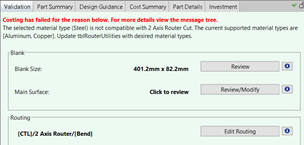
The Validation and Design Guidance tabs provide centralized information, functionality, and guidance to help you validate and modify assumptions made by aP Pro, and evaluate and address design issues.
-
The Validate tab allows you to validate and edit key assumptions aP Pro made during analysis for the selected process group.
-
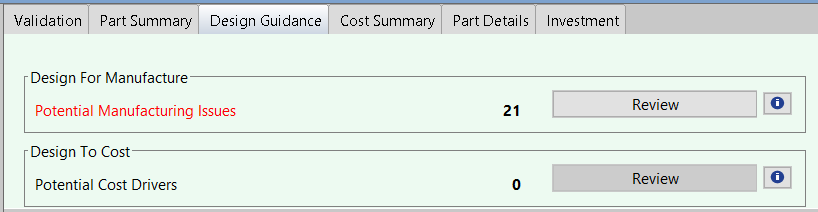
The Design Guidance tab alerts you to potential design issues and provides suggested remedies. Use Design Guidance to identify issues early in the design phase, when aPriori’s actionable feedback can have the most significant impact; reducing design cost, improving manufacturability, and checking supply-chain feasibility.
Design Guidance shows:
-
Manufacturability Issues: Design issues that affect manufacturability, such as wall thickness, corner radii, and draft angles. See Review Manufacturability Issues for more details.
-
Potential Cost Drivers: Design issues that affect cost, as when for example, a user-specified tolerance is not achievable by a primary process alone and so requires extra machining, driving additional costs. See Use Validation and Design Guidance.
-
Additional sections: Summaries of machining, material, thickness, tolerances, and slow operations. See See Use Validation and Design Guidance.
-
Note: Digital Factory administrators can configure Validation and Design Guidance display to include only desired or actionable feedback.
Tip: See also the Understanding Design Guidance aP Academy training course.
Using Validation and Design Guidance Together
The Validation and Design Guidance tabs are designed to work together as part of a logical workflow:
-
Use the Validation tab, to understand, evaluate, and adjust basic assumptions aP Pro made during analysis.
-
Use the Part Summary tab to identify key cost drivers (material, labor, and so on), to understand where to focus. See Part Summary tab.
-
Use the Design Guidance tab to:
-
Investigate issues that threaten manufacturability or pose a risk of defects by reviewing information in the Manufacturability Issues section - see Review Manufacturability Issues.
-
Evaluate design-related cost driver details in the Cost Drivers section.
-
See Use Validation and Design Guidance for more details.
Design Guidance messages
The design guidance contains detailed explanations and suggestions for information and functionality from across the product, to guide the design engineer in identifying and evaluating common areas for cost savings, and providing recommendations to make improvements in either aPriori or the CAD model.
See Deign Guidance Issue Types in the Cost Model Guide for a listing of the design issue types recognized by each process group.