Release Notes
aP Workspace Release Notes provide information about new features, enhancements, and resolved issues. If you encounter any issues, please review the Troubleshooting section in the aPriori Support knowledge base.
Mar 19, 2026
Project Types
This release introduces Project Types, allowing teams to better organize their work and control which projects appear in dashboards and reporting.
Project Types help distinguish between early exploration, active product development, and cost optimization initiatives, ensuring that only the appropriate projects contribute to reporting metrics.
Why this change matters
Customers told us that reporting dashboards sometimes included projects that were:
- Early experimentation or rough exploration
- Incomplete or temporary work
- Not intended to represent real business activity
Without a way to classify projects, teams often had to manually clean up or delete projects to prevent inaccurate reporting.
Project Type Selection During Project Creation
Project Types address this by allowing teams to explicitly define the purpose of a project and automatically control whether it is included in reporting.
When creating a project in aPriori Workspace or aP Design, users now select a Project Type. See Create a New Project
Each Project Type includes a short description explaining when it should be used. The selected type is saved with the project and can be used to determine how the project behaves in the upcoming Design Value Dashboard.
Project Type Visibility
Every project now displays its Project Type on the project page.
This helps users quickly understand:
- What type of work the project represents
- Whether the project contributes to dashboards and reporting
Project Owners Can Update the Project Type
Project owners can update the Project Type if the nature of the work evolves. See Edit Project
For example, a project may begin as early exploration and later transition into a formal product development effort. Any changes are saved and reflected in future reporting.
Initial Project Types
This release introduces three out-of-the-box Project Types.
Exploratory projects are intended for early-stage investigation, experimentation, and concept development.
Use this type when:
- Testing new ideas or product concepts
- Investigating feasibility
- Working with incomplete or temporary data
- Exploring approaches that may not move forward
New Product Investigation projects represent active product development work that is ready for cross-functional collaboration.
Use this type when:
- A product or feature concept has been defined
- Work is ready to be shared across teams
- The project should appear in reporting and dashboards
- Stakeholders will track its progress or outcomes
These projects contribute to product pipeline visibility and reporting metrics.
Cost Optimisation projects are designed for cost reduction and value engineering initiatives.
Use this type when:
- The goal is to reduce product cost or improve margin
- Cost engineering teams are evaluating design changes
- Savings or financial impact should be tracked
These projects allow teams to clearly track cost reduction initiatives and VAVE activities within dashboards.
Collaboration and permissions
All Project Types retain the same collaboration capabilities and permission model already established in aPriori Workspace. Teams can continue to share projects, collaborate across functions, and manage access as they do today, regardless of Project Type.
Jun 24, 2025
Contributor-only License Update
Contributor-only license holders can view and comment on public scenarios they are invited to join, allowing more stakeholders in a company to collaborate and view the manufacturing insights generated by aPriori.
This update enables each active aPriori cloud customer to access up to 20 Contributor-only licenses at no additional charge.
This offering applies to the remainder of each customer's current subscription term. It is subject to all terms and conditions of the existing cloud agreement between each such customer and aPriori.
- To get started: If you are an existing customer, submit a Support ticket including a new license file and the requested user information.
For more information, please contact your Customer Success Representative
Mar 26, 2025
New Features
- Project Goals Management: Users can now add and edit project goals. See Collaborate Using Projects.
- Enhanced Project Details Editing: Users can edit project details more easily. See Collaborate Using Projects.
- Start and End Dates: The Status card now includes Start Date and End Date inputs for better tracking.
User Experience Enhancements
- Improved Project Creation Form: The Project Creation form has been redesigned with new sections for improved usability. See Collaborate Using Projects.
- Layout Improvements: Various layout enhancements have improved the user experience.
Resolved Issues
- Performance Improvements for Project Creation: Selecting users when creating a new project now performs more efficiently.
- Status Field Rollback Fix: If a status update fails during editing, it will now correctly roll back to its previous value.
Sep 25, 2024
Resolved Issues
This release (Version 1.12.0) resolves the following issue:
- Display issue when selecting a process in the Routing graph – Previously, when you opened a part and selected Process Routing in the Insights section, aP Workspace sometimes displayed the Scenario Results, Viewer, Insights, and Comments panels in a vertical arrangement instead of the standard interface layout. This issue has been resolved and the panels display correctly.
Aug 13, 2024
New Features
This release (Version 1.11.0) provides the following enhancements.
Other Members can Add or Remove Scenarios for a Project
Previously, only the owner of a project could remove or add scenarios for a project. Now, other members of the project can add or remove scenarios so that the project owner is not always responsible for this task.
This change applies only to users with an Analyst or higher user role. Users with a Contributor user role still cannot add or remove scenarios
User Experience Enhancements
This release improves the layouts of the Insights card to provide a cleaner view of the data in aP Workspace.
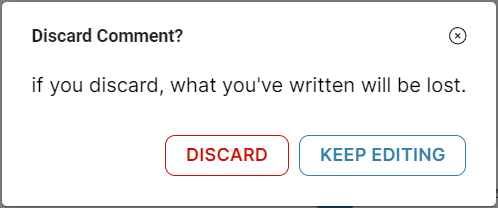
Now when you begin to create a new comment and then cancel it, the action button is called “Discard” (instead of “Abandon”) which is the standard naming convention for this type of action.
Jun 5, 2024
New Features
This release (Version 1.10.0) provides the following enhancements.
User Experience Enhancements
This release includes several user experience enhancements.
- Projects open automatically after you create them Now, when you are creating and configuring a new project, the Project Details page opens automatically after you click the Create Project button, skipping the step to find and open the project.
- Adjusted widths for Scenario Results and Comments columns The maximum width of the Scenario Results and Comments columns have been adjusted to allow a larger viewing area for the 3D model.
- Increased contrast of text The contrast of the text in the aP Workspace application has been increased to provide better accessibility and viewing of data.
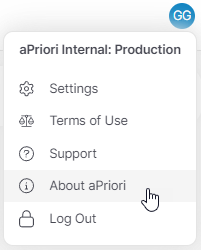
- Link for aPriori website
You can now navigate directly to the aPriori website to view solutions, resources, and news about aPriori. To access the link, click your account icon and select About aPriori.
- Highlighted scenario associated with a discussion Now, when you select a message thread in a project on the Parts & Assemblies tab, the scenario associated with the thread is highlighted in the table to visually connect the two. This makes it easier for you to understand the context of the message thread.
May 1, 2024
New Features
This release (Version 1.9.0) provides the following enhancements.
Improved Part Details Layout
The widths of the Scenario Results and Comments sections on the Part Details page have been adjusted to provide a less cluttered view of the information and the 3D Viewer.
Unread Messages Filter for Projects
This release includes a filter for the Messages column on the Projects page to help you find unread messages for a project.
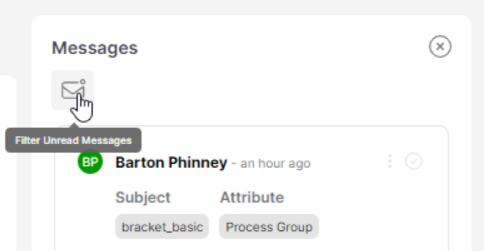
If you select a message thread with an unread message and then deselect it, the message will be marked as read and filtered from the list.
Feb 20, 2024
New Features
This release (Version 1.7.0) provides the following enhancement.
Messages Panel on Project Details Page
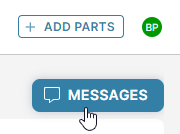
You can now view all the messages within a project without having to open each scenario individually. To view all messages, click the Messages button at the top-right of the Project Details page:
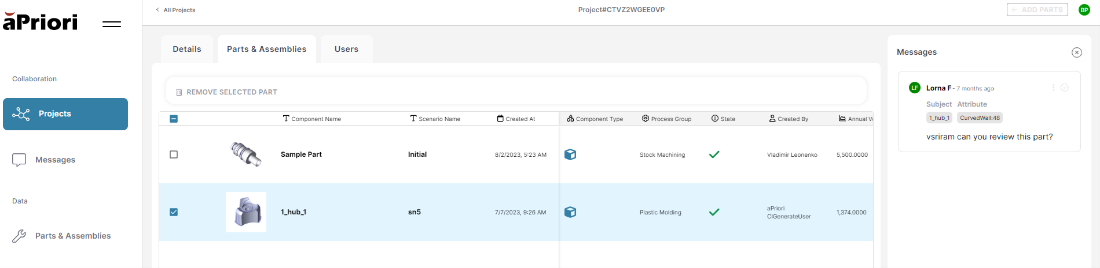
Select one or more scenarios to filter the messages by the scenario to which they are attached:
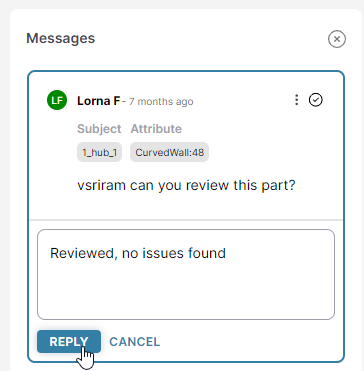
To respond to a message, in the Messages panel, click the message, enter your response, and click Reply. You can also delete, resolve, or assign messages when they are selected.
Currently you cannot add new messages on this page
Resolved Issues
The following issue is resolved in this release:
- All Scenarios Removed from a Project by the System – Previously, a scenario could automatically be removed from a project if the application detected that the scenario had been deleted from the system. This behavior was triggered in some cases by a connection issue, accidentally removing the scenarios from a project. In this release, if the system detects missing scenarios, it presents users with the option to remove the scenarios from the project if the user is confident that the scenarios were deleted intentionally, or otherwise to wait for a few minutes and refresh the page.
Known Issues and Workarounds
This release contains the following known issue.
- Projects Can Contain Duplicate Scenarios – On the Project Parts & Assemblies tab, when the project contains one or more assemblies and the table is sorted on a numeric value (for example, Annual Volume), the assembly records are duplicated in the response. We’re working on resolving this issue and will release a fix soon. Workaround Avoid sorting the table by numeric values.
Jan 31, 2024
New Features
This release (Version 1.6.1) provides the following enhancement.
Save Table Configurations for Projects
Changes you make to the table on the Parts and Assemblies tab in a project now persist. The fields displayed, column order, pinned columns, and sorting persist for each user.
Filtering and searching do not persist
Resolved Issues
The following issue is resolved in this release:
- Incorrect new message count in a project – Previously, in some cases, the new message count in the Parts and Assemblies tab of a project would be incorrect. This issue has been resolved and the correct new message count is displayed.
Jan 24, 2024
Resolved Issues
The following issue is resolved in this release:
- Occasional errors when creating projects – Previously, error messages might occasionally be displayed when creating projects. This issue has been resolved and the errors no longer occur.