aP Connect
aP Connect, which is part of the aP Generate solution, enables you to create workflows that automatically cost components, generate reports, and share the resulting data with members of your team
aP Connect automates the analysis and reporting of component manufacturability and cost by integrating Product Lifecycle Management (PLM) systems with other products and services in the aPriori Cloud.
aP Connect helps aPriori Deployment Leads and PLM System Administrators generate and communicate data that helps engineers Design for Manufacturability (DFM) and cost.
aP Connect in the aP Generate Solution
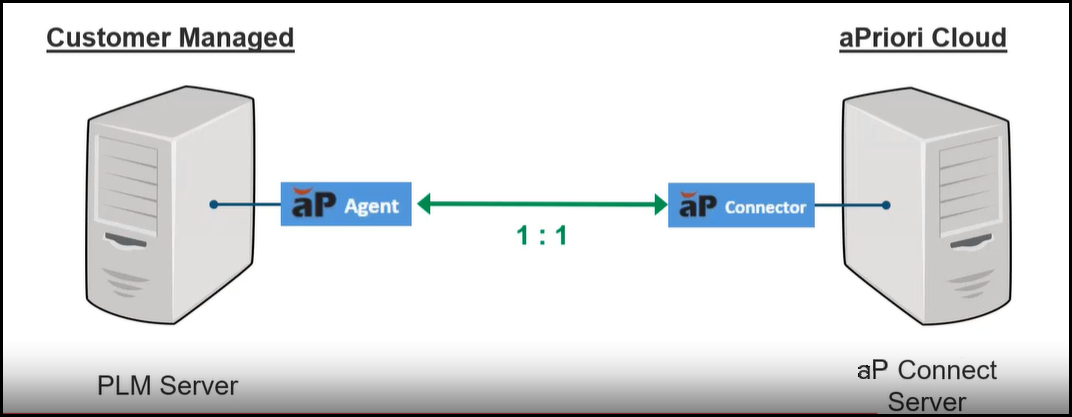
aP Connect Agents bridge your PLM or File System to aP Connect.
The aP Connect Agent Rest API allows you to retrieve information about your aP Connect Agent and Workflows or to initiate actions, such as service shutdowns or workflow invocations, from a machine or server that is networked to your Agent. Learn more about aP Generate
Connection Note
The aP Connect Agent communicates with the aP Connect application through a secure websocket connection. The agent does not support outbound proxies.
Explore the Documentation
-
Install Agents
Learn how aP Connect Agents bridge between your PLM or File System and aP Connect, explore the physical configuration options for your aP Generate integration.
-
Create Connectors
Allow aP Connect to communicate with your PLM or File System via an Agent.
-
Configure Workflows
Select your Connector, define a query, and configure workflow actions.
-
Configure Costing Service Settings
Set default values for information used during component costing.