Configure Costing Service Settings
Costing service settings allow you to set default values and actions for the costing inputs.
Note:
Mapping rules and Connector defined aP Connect to PLM Field mappings take precedence over Costing Service Settings. The Costing Service Settings take precedence over Digital Factory defaults.
Configure the Costing Service Settings:
-
In the aP Connect header bar, click Settings.
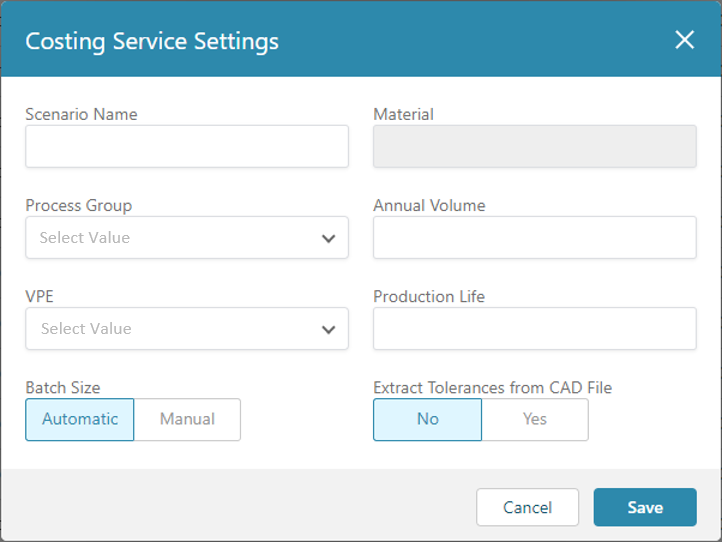
 The Costing Service Settings window opens.
-
Enter a default value for the Scenario Name. Although you can enter a different name, it is a best practice to enter
Initialfor the default Scenario Name for aPriori costings. -
From the dropdown menu, select a default value for the Process Group. The options that are available depend on your cost model licensing.
- From the dropdown menu, select a default value for the Digital Factory. The standard options that are available depend on your regional data library licensing. Any custom Digital Factories that your organization has created also appear.
-
Choose a default process for conveying the Batch Size to aP Connect The options are:
-
Automatic
-
Manual – You must enter a default value for this option
-
-
Enter a default value for the Annual Volume. Specify the value as a positive number.
- Specify a default value for the Production Life. Specify the value as a positive number.
-
Choose whether to direct aP Connect to Extract Tolerances from CAD File. Select Yes to extract tolerances and additional attributes, such as process group and annual volume. (If extracting additional attributes, leave the Process Group, Annual Volume, and Digital Factory fields empty.) The options are:
-
No
-
Yes
-
-
Click Save.
The saved settings are global settings. That is, the aPriori Costing Service will apply the settings to all Workflows. However, Connector defined field mappings and Workflow defined costing input mapping rules take precedence over Costing Service Settings. In turn, Costing Service Settings take precedence over Digital Factory defaults.
Note:
You cannot specify a default value for the Costing Service Material setting in this release of aP Connect.