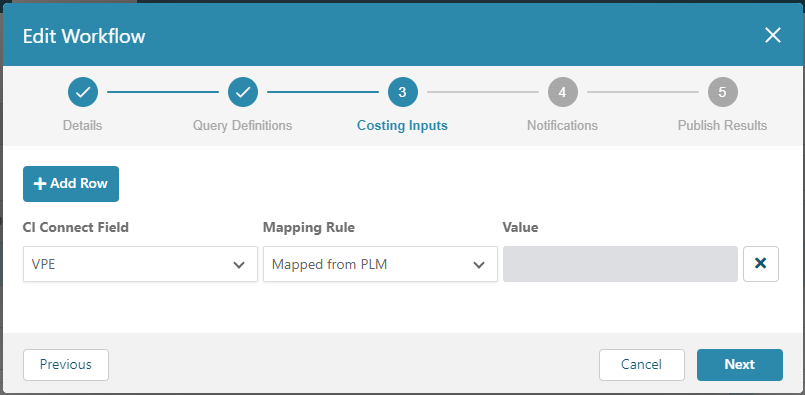
Workflow Costing Inputs
Costing input attributes are independent parameters that aP Design uses for costing components. When you create a Workflow, you can select a mapping rule and specify a default value for certain costing input attributes in the Costing Inputs settings. Mapping rules determine whether the cost analysis uses values that are pulled from the PLM system or values that are specified in the Costing Inputs settings.
There are three different mapping rules:
- Mapped from PLM – Always use the value from the mapped PLM field.
-
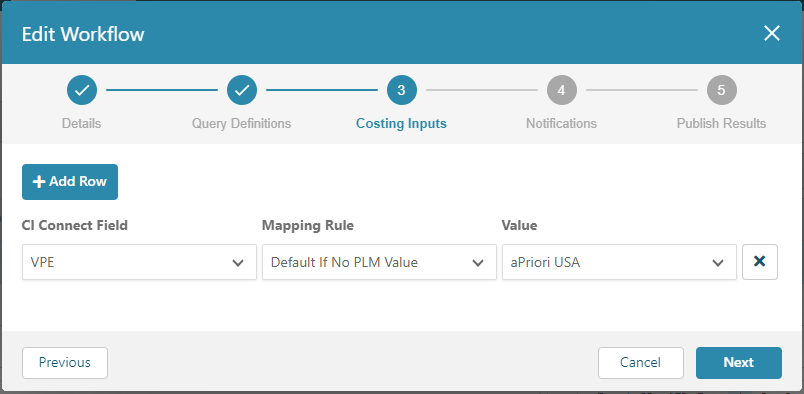
Default if No PLM Value:
- If there is no value in the mapped PLM field, use the value that is specified in the Costing Input settings of the Workflow.
- If there is a value in the mapped PLM field, use that value.
-
Constant – Always use the value specified in the Costing Input settings of the Workflow.
Notes
- Mapping rules are strictly optional.
- Mapping rules take precedence over all other methods for providing Costing input attributes, specifically, Connector defined aP Connect to PLM Field mappings, Costing Service Settings, and Digital Factory defaults.
- If there is no value a mapped PLM field, and the mapping rule is set to Mapped from PLM, aP Connect checks for PMI Attribute Mapping to pull the data from the CAD file. If no PMI Attribute Mapping is defined, aP Connect instead uses the default value that is specified for the attribute in the Costing Service Settings. If no default value is specified for the attribute in the Costing Service Settings, aP Connect instead uses the default value for the attribute as determined by the Digital Factory.
- Configure Costing Service Settings to pull other attributes (for example, process group, and annual volume) from CAD.
For example, if your PLM system contains different Digital Factories for different components based on regional pricing, but you want to determine the cost for manufacturing a group of components using the same Digital Factory, you could use a Constant mapping rule to specify a particular Digital Factory as the default Digital Factory for all costings in the Workflow. The figure shows how to apply a constant value for a costing input.
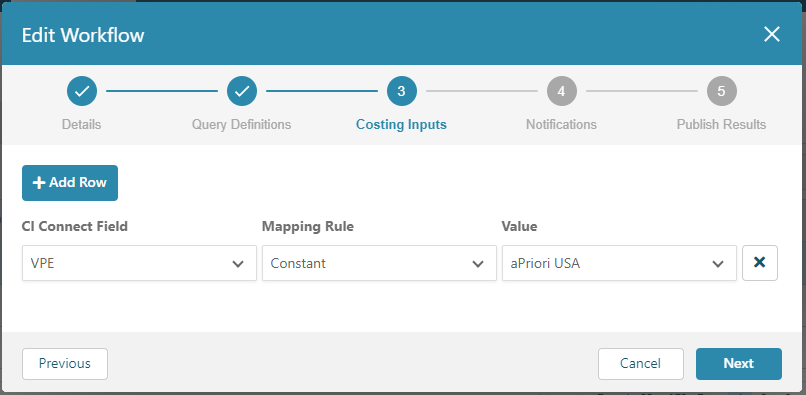
The type of mapping rule that you can apply depends on whether the field for the costing input is mapped in the Connector that is associated with the Workflow. You can always apply the Constant mapping rule. You can apply the Mapped from PLM or the Default if No PLM Value only if the field for the costing input is mapped in the associated Connector.
The costing inputs that you can apply mapping rules to are:
- Description
- Process Group
- Digital Factory
- Material
- Annual Volume
- Batch Size
- Production Life
- Costing Inputs
- Scenario Name
- User Defined Attributes (as applicable)
If the Digital Factory aP Connect field is mapped to a PLM field in the associated Connector, you could instead use the Default if No PLM Value mapping rule to instruct aP Connect to use a default value only when the mapped from PLM field is empty. The figure shows how to apply the Default if No PLM Value mapping rule.
Alternately, as this figure shows, you could use the Mapped from PLM to instruct aP Connect to always use the value from the PLM field.