What's New in aP Connect Agent Release 2023 R1 3.3.0
Extended aP Generate Inputs and Results
Create more sustainable products with carbon insights. Preserve continuity of the digital thread with aP Design and aP Workspace scenario links. Improve automated analysis precision with machining mode. Expedite outlier and opportunity analysis with target attributes.
In release aP Connect Agent 2023 R1 3.3.0 with aP Connect App 2023 R1 3.2.0, you can now use aP Generate to set the following inputs via PLM mapping, workflow definition, and the aP Connect Agent REST API’s POST/api/workflows/{identity}/runPartList endpoint:
- Target Cost (
targetCost) - Target Mass (
targetMass) - Machining Mode (
machiningMode)
Machining Mode, which specifies whether additional machining treatment should be considered, is only applicable for these process groups:
- Additive Manufacturing
- Casting – Die
- Casting – Sand
- Casting – Investment
- Forging
If you provide a value for Machining Mode but your designated process group does not support setting Machining Mode, that value will be ignored. Valid values for Machining mode are:
- May_Be_Machined – Include machining operations.
- Not_Machined – Exclude machining operations.
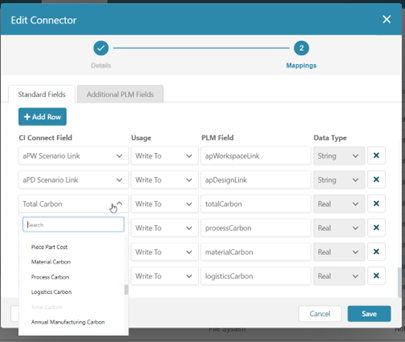
You can now also use aP Generate to return the following results for PLM write, inclusion in a File System integration’s output spreadsheet, and the aP Connect Agent REST API’s GET /api/workflows/{identity}/jobs/{identity}/results and GET /api/workflows/{identity}/jobs/{identity}/parts/{PLM part identity}/results endpoints:
- aP Design Scenario Link (
cidPartLink) - aP Workspace Scenario Link (
apwPartLink) - Material Carbon (
materialCarbon) - Process Carbon (
processCarbon) - Logistics Carbon (
logisticsCarbon) - Total Carbon (
totalCarbon) - Annual Carbon (
annualCarbon)
You can map these inputs and results to attributes in your integrated system by using the Standard Fields tab during the Mappings step of a Connector defining or editing procedure.