Cancel an Executing Workflow Job
You can cancel a Workflow job while it is executing from within aP Connect or by using the aP Connect Agent REST API. The cancellation request that is sent when you cancel an executing Workflow is subject to a Cancellation Timeout. The Cancellation Timeout is configured at the deployment level for aP Connect and has a default value of 60 s. If the job fails to be fully cleaned up within the Cancellation Timeout period, the job status transitions from Cancellation Requested to Errored. If the job is fully cleaned up within the Cancellation Timeout period, its job status transitions from Cancellation Requested to Cancelled.
To cancel an executing job, you can use either the aP Connect application or the aP Connect Agent REST API.
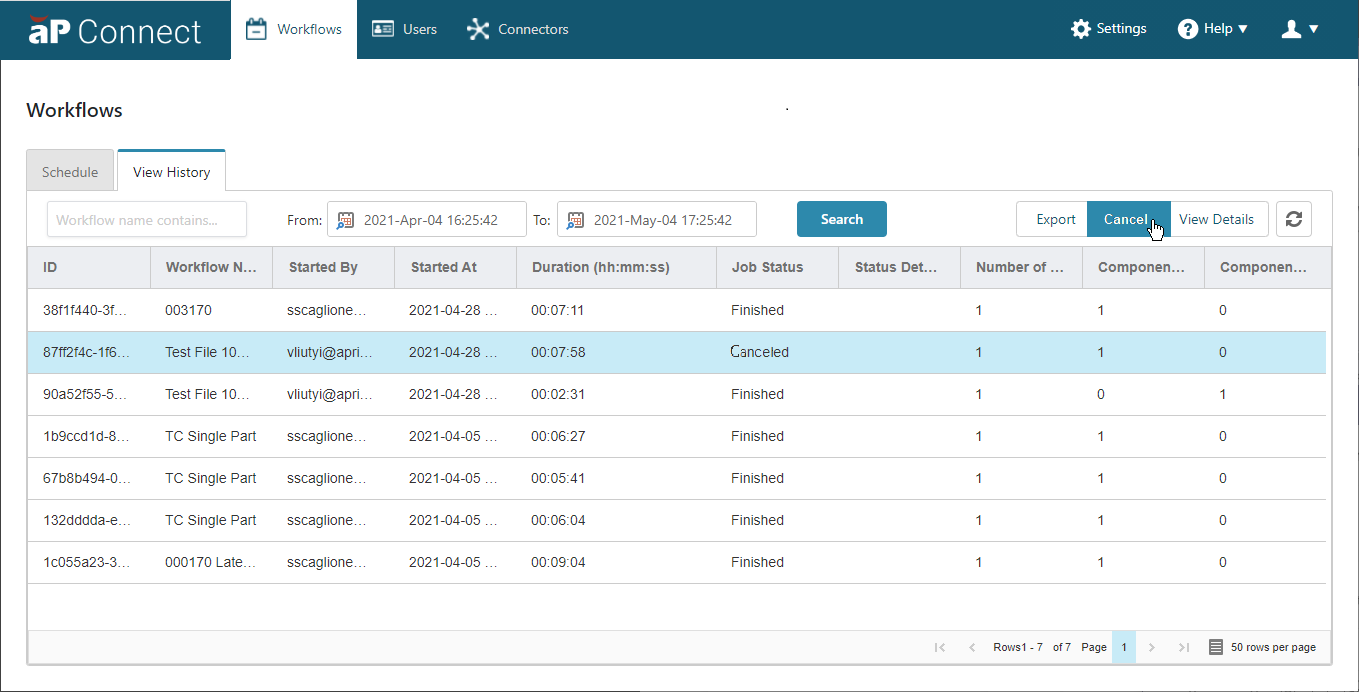
Cancel an executing job from within the aP Connect:
- In the aP Connect header bar, click Workflows.
- On the Workflows page, click the View History tab.
- Select the row that contains the executing Workflow job that you want to cancel.
-
Click the Cancel button.
Cancel an executing job through the aP Connect Agent REST API:
-
Run a
POST /api/workflows/{identity}/jobs/{identity}/cancelrequest.A successful request returns a “202 – Accepted” response.
-
To view cancellation details through the aP Connect Agent REST API, run
“GET /api/workflows/{identity}/jobs/{identity}”.A successful response includes the time that the job was cancelled, the cancelledAt time, and the job status.