Release Notes
aP Connect Release Notes provide information about new features, enhancements, and resolved issues. If you encounter any issues, please review the Troubleshooting section in the aPriori Support knowledge base.
Aug, 2026
Windchill+ PLM integration
aPriori now supports Windchill+ as a PLM integration option through the aP Connect Agent. This integration enables automated workflows that retrieve product data from Windchill+, run cost analysis in aPriori, and optionally write results back to PLM.
The integration is designed to work securely with PTC’s cloud-hosted Windchill+ environment while maintaining customer control of their infrastructure. See PLM Integration Windchill+ for integration requirements and steps.
June 30, 2026
DFM Connector Mappings Enhancement
This update adds support for the enhanced DFM classifications introduced in the latest Design Guidance Enhancements in aP Pro.
Requirements:
- Agent 5.3.0 or later.
aP Connect now supports the following DFM mapping fields:
- Max Severity
- Critical Issues
- Major Issues
- Minor Issues
- Cost Drivers
- Unclassified Issues
When configuring mappings for a Connector, select Add Row from the Standard Fields tab. The new fields are available under the Costing Outputs category.
Notification Configuration
-
Email Notification: The new DFM fields can now be included in Workflow Notifications that use the Configurable Summary email template.
-
Part Design Guidance Report: The Part Design Guidance [SSR] report is now available in Workflow Notifications.
Select the Attach Report tab, then choose Part Design Guidance [SSR] under the Single Part Reports category from the Report Name dropdown.
For additional information and steps see:
- aP Pro Design Guidance Enhancements
- Standard Field Reference
- Configure Email Notification
- Attach a Report
New Feature
Agent Certificate-based Authentication (mTLS)
This update introduces a certificate-based authentication option that removes the need for IP address allowlisting of the Agent host. This is increasingly important for organizations who may be unable to guarantee static IP addresses.
Enable the mTLS option when you create the Connector, then supply the aPriori-signed certificate during Agent installation.
Requirements:
- Agent version 5.2.0 or later
- An aPriori-signed certificate obtained from aPriori Support before Agent installation
Configuring mTLS is supported when using the Agent Setup Wizard or console (-c) installation mode. mTLS is not currently supported in unattended (-q) installation mode.
For additional information and steps see:
- Create a PLM Connector and Create a File System Connector
- Obtain a Signed Certificate
- Agent Install with Setup Wizard
May 12, 2026
Agent Update
Agent 5.2.0 Support for Upcoming mTLS Functionality
Agent 5.2.0 introduces foundational support for upcoming certificate-based authentication (mTLS) functionality in aP Connect.
Future releases will introduce Connector configuration and certificate management workflows required to enable mTLS authentication.
Apr 28, 2026
New Feature
Observe Log Forwarding for Agent and Optional MiddleCode
This release enables forwarding of aP Connect Agent logs to Observe. If your deployment uses custom MiddleCode, you can optionally include those logs during setup. Centralized log forwarding helps streamline troubleshooting, monitoring, and operational support by sending the selected log sources to the Observe environment associated with your customer ID.
Requirements:
-
aP Connect Agent version 5.1.0 or later
-
Local administrative rights to run Windows PowerShell as Administrator
-
Observe Token, URL, and Customer ID for your environment
See Forward Agent Logs to Observe for setup instructions.
Information: Windchill Tomcat Security Patch
The following issue is related to recent Windchill security updates and is not introduced by this release, but may impact Agent functionality in affected environments.
After applying certain Windchill security updates (including updates that upgrade Apache Tomcat to version 9.0.90 or later), OData requests used by the aP Connect Agent may return HTTP 500 errors. This can impact functionality such as part retrieval and report uploads.
To resolve it, update the Windchill Tomcat configuration:
- In
tomcat/conf/server.xml.default, set:discardFacades="false" - Restart Windchill services after making the change.
Refer to PTC support articles CS422295 and CS437384 for additional details.
Jan 30, 2025
New Features
This release (aP Connect App 4.1.0) provides the following enhancement.
Upgraded Windchill Rest API
This release provides an upgraded Windchill Rest API to support querying using the Equals and Does not Equal functionality in Enumerated Value Lists, and reading of these list values.
This support is in addition to aP Connect's legacy support for Legal Value Lists.
Limitations
- Other types of enumerated fields such as Contains and Begins With are not supported.
- Only reading of these field list values are supported, not write back.
Oct 23, 2024
New Features
This release (aP Connect App 3.10.0) provides the following enhancements.
Part Carbon Report
This release introduces a new sustainability-focused feature in the aP Generate: Part Carbon Report. This enhancement allows you to generate reports focused exclusively on sustainability metrics, supporting growing business needs for environmental impact analysis.
Part Carbon Report Option in Workflows
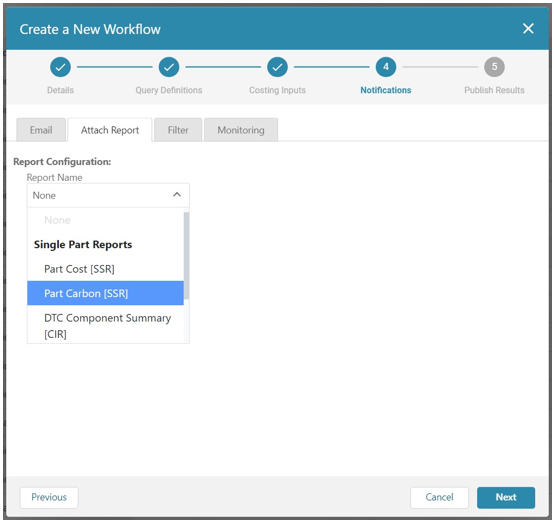
You can select the Part Carbon Report as a drop-down option within the aP Connect App when creating or editing a workflow. This report focuses on sustainability metrics, offering an alternative to the existing Part Cost, DTC Part Summary, and DFM Multiple Components Summary reports.
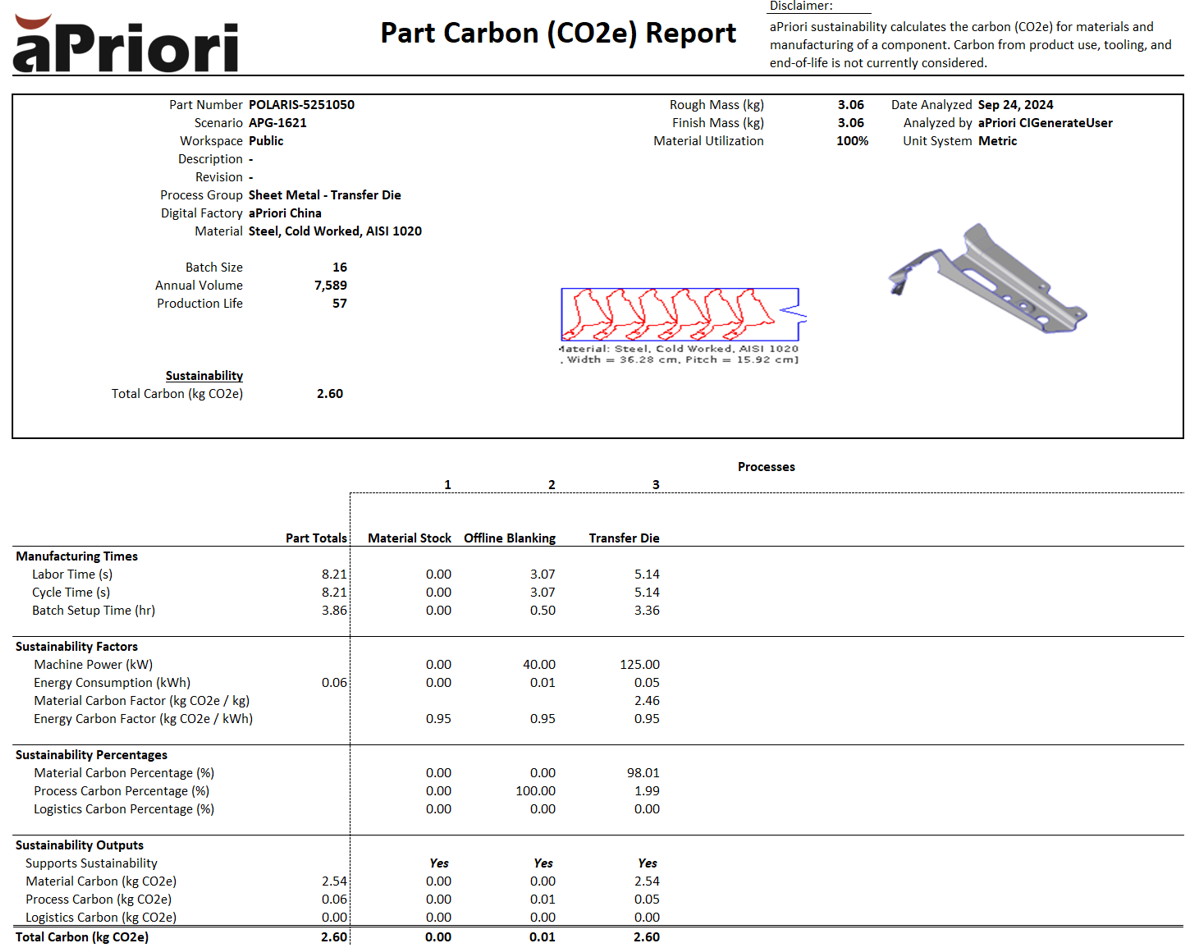
Selecting the Part Carbon Report in Workflows
You can select the Part Carbon Report option when creating a new workflow or editing an existing one. Once selected, the system will generate the Part Carbon Report and attach it to the selected email template.
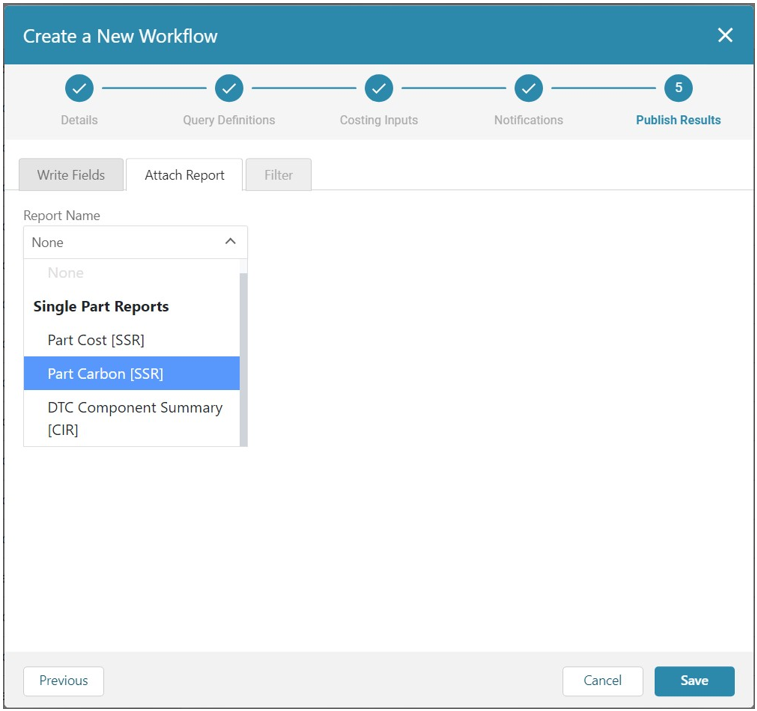
Writing Back the Part Carbon Report to PLM
You can select the Part Carbon Report to attach to the PLM system, ensuring seamless integration with your PLM setup and accurate sustainability data tracking.
Note:
You can only use the Part Carbon Report if you have an active Sustainability License. If the workflow is invoked but you do not have an active Sustainability License, the workflow completes but the Part Carbon Report is not generated. This ensures minimal workflow disruption.
Info
Learn more about the Part Carbon Report in the aP Connect System Administration Guide topic Part Carbon Report.
Jul 22, 2024
New Features
This release (aP Connect Agent 4.0.0) provides the following enhancements:
Enhanced GET Results Endpoints with User Defined Attributes (UDAs) Support
In this release, the aP Connect Agent REST API has been enhanced to include User Defined Attributes (UDAs) in the response bodies for GET Results endpoints. This improvement allows you to access a complete set of data tailored to your specific business needs when retrieving job or part results.
When you complete a workflow and make a request to GET /api/workflows/{identity}/jobs/{identity}/results or GET /api/workflows/{identity}/jobs/{identity}/parts/{PLM part identity}/results, the response body will now include all UDAs defined in your company’s setup. This ensures that all custom attributes set in your costing inputs are fully represented in the results.
This enhancement supports a variety of use cases and provides multiple benefits:
- PLM integration: enabling comprehensive attribute data exchange, ensuring seamless data synchronization across various PLM systems.
- Custom reporting: including all relevant attributes in the GET Results API responses facilitates detailed custom reporting, providing more insightful analysis and decision-making capabilities.
- Data consistency: ensuring all custom attributes are available through the API aligns with the data written to output spreadsheets, supporting document-centric integration approaches and reliable data management.
By including these attributes, you gain a more comprehensive view of your costing inputs and outputs, enabling better integration with your PLM systems and more detailed data analysis. This update is part of our ongoing commitment to extend the aP Connect Agent REST API capabilities based on customer feedback and evolving business needs.
Info
For more details, see the sections ‘Returns the results for a part within a job’ and ‘Returns the results for all parts within a job’ in the aP Connect Agent REST API Reference Guide.
Enhanced Support for Custom Attributes on WT Part Soft Types in Windchill PLM
With this release, the aP Connect Agent now supports reading and writing custom attributes defined on the soft types of WT Parts in Windchill PLM. This enhancement allows users to leverage custom attributes specific to different product variations without duplicating them on the WT Part.
Feature details:
- Custom attribute retrieval: the aP Connect Agent can now traverse the Windchill PLM hierarchy to retrieve custom attributes defined on the soft types of WT Parts. This ensures all relevant attributes are accessible and usable within aP Connect workflows.
- Attribute precedence: if a custom attribute exists on the WT Part and its soft type, the value from the WT Part takes precedence.
- Configuration options: a new property
searchAllPlmSoftTypeshas been introduced. The Agent will query and write back attributes for all soft types when set totrue. The behavior remains unchanged iffalse, targeting only the WT Part attributes. - Configurable pagination requests: the Agent now queries Windchill using a paginated request and retrieves a specific number of results at a time. The
MaxPageSizeproperty can be set in ThingWorx Admin from the service output when querying Windchill instead of a hard-coded value. -
Workflow integration: workflows can be configured to read and write back custom attributes from/to PLM, ensuring seamless data flow and integration.
Note:
Queries filtering parts based on PLM attributes will return parts only when their soft type has all the queried attributes, either directly or inherited from a parent soft type.
This enhancement provides several key benefits:
- Product variation management: efficiently manage custom attributes for different product variations without duplication.
- Data consistency: maintain consistent attribute data across the WT Part and its soft types.
- Enhanced reporting: improved attribute visibility for detailed reporting and analysis.
This update significantly enhances aP Generate's flexibility and capability in managing complex product data within Windchill PLM, supporting a broader range of custom business needs.
Resolved Issues
The following issues are resolved in this release:
- Windchill Checkout Issue Due to Data Type Mismatch – Previously, Windchill Part objects remained checked out if a PLM Write operation failed due to a data type mismatch, for example when a CI Connect field of data type Real was mapped to a Windchill attribute of type Integer. Now, if a PLM Write operation fails due to a data type mismatch, the checkout will be canceled, ensuring that parts are not left checked out in Windchill.
- Part Processing Failure with Unsupported Machining Mode – Previously, part processing failed when the Machining Mode 'Not Machined' was set for a Process Group that does not support machining mode input, for example, Plastic Molding. Now, if a Machining Mode input is set for a Process Group that does not support this input, the costing will complete successfully, and a descriptive message indicating that the Machining Mode input was ignored will be displayed in the Status Details.
- Job Failures Due to Invalid PLM Attribute Mapping – Previously, jobs failed and were left in a non-terminal state when a Connector had a mapping to a nonexistent PLM attribute. This issue prevented job cancellation and left workflows permanently locked and uneditable. Now, if a Connector has an invalid mapping, jobs will fail with an appropriate error message, such as:
Unable to execute due to invalid mapping defined in associated connector: [PLM field]. Please update to valid mapping.If the error message cannot be parsed, the error message from the PLM system will be displayed. Jobs will no longer be left in a non-terminal state, allowing for proper workflow management.
May 1, 2024
Resolved Issues
The following issues are resolved in this release (aP Connect App 3.7.0):
-
Job Not Completing When Experiencing an Export Failure – Previously, when executing a workflow, if an export failure occurred for a job with aP Admin, the job became stuck and eventually timed out. Now, the job bypasses the export step and completes the other steps in the workflow, such as sending notifications or writing attributes to PLM.
Note:
If an export failure occurs for a job, reports will not be generated for that job as the export is required to run them.
-
Non-Specific Error Reporting for Assemblies – Previously, if a failure occurred for a part in an assembly that caused the assembly to fail, a generic error message was displayed for the user. Now, an error message from the part that caused the failure is displayed and explains what caused the failure.
- Data Mismatch Causing Job Failures – Previously, when a Connector had a mapping to a nonexistent PLM attribute, jobs failed and were left in a non-terminal state, preventing cancellation of the job, and leaving the workflow permanently locked. Now, when the jobs fail, a message explains to the user what caused the failure, and the workflow continues to be executable.
Apr 10, 2024
Resolved Issues
The following issues are resolved in this release:
- Incorrect Copyright Year in Notification Summary – Previously, the copyright year was still displayed as 2023. This has now been updated to 2024.
- Part Number and Scenario Name Truncating – Previously, long Part Numbers and Scenario Names were truncated with the remaining characters represented by three dots, thus hiding the names from the user, and making it difficult to identify the parts and scenarios being run. In this release the names wrap in the table and are viewable in full.
Mar 27, 2024
Resolved Issues
The following issues are resolved in this release (aP Connect App 3.6.0):
- Machining Mode Input Displayed as Output – Previously, the Machining Mode that was specified as the input for a scenario was displayed in the notifications instead of the option used to analyze a component. The option displayed now is the one with which the scenario was analyzed.
- Invalid Material Name shown when a Scenario Failed to Process – Previously, if a scenario failed during the analysis, the name shown in the notification would be “invalid.” Now the material name used to analyze the scenario will be shown instead.
- Production Fields Missing for Assemblies in PLM Write – Previously, the Annual Volume, Batch Size, and Production Life were not being written back to the PLM System. This issue has been fixed and these fields are now written to the PLM system.
- Incorrect Grouping of Components in DFM Multiple Component Summary Report – Previously, when multiple email recipients were read from the PLM System, a DFM Multiple Component Summary Report was generated for each email sent to cover all these components. Now, one DFM Multiple Component Summary Report is sent per unique email address in the batch, and the Report contains all components associated with that email address.
Mar 4, 2024
New Features
This release (aP Connect App 3.5.0) provides the following enhancement.
Flexible aP Generate Notifications
Choose the data most relevant to you in the notifications you receive.
In previous releases, the notifications for aP Generate included a standard email template with specific fields. In this release, you can configure these fields when setting up a Workflow in aP Connect.
When you are creating or editing an aP Connect Workflow and you reach the Notifications settings stage, you can now select a Configurable Summary template in addition to the standard DFM Part Summary template. The Configurable Summary template allows you to select the fields you want to view in the notification.
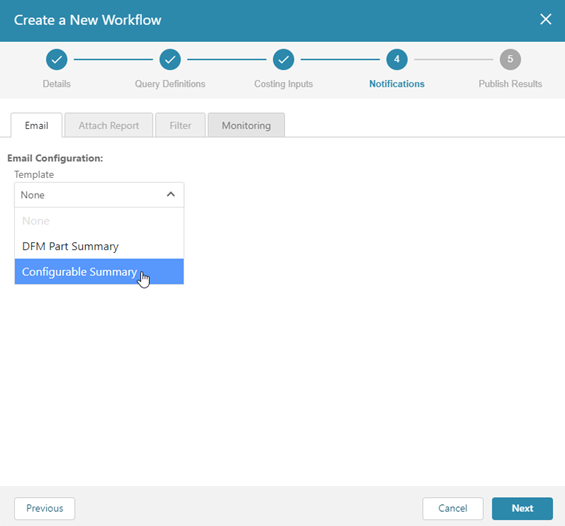
Using the Configurable Summary template, you can select the Recipient, the Scenario, and up to five configurable Fields. For each Field you use a drop-down list to select the input and output options under the following categories: PLM System, Admin Info, Production Inputs, Costing Outputs, and Additional Info (and User Defined Attributes, depending on the UDAs defined in your system).
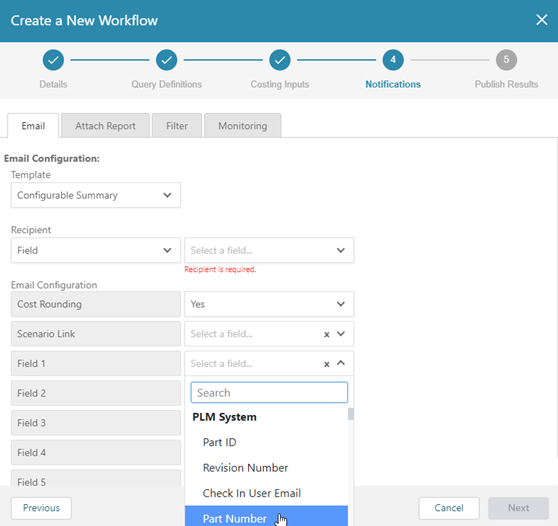
The input and output options become the table column headings in the notification email. The options that are available for selection in each category are as follows:
PLM System fields
- Part ID
- Revision Number
- Check in User Email
- Part Number
- CAD File Name
- Sequence Id
- Part Name
Admin Info fields
- Description
Production Inputs fields
- Process Group
- Material
- Annual Volume
- Batch Size
- Production Life
- Digital Factory
- Target Cost
- Target Mass
- Machining Mode
Costing Outputs fields
- Capital Investment
- Fully Burdened Cost
- Material Cost
- Labor Time
- Finish Mass
- Rough Mass
- Utilization
- DFM Risk Rating
- Currency Code
- Costing Result
- Cycle Time
- DFM Risk Score
- Piece Part Cost
- Material Carbon
- Process Carbon
- Logistics Carbon
- Total Carbon
- Annual Manufacturing Carbon
Additional Info fields
- Status Details
- Component Type
- Process Routing
User Defined Attributes (UDA) fields
-
These depend on the user defined attributes that are defined in your environment.
Note:
For full details, refer to the section called Step 4. Configure the Workflow Notifications Settings in the Create a Workflow topic in the aP Connect System Administration Guide.