Role of Agents in aP Generate Solution
aP Generate is a cloud-based solution that allows you to automate these processes by integrating your PLM or File System with the aPriori Cloud:
- Data Reading – Read CAD files and related production and manufacturing information (PMI) from your PLM or File System.
- Component Analysis – Analyze the parts in the CAD files for cost and manufacturability.
- Report Generation – Generate cost and manufacturability reports.
- Data Writing – Write analysis results and generated reports back to your PLM or File System
- Notification – Send an email that includes analysis results and generated reports to you, members of a product team, and or key stakeholders.
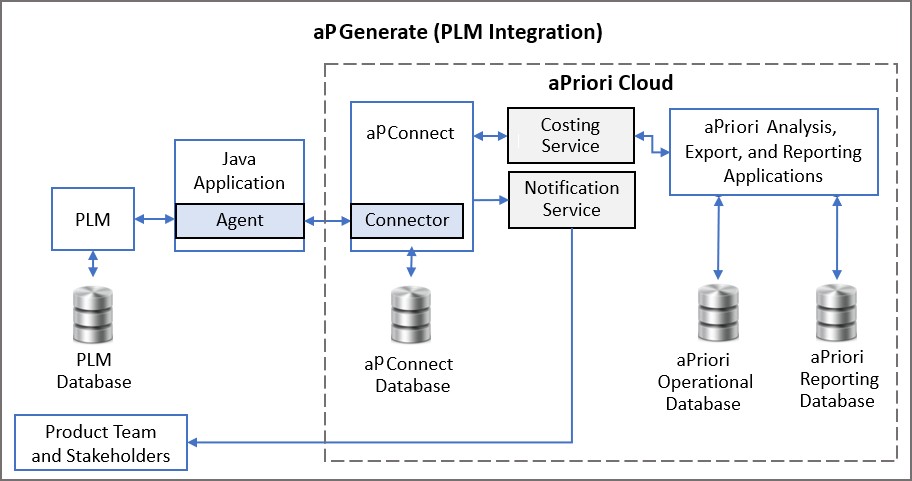
This diagram shows the general architecture for an aP Generate PLM integration.
You can implement a File System integration instead of or in addition to a PLM integration. This figure shows the general architecture for an aP Generate File System integration.
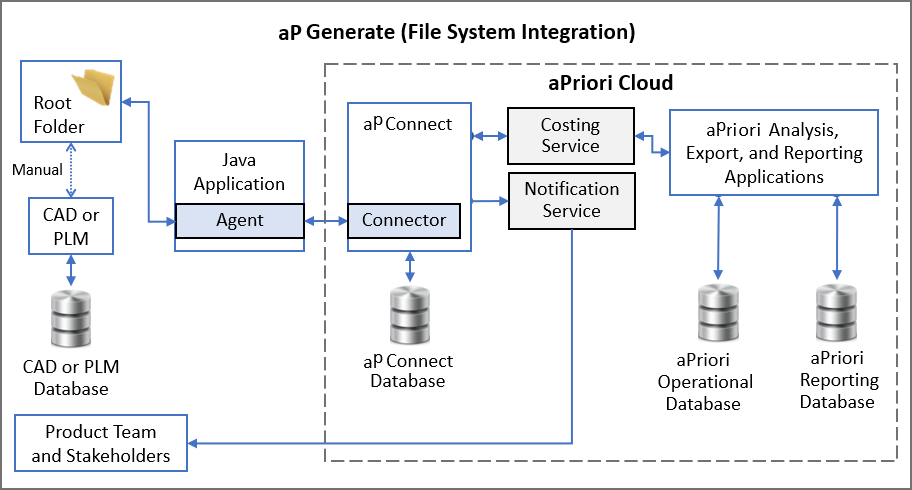
For both PLM and File System integration, an Agent is a Java connectivity agent that bridges your PLM system or File System to a Connector in aP Connect. A Connector is also a type of connectivity agent.
aP Connect is an aPriori Cloud application that allows you to create the Workflows that manage the automated data reading, part analysis, report generation, data writing, and email notification processes.
See PLM Integration, File System Integration and Windchill+ PLM Integration to learn more.