Connector, Agent, and Root Folder Management Responsibilities
Connectors and Agents are essential for communication between your Product Lifecycle Management (PLM) or File System and aP Connect. A Connector is a connectivity Agent within the aP Connect application that stores connection information and database field mappings. An Agent is a Java connectivity Agent that bridges your PLM or File System to aP Connect.
This diagram shows how an Agent in a PLM integration bridges a PLM system to aP Connect.
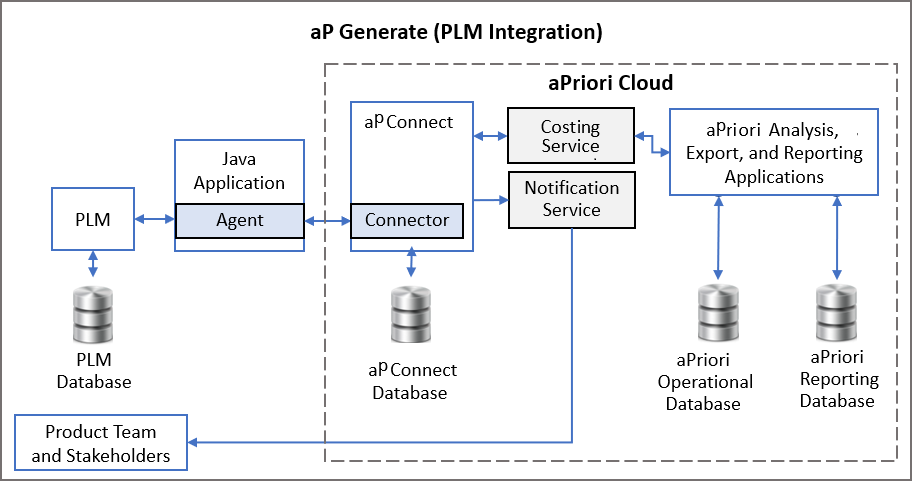
You can connect multiple PLM systems to aP Connect. For each PLM system that you want to connect to aP Connect:
- Create and configure one Connector in aP Connect.
- Install and configure one PLM Agent either on the PLM server or on a server that can access, read to, and write to the PLM server. Both the PLM and Agent servers can be on premise or remote. For more information, see the aP Connect Agent Installation Guide.
- Establish and verify the Connector-to-PLM connection.
As this diagram shows, for a File System integration, an Agent bridges an aP Connect Root Folder on your machine or server to aP Connect.
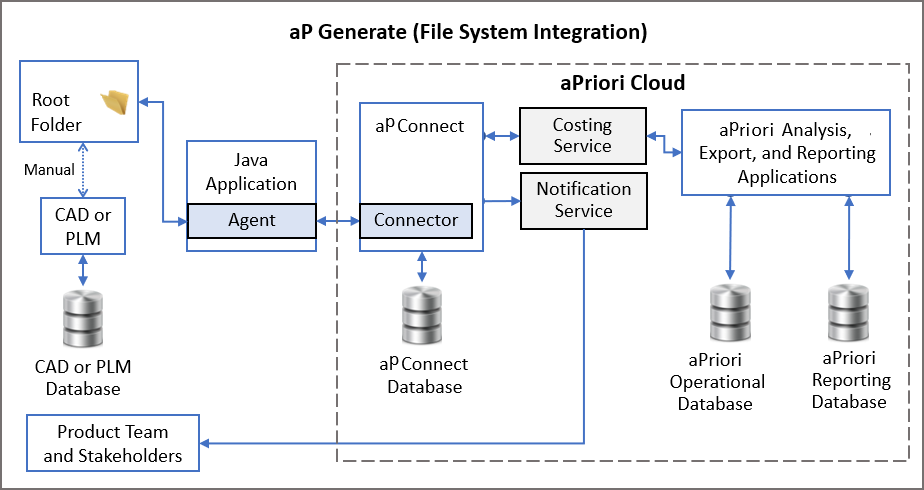
For each aP Connect Root Folder that you want to connect to aP Connect, you must:
- Create the aP Connect Root Folder on a machine or server that you can read to and write from.
- Create and configure one Connector in aP Connect.
- Install and configure one File System Agent on a machine or server that can access, control, read from, and write to the machine or server that contains the aP Connect Root Folder. For more information, see the aP Connect Agent Installation Guide.
- Establish and verify the Connector-to-Root Folder connection
- Create a Workflow that uses the configured Connector
When you create the Workflow, aP Connect populates the associated Root Folder with subdirectories for the aPriori inputs and outputs for that Workflow. The input subdirectory contains a spreadsheet. Before you can run the Workflow, you must add CAD files to the input subdirectory and populate the spreadsheet with PMI for the parts that are in the CAD files.
Additional aP Connect System Administrator management tasks include:
- Editing and deleting Connectors.
- Reconfiguring and uninstalling Agents.
- Manually transferring data between your PLM or CAD system and your aP Connect Root Folder.
For information on installing and configuring an Agent, see the aP Connect Agent Installation Guide.