Cost Insight through Automated Workflows
Within the aP Generate solution, the PLM or File System, aPriori operational, and aPriori reporting databases each store design, production, manufacturing, and cost data, such as the 3D model, manufacturing specifications, and bill of materials (BOM), for each product that you make.
The aP Connect database stores Workflows that can automatically cost components, generate reports, and share information between your PLM database or File System, your aPriori databases, and the members of your product team.
A Workflow is a series of sequential steps that complete a specific job. Some of the steps that you can include in an aP Connect Workflow are:
- Read information from your PLM system, File System, or aPriori databases.
- Cost components by using the cost-analysis capability of aP Design
- Export data from your aPriori operational database to your aPriori Reporting data base by using the scenario-export capability of aP Admin.
- Create reports by using the report generation capabilities of aP Analytics.
- Notify users by using the aPriori notification service to send emails that include generated reports.
- Write information to your PLM system, File System, or aPriori database.
- Attach a report to a component in the PLM or File System.
Workflows are typically scheduled to automatically occur or repeat on regular basis. When you add a Workflow to your aP Connect database, you also configure the Workflow schedule. By setting the Workflow steps to a schedule you can accomplish complex tasks. For example, your Workflow can:
- Automatically cost parts after they are checked into the PLM system.
- Identify and notify team members about parts that have the most-costly manufacturability issues.
- Highlight the important cost drivers and provide guidance for remediation.
The diagram shows an example of a typical Workflow that you can automate using aP Connect for a PLM integration.
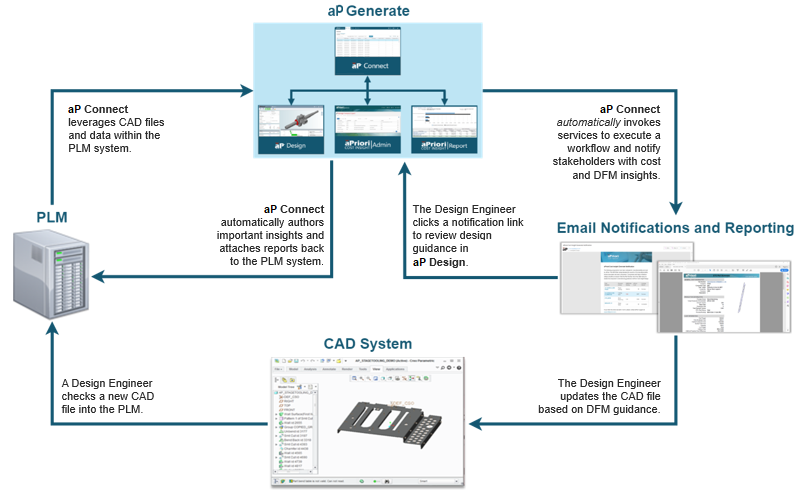
In the diagram, a Design Engineer checks a new CAD design into PLM. Then the file is automatically loaded into aP Connect by an aP Connect Workflow that pulls new components at scheduled intervals. aP Connect passes the file to aP Design where a new scenario is created and costed.
The results from the cost analysis are automatically written back to the PLM system. Meanwhile, aP Admin automatically exports the costing outputs to aP Analytics. aP Analytics automatically generates a report of the results. The report is fed back to the PLM system. It is also attached as a PDF to an email that is automatically sent to the aP Connect System Admin for distribution to the Design Engineer, Cost Engineer, Sourcing Expert, or other Key Stakeholders.
The product team and key stakeholders can review the information and make data-based decisions on how to proceed. The engineers can click a link in the email notification or the attached PDF report to access the scenario in aP Design. They can collaborate, using aP Design, aP Pro (via AppStream), and CAD software to optimize the design for manufacturability and cost based on and issues highlighted in the generated report.
Ultimately, the PLM system data is updated when the CAD file is optimized and checked in. Then, aP Connect can repeat the Workflow. The updated design is costed, and the results are written back to the PLM system and reported out to team members and stakeholders. The cycle can be repeated as many times as are needed to obtain a target cost.