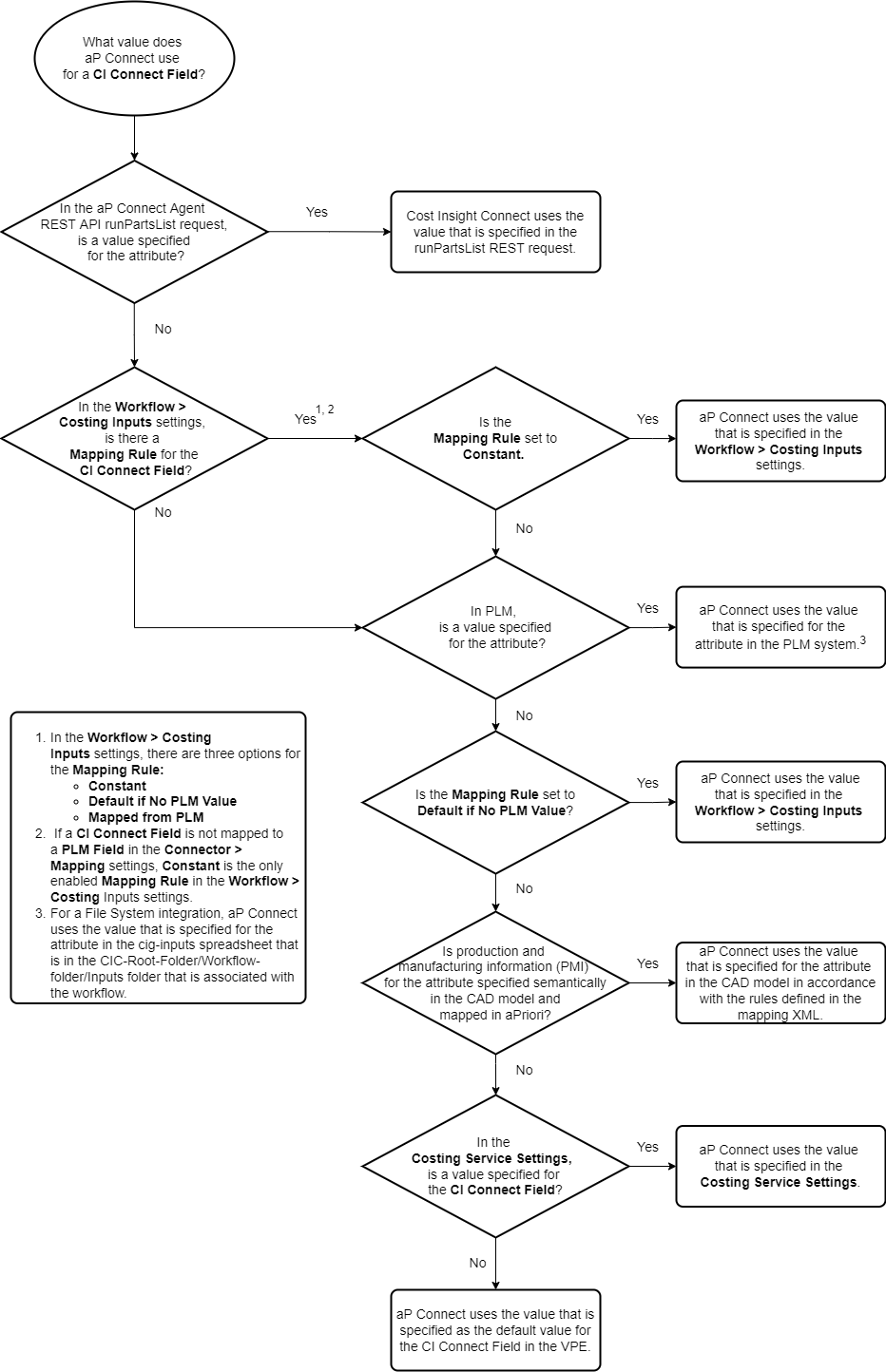
Attribute Value Precedence
There are several potential sources for the attributes, that is the scenario, production, and manufacturing data, that aP Generate uses to perform a cost and manufacturability analysis:
- aP Connect – A default attribute value can be assigned in either the Costing Service Settings or the Workflow > Costing Inputs settings.
- aPriori Digital Factory settings – Default values can also be assigned to attributes that are included in standard or custom Digital Factory settings in aP Pro (via AppStream) and aP Design.
- PLM System – Attribute values can be specified explicitly or extracted from other data that is imported into your PLM system.
- CAD files – Certain production and manufacturing information (PMI), such as tolerance and threading specifications, which, when included as semantic data in CAD models, can be extracted to a scenario by aP Pro and aP Design.
For a single attribute, each source can contain a different value. For example, when aP Generate analyzes a part for manufacturability and cost, it considers tolerance. The value for a tolerance attribute could be specified as:
- A default or constant value of 0.01 in the Costing Inputs settings of an aP Connect Workflow.
- A default value of 0.02 in the Costing Service Settings for aP Connect.
- A default value of 0.03 as defined by the Digital Factory that is specified for the scenario.
- A value of 0.04 in your PLM system for a PLM field that is mapped to an aP Connect Field in the settings of an aP Connect Connector.
- A value of 0.05 in your PLM system for a PLM field that is not mapped to an aP Connect Field.
- A value of 0.06 in semantic PMI in the CAD file.
Furthermore, in the Costing Inputs settings of an aP Connect Workflow, you can select one of these mapping rules to indicate the source that you want aP Connect to use for certain aP Connect Field values:
- Mapped from PLM – You want to use the value that specified by the PLM Field that is mapped to an aP Connect Field in the Mappings settings of the Connector that is specified for the Workflow.
- Default If No PLM Value – You prefer to use the value that is Mapped from PLM, but if there is no value in the mapped PLM field, you want to use the value that you specify in the Costing Inputs settings.
- Constant – You want to use the value that you specify in the Costing Inputs settings.
To determine which source, and therefore, which value to use, aP Connect uses the value precedence algorithm in this flowchart.