Criteria-Based Preset and Custom Scenario Filters
Cost Insight Design (CID) Release Notes 2021 R1 SP1
Quickly and easily access private and public scenario by using predefined and custom filters.
The new Scenario Filter on the Explore tab provides useful predefined filters and allows you to build and save multiple custom filters. All filters respect the access control model that has been applied to Cost Insight Design.
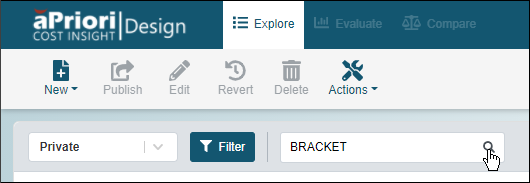
To use a predefined filter, expand the filter dropdown menu and select one of the Preset options:
- All – Returns all your private scenario and all the published scenario that you have permission to access.
- Assigned to me – Returns all scenario that are assigned to you.
- Recent – Returns all scenario that you recently interacted with.
- Private – Returns all scenario that are in your private workspace.
- All – Returns all the published scenario that you have permission to access
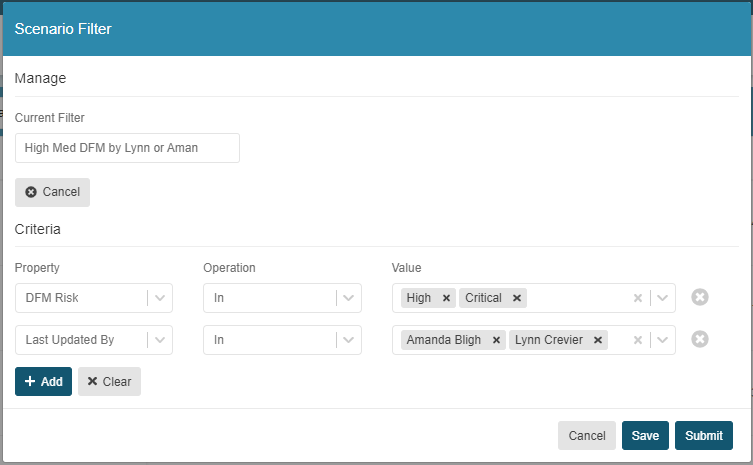
To build a custom filter, click the Filter button and then, in the Scenario Filter window, define supply a name and configure the filter criteria. You can build, use, and save multiple custom filters. You can also use a predefined custom filter as the basis for a new custom filter. For each custom filter, you can include multiple property-based criteria. Each criterion allows you to choose from a variety of relevant operators and many allow you to select multiple values.
For example, as this figure of the Scenario Filter shows, you could use the preset Public filter to create a filter to return all scenario that have a critical or high DFM risk that have been published by one or more users.
This table includes the properties and operators that you can use to define the criteria for your custom filters.
| Category | Property | Operations | Value |
|---|---|---|---|
| Production Inputs | Annual Volume | Equals Not Equals Greater Than Greater Than or Equal to Less Than Less Than or Equal To |
Enter a real number |
| Production Inputs | Batch Size | Equals Not Equals Greater Than Greater Than or Equal to Less Than Less Than or Equal To |
Enter a Real Number |
| Production Inputs | Digital Factory | In Is Not Defined Not In |
Select one or more licensed Digital Factories |
| Production Inputs | Material | Equals Not Equals Contains Ends With Starts With |
Enter a string |
| Production Inputs | Process Group | In Is Not Defined Not In |
Select a licensed supported primary Process Group |
| Production Inputs | Production Life | Greater Than Less Than |
Enter a real number |
| General | Assignee | In Is Not Defined Not In |
Select one or more user |
| General | CAD Connected | Equals | Select between: Yes No |
| General | Component Type | In Is Not Defined Not In |
Select between: Assembly Part Unknown |
| General | Component Name | Equals Not Equals Contains Ends With Starts With |
Enter a string |
| General | Configuration Name | Equals Not Equals Contains Ends With Starts With |
Enter a string |
| General | Cost Maturity | In Is Not Defined Not In |
Select between: Initial Low Medium High |
| General | Created At | Greater Than Less Than |
Select or enter a date and time. |
| General | Created By | In Is Not Defined Not In |
Select one or more users |
| General | Description | Equals Not Equals Contains Ends With Starts With |
Enter a string |
| General | Last Updated At | Greater Than Less Than |
Select or enter a date and time. |
| General | Last Updated By | In Is Not Defined Not In |
Select one or more users |
| General | Locked | Equals | Select between: Yes No |
| General | Notes | Equals Not Equals Contains Ends With Starts With |
Enter a string |
| General | Published | Equals | Select between: Yes No |
| General | Published At | Greater Than Less Than |
Select or enter a date and time. |
| Scenario Name | Equals Not Equals Contains Ends With Starts With |
Enter a string |
|
| General | State | In Is Not Defined Not In |
Select one or more: Processing ProcessingFailed NotCosted Costing CostingFailed CostIncomplete CostComplete |
| General | Status | In Is Not Defined Not In |
Select one or more: New Analysis Waiting Complete Closed |
| DFM | DFM Risk | In Is Not Defined Not In |
Select one or more: Low Medium High Critical |
| Cost Results | Fully Burdened Cost | Greater Than Less Than |
Enter a real number |
| Cost Results | Material Cost | Greater Than Less Than |
Enter a real number |
| Cost Results | Piece Part Cost | Greater Than Less Than |
Enter a real number |
| Cost Results | Total Capital Investment | Greater Than Less Than |
Enter a real number |
| Material & Process Results | Cycle Time | Equals Not Equals Contains Ends With Starts With |
Enter a real number |
| Material & Process Results | Finish Mass | Equals Not Equals Contains Ends With Starts With |
Enter a real number |
| Material & Process Results | Process Routing | Equals Not Equals Contains Ends With Starts With |
Enter a string |
| Material & Process Results | Utilization | Equals Not Equals Contains Ends With Starts With |
Enter a real number |