Known Issues and Workarounds for CID 2021 R1 SP1
Cost Insight Design (CID) Release Notes 2021 R1 SP1
These Known Issues are identified for version 2021 R1 SP1.
- Reversion to Automatically Selected Secondary Digital Factories – If a scenario that is configured to use the primary Digital Factory for all secondary processes is first cost, and then edited to use a different secondary Digital Factory, and then recost, the Digital Factory reverts to the automatically selected primary Digital Factories for the recosting.
Workarounds
If you are going to use two or more different Digital Factories to cost a scenario, one of which is the same as the primary Digital Factory, you can either:
- Create two scenario for the component. Configure one of the scenario to use the primary Digital Factory for all secondary processes. Manually select secondary Digital Factories for the other scenario.
- Select the secondary Digital Factories manually instead of using the option to use the primary Digital Factory for all secondary processes.
To manually select a Digital Factory for a secondary process, on INPUTS tile, on the Secondary tab, click the edit button for the Secondary Digital Factories field.
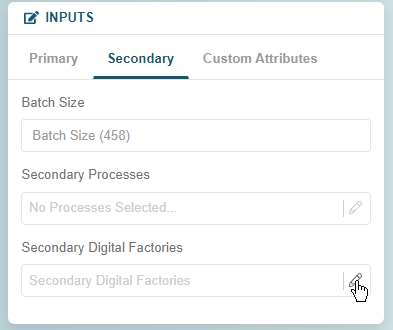
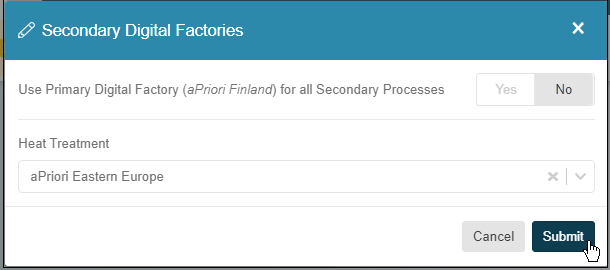
Then, in the Secondary Digital Factories window, for Use the primary digital factory (<Selected Primary Digital Factory>) for all secondary processes, first click No, then from the dropdown menu for the secondary process, select a Digital Factory, and finally click Submit.
- Failed Costing after Digital Factory Setting Update – If a pre-existing scenario in Cost Insight Design or newly costed and saved scenario in aPriori Professional used a process group that is not supported in Cost Insight Design, you cannot cost that scenario in Cost Insight Design if you assign it a Digital Factory that does not includes the unsupported scenario but is generally less complex than the original process group.
For example, consider two cases for an organization that has a deployment that includes these two Digital Factories:
- Complex – Includes the Casting-Investment, Casting-Die, and Casting-Sand process groups and many other process groups.
- Basic – Includes only the Casting process groups.
In the first case, a user costs a scenario using the Complex Digital Factory and the Casting-Investment process group in Cost Insight Design. Then, the user tries to cost the same scenario in Cost Insight Design after changing to the Basic Digital Factory and the Casting process group. Even though Casting is supported by the Basic Digital Factory the costing fails. Cost Insight Design flagged the Casting-Investment process group as not being supported by the Basic Digital Factory even though Casting-Investment was no longer the specified process group.
In the second case, a user costs a scenario using the Basic Digital Factory and the Casting process group in Cost Insight Design. Then, the user tries to cost the same scenario in Cost Insight Design after changing to the Complex Digital Factory and the Casting-Investment process group. In this case, the costing succeeds. Cost Insight Design did not flag the Casting process group as not being supported by the because, perhaps because the new digital factory is more complex than the original digital factory.
Workarounds
To perform multiple costings on a single scenario by using a variety of Digital Factories, each of which varies in complexity and in the process groups that it supports in Cost Insight Design, as a best practice, first cost the scenario using the most basic Digital Factory, then, for each subsequent costing, use a scenario of the same or greater complexity.
Alternately, perform this type of analysis in aPriori Professional.
- Inactive User Not Indicated in Search Filter Value Options – When you create a custom search filter, and select a criterion Property that includes user IDs in the options for the criterion Value, in the Value dropdown list, a strikethrough line is not displayed through the username of an inactive user.
- Firefox Browser Limitation – Due to Firefox issues, it is a best practice to use an alternative browser to access and use Cost Insight Design.
- Time Zone Mismatch Search Issue – Using date filters with a local time zone that differs from the server time zone might yield results with a shifted time window.
Workaround: Expand or shift the period of the search range to coincide with the date range for all applicable scenario.