Review Materials and Process
The Material & Process tile provides high level information about the process routing, manufacturing time, mass, and material utilization of a component.
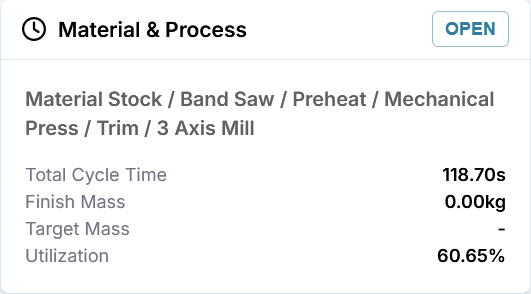
This tile shows:
- The suggested routing: the order and name of each high-level process, for making the part.
- Total Cycle Time or Assembly Time: time required to complete all processes that are required to make the part or assembly.
- Finish Mass: mass of the manufactured component.
- Target Mass: desired or required maximum mass for the manufactured component. Displayed only if specified for the scenario.
- Utilization: typically, the ratio of the mass of the finished part to the mass of material that is required to manufacture the component.
Note
The material utilization calculation varies depending on calculation options defined for the scenario in aP Pro.
View Material and Process Details
To open the Material & Process explorer, on the Evaluate tab, in the Material & Process tile, click the OPEN button.
The Material & Process explorer opens to the Processes tab by default.
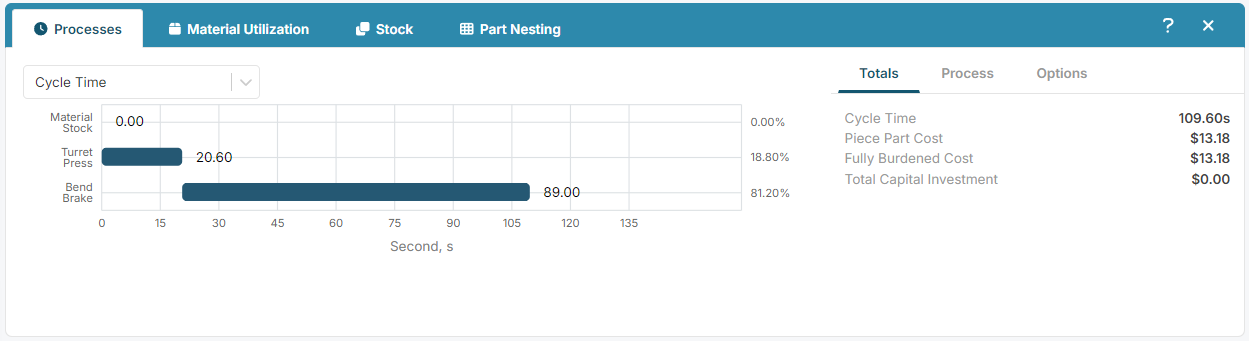
Depending on the component type (part or assembly) and the processes that are required to make the component, the Material & Process explorer can include one or more of these tabs:
- Processes: interactive chart that shows detailed cycle times and fully burdened costs for each process when you click on it. See Examine Processes.
- Material Utilization: basic information on the material selected, including material mass, utilization, and properties. See Examine Material Utilization.
-
Stock: enveloping dimensions of the part, and the dimensions and the type of the stock used to produce the part. See Examine Material Stock details.
-
Part Nesting: nesting layout for sheet metal parts, including, as applicable, potential utilization modes and part nesting diagrams. See Examine Part Nesting.