Explore tab Card View
Cost Insight Design (CID) Release Notes 2021 R1 SP1
Display each scenario on an individual card on the Explore tab.
The Explore tab can now display scenario in the Table View or in the new Card View. The Card View contains an individual card for each scenario. The cards contain the thumbnail image, status, creator name, Process Group, and Digital Factory for the scenario.
To open the Card View, in the Explore configuration panel, click the card view button .
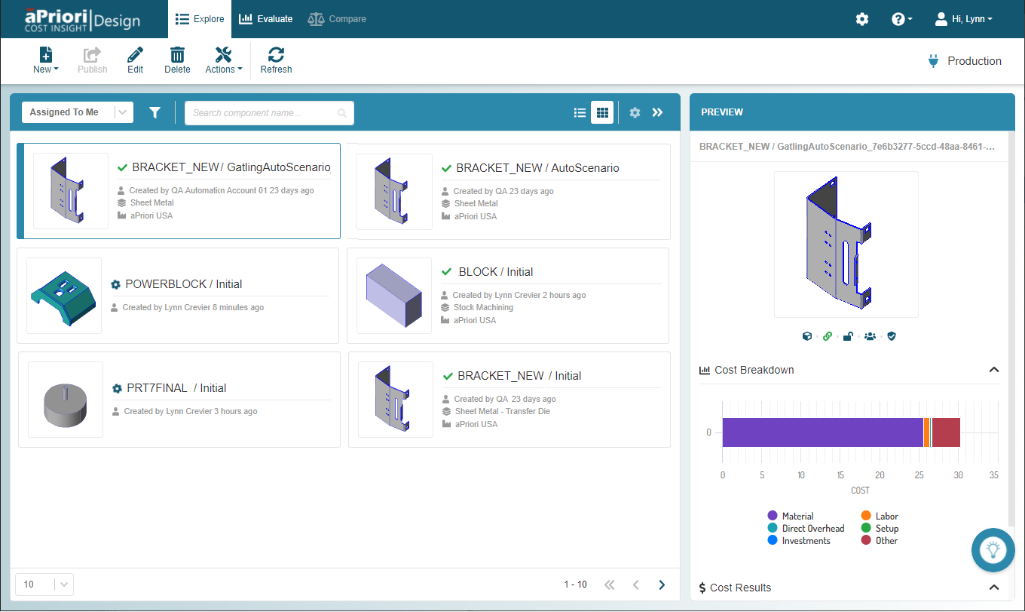
Like the Table View, the Card View allows you to select a scenario and:
- Open it in the Preview panel.
- Open it to the Explore tab.
- Select, as applicable, options from the New, Edit, Delete, and Actions menus in the Explore tab menu bar.