Introduction to aP Design
aP Design helps Design Engineers optimize designs for manufacturability, cost, and sustainability, by providing:
- Manufacturing cost estimates of cost of parts and assemblies.
- Design Guidance to help you reduce complex and expensive geometry.
- Clear views on cost, carbon emissions, and manufacturability factors.
Use aP Design to analyze the impact of changes in a product’s design, manufacturing process, and factory selection. You can then compare design options, to choose the best results for your design.
See aP Design product information for more introduction materials
Key Concepts
aP Design organizes your work into the following hierarchy:
- Design: A grouping of one or more Components that represent the same piece of work as it evolves. The Design owns the progress history and cost avoidance across all its linked Components.
- Component: The CAD model you upload to aP Design that provides the Geometric Cost Drivers (GCDs) for analysis. Each Component lives inside exactly one Design.
- Scenario: Your Component plus Production and Manufacturing Information (PMI). Each Scenario lets you adjust inputs such as material, manufacturing process, and batch size.
- Iteration: The individual record of a successful analysis of your Component within a Scenario.
Design hierarchy
Design
└── Component(s)
└── Scenario(s)
└── Iteration(s)
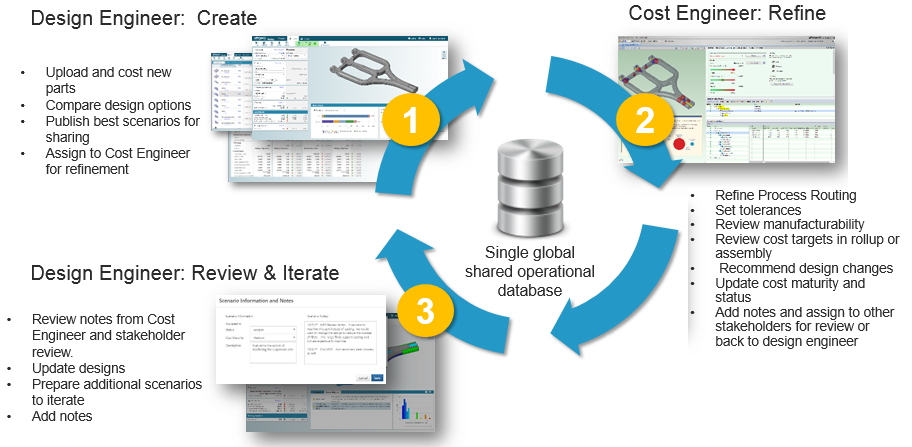
Use aP Design with aP Pro
This diagram shows how you can use aP Design along with our aP Pro product in a collaborative, iterative design process: