Secondary Processes and Setup Options
To view Secondary Processes and Setup Options:
-
Select the Inputs tile > Advanced tab, then in the Secondary Processes field, click the edit button.
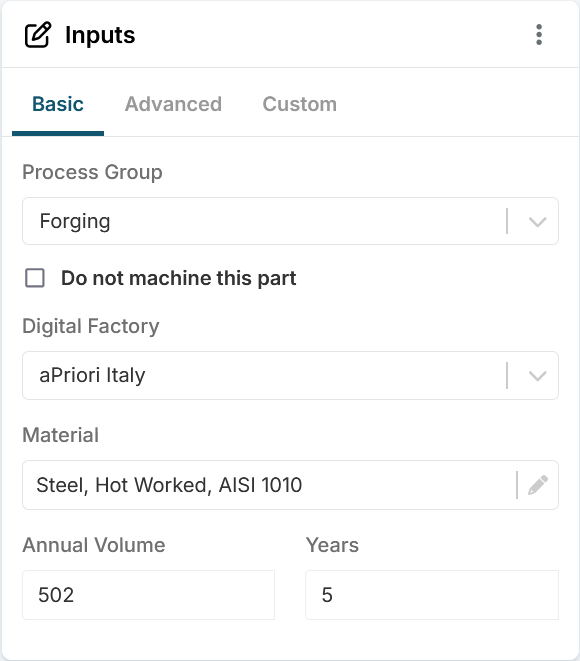
-
You can now edit content in the Secondary Processes dialog:
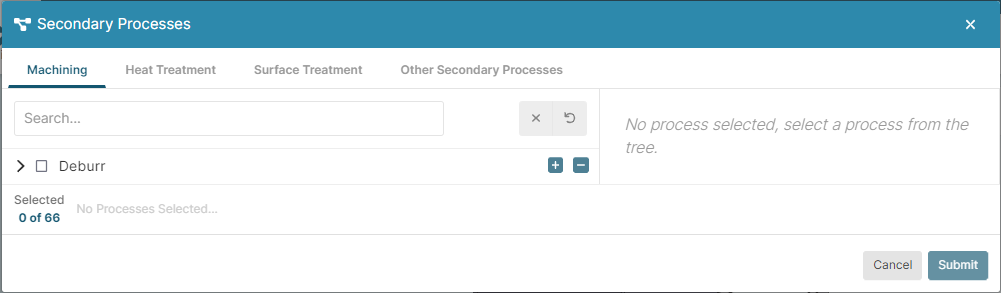
Tip
Scroll as needed to examine the information in each pane of the dialog.
Secondary Process Categories
The secondary processes available depend on the selected primary process group, the selected digital factory, and your organization's licenses.
The categories of secondary process can include:
- Machining (Includes the same processes as the Other Machining Processes category, which is available, depending on your organization's licenses, for the Machining and 2-Model Machining primary process groups.)
- Heat Treatment
- Surface Treatment
- Other Secondary Processes
Configure Secondary Processes
Configure the secondary processes by using the interactive and informative elements in the Secondary Processes dialog, as described in this table.
| Element | Name | Action | Notes |
|---|---|---|---|
 |
Search | Filter on specified string | The filter is applied only to the selected tab |
 |
Process name | Display Process Setup Options and information | Applies only to certain processes. Click the process name. |
 |
Tab Count | Number of processes selected on the tab | |
 |
Clear all | Clear all options on the current tab. | Enabled only if one or more options are selected on the current tab. |
 |
Reset | Reset process check box selections on the current tab to last submitted state. | Process setup options changes are not reset. Enabled only if one or more processes check box selections have changed from the last submitted state. |
 |
Expand all | Expand all nodes | |
 |
Collapse all | Collapse all nodes | |
 |
Expand node | Expand node | |
 |
Collapse node | Collapse node | |
 , , |
Select or clear all | Select or clear the process and all subprocesses | |
 |
Information | Click to display information about a Process Setup Option | |
 |
Required | Input is required |