Default Unit System, Significant Figure, and Currency Display Settings
The Display Preferences settings allow you to specify the default configuration for dimensional units, decimal places, and currency in your aP Design environment:
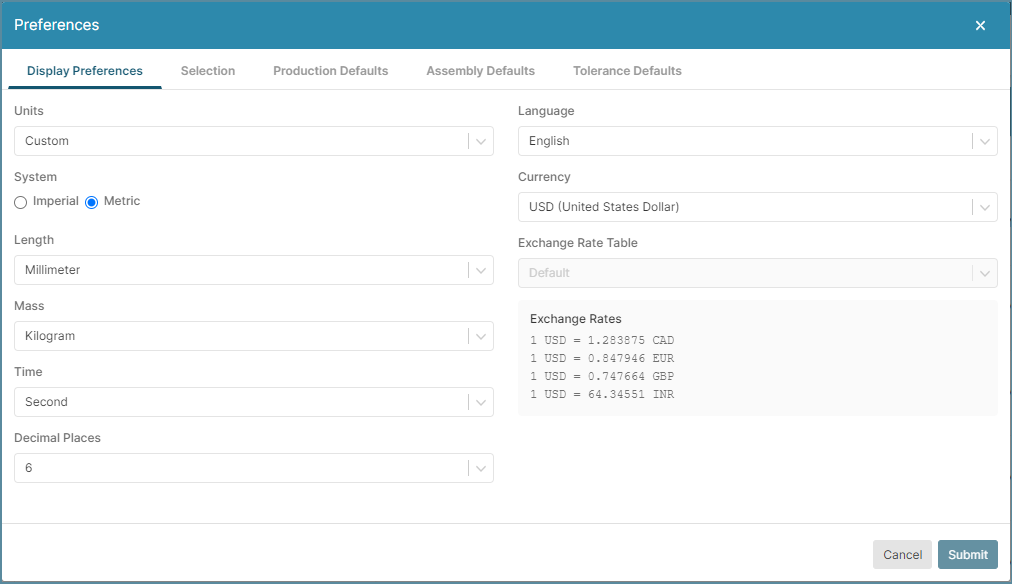
Set Dimensional Units
The Units setting allows you to select a predefined or custom unit system for Mass, Length, Time, and associated compound units.
Note
Typically, aP Design displays generic unit definitions, but some fields use and display an explicit default unit type, such as “meter” instead of “Length”.
Changing the Unit System Settings affects only the displayed values of the data fields. It does not impact the values of any data stored in a Digital Factory or any cost models. Similarly, Reports are not affected by your own user Unit System Settings.
When defining new cost model variables, define appropriate unit types for the cost model and use explicit unit types for field values that should not be affected by unit system settings. For example, if certain stock dimensions for a material only make sense viewed in millimeters or inches, explicitly define the unit type for those stock dimensions as mm instead of Length.
Default Unit Options
The default display unit System is Metric and the default units in the Metric system for Length, Mass, and Time are mm (millimeter), kg (kilogram), and s (seconds), respectively.
Additional default unit sets are:
| Unit Sets | System | Length | Mass | Time |
|---|---|---|---|---|
| CGM | Metric | centimeter | gram | minute |
| CGS | Metric | centimeter | gram | second |
| FPM | Imperial | foot | pound | minute |
| FPS | Imperial | foot | pound | second |
| IOM | Imperial | inch | ounce | minute |
| IOS | Imperial | inch | ounce | second |
| IPM | Imperial | inch | pound | minute |
| IPS | Imperial | inch | pound | second |
| MGM | Metric | meter | gram | minute |
| MGS | Metric | meter | gram | second |
| MKM | Metric | meter | kilogram | minute |
| MKS | Metric | meter | kilogram | second |
| MMGM | Metric | millimeter | gram | minute |
| MMGS | Metric | millimeter | gram | second |
| MMKS | Metric | millimeter | kilogram | second |
Custom Unit Options
Select the Custom option for Units to define a custom default display unit set of Length, Mass, and Time settings for your environment.
Set the Decimal Places Displayed
Use the Decimal Places dropdown to set the number of significant figures that are displayed for numeric data in your environment.
Set the Currency Displayed
Use the Currency dropdown to set the unit that is displayed for cost data in your environment. The Currency options depend on the Digital Factories that you are licensed for and the customizations that your System Administrator has configured for each licensed Digital Factory. The default currency is the United States Dollar (USD).