Access Control Considerations
There are some important aspects of user access that you must consider when planning how to create and run Scenario and System Data Export sets.
- An aPriori system administrator must perform some access configuration as described in the section “Creating and Granting aP Admin Export Service Privileges” in the Enterprise Platform Installation Guide.
- The export job will run under the account and privileges of the last person to create or modify the job. In other words, the person who logs into the Export Set manager and creates or edits a job is the person under whose account the job will run.
- To log in, the user must belong to the group defined by "
datamart.admin.group=" at installation time. For more information about aPriori groups and Access Control, see the aP Pro System Administration Guide. -
The logged-in user must have two levels of access to ensure that the export job runs correctly:
-
Component schema access – You can ensure that the user has access to the component schema by going to their aPriori client and clicking Tools > System Admin Toolset > System Administrator, then clicking Users. Select the username and click Edit User. In the resulting Edit User dialog, expand the Schema Privileges drop-down menu and ensure that the necessary schemas are selected.
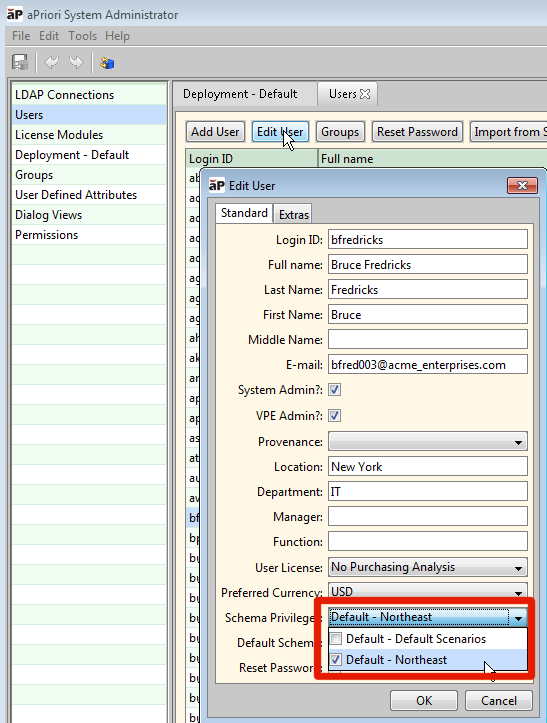
For general information about component schemas, see the "Managing Deployments" section of the aPriori System Administration Guide.
-
Access Control permissions – If your deployment has implemented aPriori Access Control, you must also ensure that your logged-in user has the correct permissions to access ALL the components and subcomponents that will be involved in the export process (both “All” and “All Delta” scopes). If not, the job may fail or may return incomplete results.
In general, Scenario Export follows the same Access Control rules as Scenario Synchronization: Export results will be incomplete if some of the subcomponents (or the root scenarios for All/All Delta exports) are not accessible. All of the access control failures are reported and scenarios are marked as failed. For more information, see Access Control Considerations.
-