Calculated Fields
Calculated fields allow you to generating metrics for use across multiple Ad Hoc views.
In the aPriori Ad Hoc Data Domain, these tables include calculated fields:
- scenario_facts_base
- operations_facts_base
- process_facts_base
Most of the calculated fields in these tables are used for currency conversion. Currency conversion fields allow you to present cost data in a single Ad Hoc Report in any combination of these currencies:
- Costing currency – The currency that was specified for costing the component in the aPriori application. When a cost metric is saved to the operational database, both the value and the currency code for the costing currency are recorded.
- US dollars (usd)
- Reporting currency – The default reporting database currency (rdb). When a cost metric is saved to the reporting database, both the value and factor used to convert the value metric from the costing currency to the reporting currency are recorded.
To examine the definition of a calculated field
- Open the aPriori Ad Hoc Data Domain to the Domain Designer. For more information, see To Open the Domain Designer.
-
In the Domain Designer menu bar, click Joins.
 The Joins tab opens.
 -
On the right side of the tab, in the Data Structure panel, search for or expand and scroll to the calculated field of interest. For example, to search for fields that convert cost metrics to US dollars, enter
usdin the search field.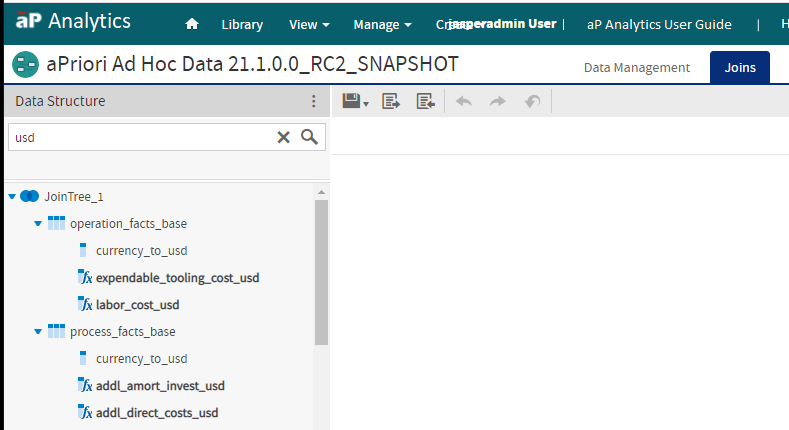
-
Right-click the name of the calculated field, and from the context menu, select Edit Calculated Field.
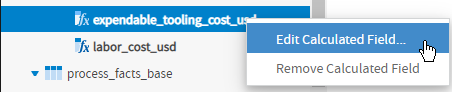 The Edit Calculated Field window opens.
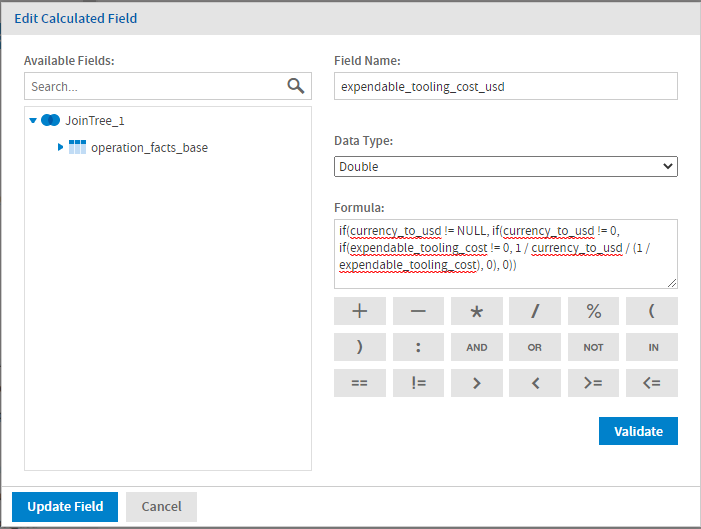
The Edit Derived Table window contains selectable mathematical operators and these fields:
- Available Fields – Searchable, expandable, selectable list of fields that can be included in the calculation.
- Field Name – Name for the calculated field.
- Data Type – Dropdown menu of data types that can be applied to the calculated value.
- Formula – Expression for the calculated field.
For more information, including syntax rules, for field names and data types, see the Jaspersoft documentation.
The scenario_facts_base also contains a calculated field that is named CostperMass (Cost per Mass). The formula for CostperMass is:
if(aggr_rough_mass > 0, aggr_piece_part_cost / aggr_rough_mass, 0)
That is, if the aggregate rough mass is greater than zero, thus eliminating the chance of an error due to a division by zero, then the Cost per Mass is calculated as the aggregate piece part cost divided by the aggregate rough mass. If the aggregate rough mass is not greater than zero, the calculation returns a value of 0.