Report Versions and Print-Ready Reports
The description field for each aP Analytics Out-of-Box (OOB) report includes a version number and indicates if a report is print-ready (formatted for printing).
Tip:
If a description is truncated, to see the complete description in a tooltip, hover over the description field.
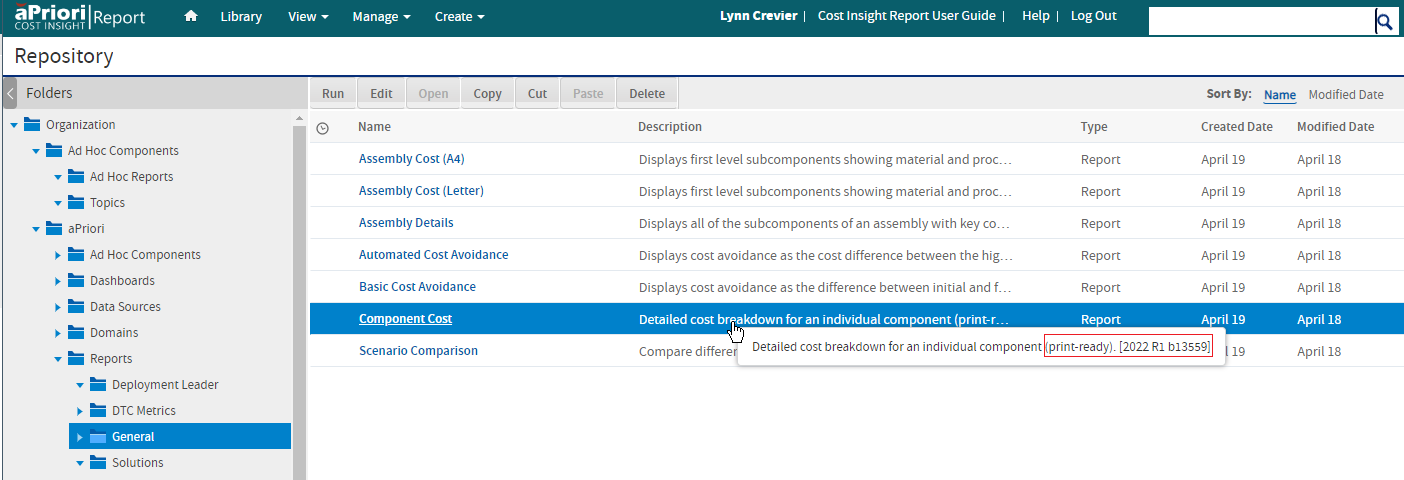
Version Numbers
Version numbers indicate the release version of the OOB report. If you need to contact aPriori Customer Support regarding a report, include the version number.
Print-Ready Reports
Certain aPriori OOB reports can be readily exported to Word or RTF because they are paginated and will print cleanly, without truncating any information. These reports have “(print-ready)” appended to their descriptions.
Print ready OOB reports include:
- Assembly Cost (A4)
- Assembly Cost (Letter)
- Component Cost
- Scenario Comparison
All other reports are “interactive” – they are formatted for web display and are intended to be viewed on-line by hovering over charts and examining data points, zooming in and out, using input controls to see more or less data, etc. Interactive reports do not necessarily provide good results if exported to a paginated format and sent to a printer. Only PDF and Excel formats are supported when exporting interactive reports.
Note:
Although the Assembly Details report appears similar to the Assembly Cost report, the Assembly Details report is a long report and is NOT paginated. Therefore, like other unpaginated long reports, it does not export well to formats such as Word or RTF.